EasyManua.ls Logo

FeinTech ABT00101 - User Manual

FeinTech ABT00101
8 pages
Print Icon
To Next Page IconTo Next Page
Loading...
ABT00101
Bluetooth 5.0 Audio Transmitter & Receiver
Instruction manual
Thank you for choosing our Bluetooth audio adapter. With
this device, you can wirelessly transmit the sound of an au-
dio source in transmitterr mode (TX) and play it back with a
Bluetooth headset or speaker. In Receiver mode (RX), you
can receive a Bluetooth audio signal form a smartphone
or similiar and play it back on an audio amplifier, wired
headset, or the like. Power can be supplied from the built-in
battery or an USB-A port.
1. Scope of delivery:
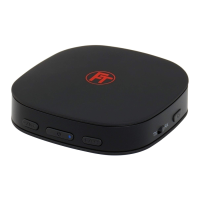
Bluetooth Audio Transmitter & Receiver
SPDIF optical digital audio cable, Toslink connector
Analog audio cable, 3.5 mm jack plug
USB charging cable with USB-A and USB-micro con-
nector
this manual
2. Overview
1. Volume down (short press) / track back (press long)
during music playback
2. MFB: Press and hold button for 2 s to switch on/off
Pause / Resume during playback
3. LED indicator
4. Volume up (short press) / track forward (press long)
during music playback
5. Switch position to TX for transmitter mode
6. Switch position to RX for receiver mode
7. Button for activating the pairing mode
8. AUX input and output for 3.5 mm audio cable
9. Optical digital input, this audio signal is transmitted
10. Optical digital output, received signal is output here
11. USB-micro connector for powering or battery-charg-
ing
Note: In TX mode, keys 1,2, 4 have no function (except for
switching on/off by key 2).
3. Pairing/coupling mode
In order to connect 2 Bluetooth devices with each other,
you must pair them for the first time and activate pairing
manually. The next time you switch on the device, the
pairing will then take place automatically. The connection
information is stored until the mode (TX/RX) is changed.
For resetting the connection memory, please change the
mode within 3 seconds after switching off (e.g. switch
off - slide switch from TX to RX) Then switch on for a short
time, switch off and set the desired mode.
3.1 Using the Transmitter Mode TX)
When the unit is switched off, slide the switch to TX. Then
press and hold the MFB for 2 seconds to turn on the
ABT00101. Briefly press the pairing button to enter pairing
mode. The LED will then flash evenly and rapidly in blue.
Switch the Bluetooth function of your device (Bluetooth
headphones, speaker or receiver, etc.) to pairing mode.
On most devices, an LED will flash alternately red/blue or
blue only to signal pairing mode. After about 530 sec-
onds, the ABT00101 will be connected to your device. The
LED then flashes slowly in blue. Connect the ABT00101 to
an audio source, e.g. TV, radio, game console, using a 3.5
mm audio cable or Toslink cable.
Note: The blue LED may blink differently to indicate the
audio codec in use, see appendix. The ABT00101 always
tries to establish the connection in the highest quality
codec aptX-HD first, then aptX Low Latency and so on.
When the audio cable is plugged in, the system automat-
ically switches to the respective operating mode (optical
digital connection or analogue).
3.2 Multipoint with 2 headphones
Initially couple the first device as previously described in
3.1. Then briefly press the pairing button. The blue LED
flashes quickly again and indicates the pairing mode. Now
switch a second Bluetooth device (e.g. headphones) to
pairing mode as well. After 530 seconds it is paired. The
LED now lights up constantly green. You can now listen to
music with 2 headphones at the same time.
Note: If it does not work the first time, please switch off
the ABT00101 and carry out steps 3.1 / 3.2 again. A few
Bluetooth devices do not support Multipoint.
3.3 Using the Receiver Mode (RX)
With the unit turned off, slide the switch to RX. Then press
and hold the MFB for 2 seconds to turn on the ABT00101.
Briefly press the pairing button to enter pairing mode.
The LED will then flash evenly and rapidly in red and blue.
Switch the Bluetooth function of your device (mobile
phone, notebook, PC, etc.) to pairing mode. For Android
smartphones, you can find the function under the
Bluetooth settings „Pair new device. On your iOS device,
select Settings > Bluetooth and enable Bluetooth. After
the FeinTech-ABT00101 is found, tap the device name
to pair. Then connect your audio device (HiFi amplifier,
car radio, etc.) via the analogue 3.5 mm connection or
digitally via Toslink.
Note: The blue LED can blink differently to indicate the
audio codec used, see appendix.
If a password is requested, enter „0000, „1234, „8888
or1111“.
3.4 Multipoint with 2 telephones
Initially couple the first device as previously described in
3.3. Then briefly press the pairing button. The LED flashes
quickly again in blue & red and indicates the pairing
mode. Now activate Bluetooh on a second smartphone
and search for new devices. Once the FeinTech-ABT00101
is detected, tap this name. There are now 2 sources
paired and the LED is constantly green.
Note: Only one device can play music at a time. Music
from the second device will not be played until the first
device is paused. Here, too, the best possible playback is
attempted using aptX-HD. The LED is lit green, there is no
Codec signalling by the LED.
4. charging
If the LED flashes red, the battery must be charged. To do
this, connect the device to a USB socket on a computer or
USB charger. Full charging will take up to 2 hours. During
charging, the LED will be permanently red. The red LED
goes out when fully charged.
Note: A Bluetooth connection is also possible during
charging.
5. Reset
To reset the ABT00101, press and hold the power button
while plugging in the charger cable.
6. LED-Indicator& technical data
Power on LED flashes 2 x blue
Power off LED flashes 2 x red
Pairing-Mode
LED flashes blue (TX-mode)
LED flashes red & blue (RX-mode)
Standby, not
conneced
LED flashes 1x per second blue (TX)
LED flashes 2x per second blue (RX)
Standby, connected
solid blue LED
Multipoint mode solid green LED
Battery low LED flashes red
Battery charging solid red LED
Fully charged red LED turns off
Connected working
mode, Codec
aptX-HD blinks blue 4x every 10 s
aptX-LL blinks blue 3x every 10 s
aptX blinks blue 2x every 10 s
AAC blinks blue 6x every 10 s
SBC blinkt blue 1x every 10 s
Bluetooth 5.0 Chipset: CSR 8675
Supported profile: A2DP, AVRCP
Supported Codecs*:
RX-mode: aptX-HD, aptX Low Latency, aptX, AAC, SBC
TX-mode: aptX-HD, aptX Low Latency, aptX, SBC
Battery working time AUX: RX ca. 17.5 h, TX ca. 20 h
SPDIF: RX ca. 12.5 h, TX ca. 14 h
Battery capacity: 350 mAh / 3.7 V
Charging time: approx. 2 hours
Dimensions: 70 x 70 x 22 mm
Bluetooth Class II: range 10 m, EIRP max. 5.78 dBm
Bluetooth frequency: 24022480 MHz
Qualcomm aptX and CSR8675 are products of Qualcomm
Technologies, Inc.
We declare that this product complies with the rules of the
following EU directives (including all applicable amend-
ments):
2014/53/EU “radio equipment - RED
2011/65/EU “RoHS2
2001/95/EC “General Product Safety Directive
Please contact us for a formal declaration of conformity or
visit https://feintech.eu/ce.
FeinTech by Spreewald Kommunikationstechnik GmbH,
Radensdorfer Hauptstr. 45 a • 15907 Lübben • Germany
*
If you prefer aptX Low Latency instead of high quality audio in aptX
HD, you can deactivate aptX HD on the ABT00101 as follows: Press
and hold the multifunction button for approx. 8 seconds until the
LED lights up 1 x green. aptX HD is then deactivated and aptX Low
Latency is prioritised as a codec. To reactivate aptX HD, press and
hold the multifunction button for 8 seconds until the LED lights up
2 x green.

Question and Answer IconNeed help?

Do you have a question about the FeinTech ABT00101 and is the answer not in the manual?

Summary

Scope of Delivery

Device Overview

Pairing and Coupling Modes

Transmitter Mode (TX) Operation

How to use the device to send audio wirelessly to Bluetooth receivers.

Multipoint Connection for Two Headphones

Connect two headphones simultaneously for shared audio playback.

Receiver Mode (RX) Operation

How to receive audio wirelessly from Bluetooth sources and output it.

Multipoint Connection for Two Telephones

Connect two smartphones or devices for audio input.

Charging the Device

Resetting the Device

LED Indicators and Technical Data

Overview

This document describes the FeinTech ABT00101 Bluetooth 5.0 Audio Transmitter & Receiver, a versatile device designed for wireless audio transmission and reception. It allows users to transmit audio from a source to a Bluetooth headset or speaker in Transmitter (TX) mode, or receive Bluetooth audio from a smartphone or similar device to an audio amplifier or wired headset in Receiver (RX) mode. The device can be powered by its built-in battery or via a USB-A port.

Function Description:

The ABT00101 acts as a bridge between non-Bluetooth audio devices and Bluetooth-enabled audio devices.

  • Transmitter Mode (TX): In this mode, the device takes an audio input (either analog via 3.5mm jack or digital via SPDIF optical) and transmits it wirelessly via Bluetooth to a compatible Bluetooth headset, speaker, or receiver. This is ideal for connecting older TVs, radios, or game consoles to modern wireless audio solutions.
  • Receiver Mode (RX): In this mode, the device receives a Bluetooth audio signal from a smartphone, tablet, or computer. It then outputs this audio signal via either a 3.5mm analog jack or an SPDIF optical digital output to a wired headset, audio amplifier, or car radio. This allows Bluetooth streaming to non-Bluetooth audio systems.

Important Technical Specifications:

  • Bluetooth Version: 5.0
  • Bluetooth Chipset: CSR 8675
  • Bluetooth Class: II (range 10 m, EIRP max. 5.78 dBm)
  • Bluetooth Frequency: 2402-2480 MHz
  • Supported Profiles: A2DP, AVRCP
  • Supported Codecs:
    • RX-mode: aptX-HD, aptX Low Latency, aptX, AAC, SBC
    • TX-mode: aptX-HD, aptX Low Latency, aptX, SBC
  • Audio Inputs/Outputs:
    • 3.5 mm AUX input/output
    • SPDIF optical digital input (TX mode)
    • SPDIF optical digital output (RX mode)
  • Battery:
    • Capacity: 350 mAh / 3.7 V
    • Charging Time: Approximately 2 hours
    • Working Time (AUX): RX approx. 17.5 h, TX approx. 20 h
    • Working Time (SPDIF): RX approx. 12.5 h, TX approx. 14 h
  • Dimensions: 70 x 70 x 22 mm
  • Power Connector: USB-micro for powering or battery charging.

Usage Features:

The device features several controls and indicators for ease of use:

  • MFB (Multi-Function Button): Press and hold for 2 seconds to switch the device on/off. A short press during playback will pause/resume music.
  • Volume Down / Track Back Button: Short press for volume down, long press for track back during music playback.
  • Volume Up / Track Forward Button: Short press for volume up, long press for track forward during music playback.
  • TX/RX Mode Switch: A physical slide switch to select between Transmitter and Receiver modes.
  • Pairing Button: Used to activate pairing mode for connecting Bluetooth devices.
  • LED Indicator: A multi-color LED provides visual feedback on the device's status, including power, pairing mode, connection status, battery level, and the active audio codec.

Pairing/Coupling Mode:

  • Initial Pairing: To connect two Bluetooth devices, they must be paired manually the first time. The device stores connection information, allowing for automatic reconnection upon subsequent power-ups, provided the TX/RX mode has not been changed.
  • Resetting Connection Memory: To clear the connection memory, change the TX/RX mode within 3 seconds after switching off the device (e.g., switch off, slide switch from TX to RX, then switch on briefly, switch off, and set the desired mode).
  • Transmitter Mode (TX) Pairing:
    1. Ensure the unit is off and the switch is set to TX.
    2. Press and hold the MFB for 2 seconds to turn on.
    3. Briefly press the pairing button; the LED will flash rapidly in blue.
    4. Put the target Bluetooth device (headphones, speaker) into pairing mode.
    5. The ABT00101 will connect within 5-30 seconds, and the LED will flash slowly in blue.
    6. Connect the ABT00101 to an audio source (TV, radio, game console) using a 3.5mm audio cable or Toslink cable. The device automatically switches to the correct operating mode (optical/analog) when the cable is plugged in.
  • Multipoint with 2 Headphones (TX Mode):
    1. Pair the first device as described above.
    2. Briefly press the pairing button again; the blue LED will flash quickly.
    3. Put the second Bluetooth device into pairing mode.
    4. After 5-30 seconds, both devices will be paired, and the LED will light up constantly green.
    5. Note: Some Bluetooth devices may not support Multipoint.
  • Receiver Mode (RX) Pairing:
    1. Ensure the unit is off and the switch is set to RX.
    2. Press and hold the MFB for 2 seconds to turn on.
    3. Briefly press the pairing button; the LED will flash rapidly in red and blue.
    4. Enable Bluetooth on your smartphone/device and search for new devices (e.g., "FeinTech-ABT00101").
    5. Tap the device name to pair.
    6. Connect your audio device (HiFi amplifier, car radio) via the analog 3.5mm connection or digitally via Toslink.
    7. If a password is requested, common options are "0000", "1234", "8888", or "1111".
  • Multipoint with 2 Telephones (RX Mode):
    1. Pair the first phone as described above.
    2. Briefly press the pairing button again; the LED will flash quickly in blue & red.
    3. Activate Bluetooth on the second smartphone and search for new devices.
    4. Tap "FeinTech-ABT00101" to pair. The LED will be constantly green.
    5. Note: Only one device can play music at a time. Music from the second device will play only after the first device is paused.

LED Indicator Meanings:

  • Power on: LED flashes 2x blue
  • Power off: LED flashes 2x red
  • Pairing-Mode (TX): LED flashes blue
  • Pairing-Mode (RX): LED flashes red & blue
  • Standby, not connected (TX): LED flashes 1x per second blue
  • Standby, not connected (RX): LED flashes 2x per second blue
  • Standby, connected: Solid blue LED
  • Multipoint mode: Solid green LED
  • Battery low: LED flashes red
  • Battery charging: Solid red LED
  • Fully charged: Red LED turns off
  • Connected working mode, Codec:
    • aptX-HD: blinks blue 4x every 10 s
    • aptX-LL: blinks blue 3x every 10 s
    • aptX: blinks blue 2x every 10 s
    • AAC: blinks blue 6x every 10 s
    • SBC: blinks blue 1x every 10 s

Maintenance Features:

  • Charging:
    • When the LED flashes red, the battery needs charging.
    • Connect the device to a USB socket on a computer or USB charger using the provided USB-A to USB-micro cable.
    • During charging, the LED will be permanently red.
    • The red LED turns off when fully charged.
    • A Bluetooth connection can be maintained during charging.
  • Reset: To reset the ABT00101, press and hold the power button while plugging in the charger cable.
  • Codec Prioritization: The device prioritizes aptX-HD for the highest quality audio. If aptX Low Latency is preferred, aptX HD can be deactivated:
    • Press and hold the multifunction button for approximately 8 seconds until the LED lights up 1x green. aptX HD is then deactivated, and aptX Low Latency is prioritized.
    • To reactivate aptX HD, press and hold the multifunction button for 8 seconds until the LED lights up 2x green.

The device comes with a comprehensive set of accessories, including SPDIF optical digital audio cable (Toslink), analog audio cable (3.5 mm jack plug), and a USB charging cable (USB-A to USB-micro connector), along with this instruction manual.

FeinTech ABT00101 Specifications

General IconGeneral
BrandFeinTech
ModelABT00101
CategoryReceiver
LanguageEnglish

Related product manuals