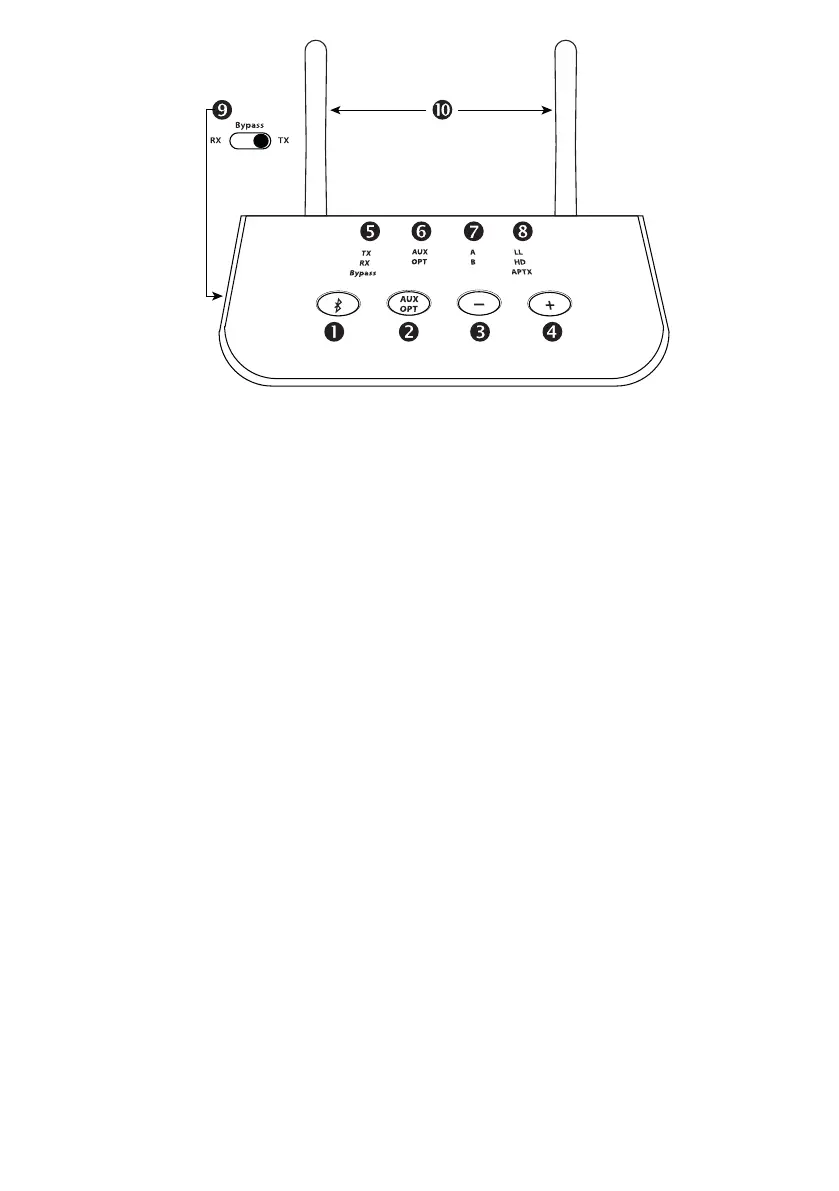
Front
1. Bluetooth multifunction key:
- Double press to activate the Bluetooth pairing mode
- Press once to pause playback in RX mode
- Press and hold for 7 seconds to enable/disable aptX HD support
2. Key for switching between the AUX analogue and OPTICAL digital connections
3. Volume down (press briefly) / title back (press for 1 second) during music playback
4. Volume up (press briefly) / track forward (press for 1 second) during music playback
5. Display of the selected mode (select with slide switch 9):
- TX Transmitter mode, the unit transmits audio, e.g. to headphones
- RX Receiver mode, the device receives audio, e.g. from a smartphone
- Bypass mode, the audio signal is passed through and converted if necessary
6. Display of the selected input / output AUX analogue or OPTICAL digital
7. Indication of successful coupling with device A and with multipoint device B
8. Displays the audio codec in use:
- LL: aptX Low Latency, optimal for the sound during a video or game
- HD: aptX HD, especially high audio quality for music
- aptX: improved latency and audio quality over standard codec
- without display: SBC, standard Bluetooth codec, normal quality
9. Slide switch for selecting the operating mode as transmitter, receiver or bypass
10. Bluetooth transmit and receive antennas
Note: In TX and Bypass mode, keys 3 and 4 have no function



 To Next Page