FAQ • VIMBLE 2S
4) How do I use the telescoping hand of the
Vimble 2S? How can I take selfies with
the Vimble 2S?
The telescoping hand can be extended and
retracted for selfies regardless of whether the
gimbal is on or o. Its max length is 180mm.
Two ways to take selfies:
Method One: Activate the Bluetooth on your
smartphone, find Vimble 2S in the Bluetooth list
and then connect.
Open the camera on your smartphone, switch to front camera, extend the
telescoping hand, then click the Bluetooth shutter button on the Vimble 2S to take
a selfie.
Method Two: Activate the Bluetooth on your smartphone and connect to the
Feiyu On App. Triple-click on the function button to switch to front camera or
rear camera, extend the telescoping hand and then click on the Bluetooth shutter
button on the Vimble 2S to take a selfie.
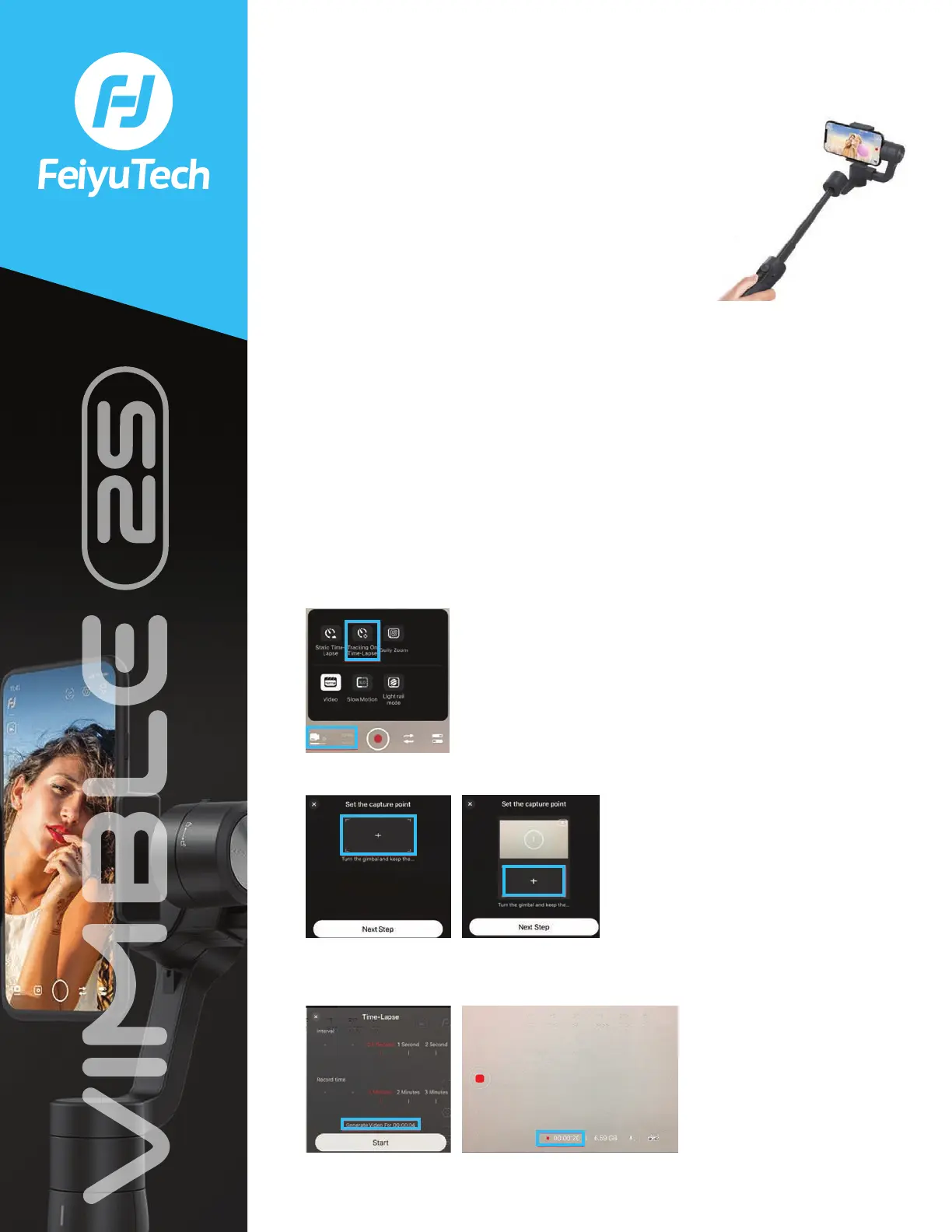
5) How do I perform tracking on Time- Lapse?
After connecting to the Feiyu On App successfully, please switch the shooting
mode to video mode, click “Normal”, then select Tracking On Time-Lapse. Kindly
see below:
Click “+” to set up the position 1. Set up position 2 by clicking the “+” once more.
After setting up position 1 and 2, click “Next” to enter into time-lapse setting, click
“Start” to start recording. Exit by clicking the recording button.















 To Next Page