IMPORTANT SAFETY INSTRUCTIONS — Read Before Using!
t 0QFSBUJPONBJOUFOBODFBOETFSWJDFSFRVJSFNFOUTBSFDPWFSFEJOUIFJOTUSVDUJPO
manual. Read the entire instruction manual before operating shredders.
t ,FFQBXBZGSPNDIJMESFOBOEQFUT,FFQIBOETBXBZGSPNQBQFSFOUSZ"MXBZTTFU
to off or unplug when not in use.
t ,FFQGPSFJHOPCKFDUToHMPWFTKFXFMSZDMPUIJOHIBJSFUDoBXBZGSPNTISFEEFS
PQFOJOHT*GPCKFDUFOUFSTUPQPQFOJOHTXJUDIUP3FWFSTF3UPCBDLPVUPCKFDU
t %0/05VTFBFSPTPMQSPEVDUTQFUSPMFVNCBTFEPSBFSPTPMMVCSJDBOUTPOPSOFBS
shredder. DO NOT USE “CANNED AIR” or “AIR DUSTERS” ON SHREDDER. Vapors
from propellants and petroleum based lubricants may combust causing serious
JOKVSZ
t "WPJEUPVDIJOHFYQPTFEDVUUJOHCMBEFTHFBSTBOEUBDLTVOEFSTISFEEFSIFBEPS
feed arms.
t 6OQMVHTISFEEFSCFGPSFDMFBOJOHPSTFSWJDJOH
t %POPUVTFJGEBNBHFEPSEFGFDUJWF%POPUEJTBTTFNCMFTISFEEFS
Do not place near or over heat source or water.
t 5IJTTISFEEFSIBTB%JTDPOOFDU1PXFS4XJUDI%UIBUNVTUCFJOUIF0/
(I)
position to operate shredder. In case of emergency, move switch to OFF
(O)
position. This action will stop shredder immediately.
t 4ISFEEFSNVTUCFQMVHHFEJOUPBQSPQFSMZHSPVOEFEXBMMPVUMFUPSTPDLFUPGUIF
voltage and amperage designated on the label. The grounded outlet or socket
NVTUCFJOTUBMMFEOFBSUIFFRVJQNFOUBOEFBTJMZBDDFTTJCMF&OFSHZDPOWFSUFST
transformers, or extension cords should not be used with this product.
t '*3&)";"3%o%P/05TISFEHSFFUJOHDBSETXJUITPVOEDIJQTPSCBUUFSJFT
t 'PSJOEPPSVTFPOMZ
3
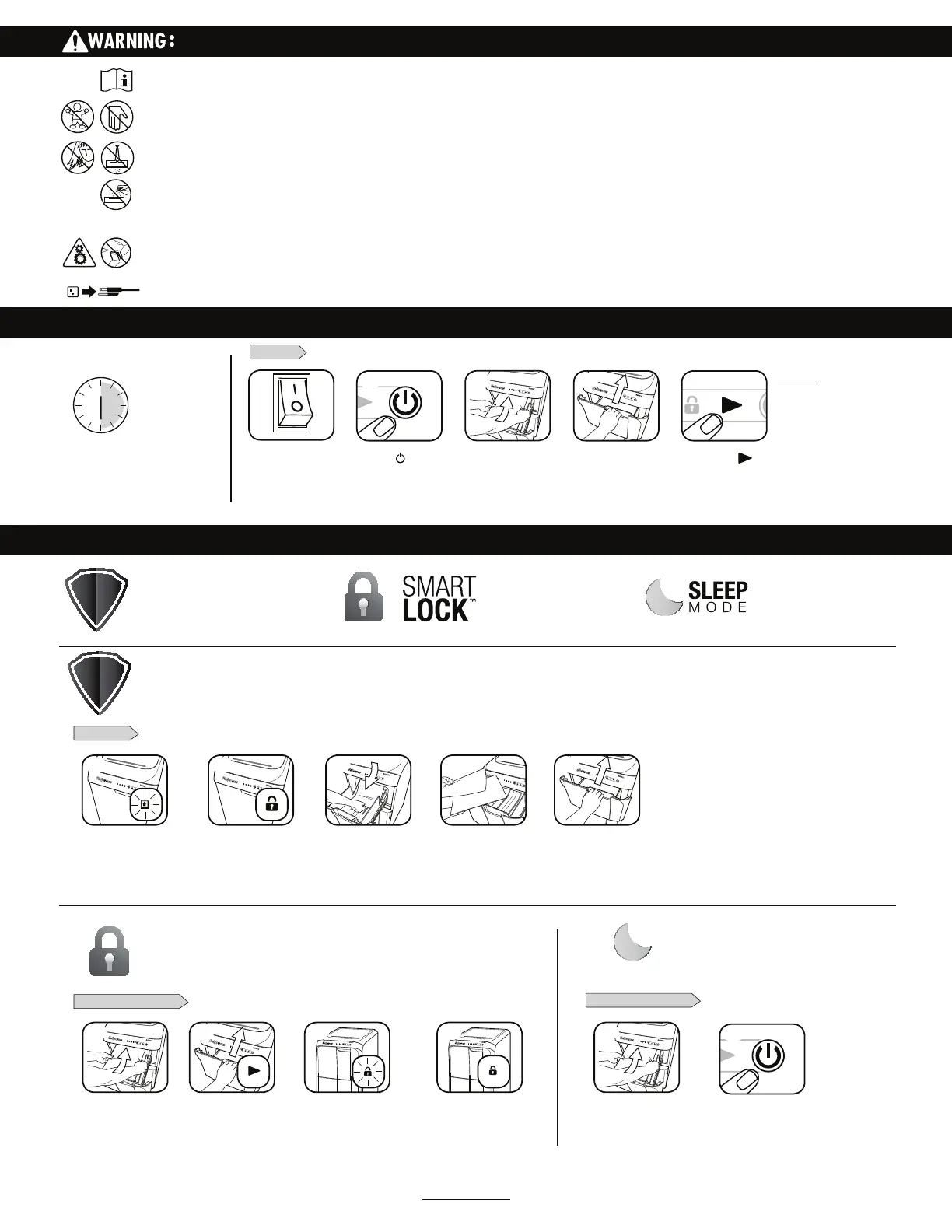
BASIC SHREDDING OPERATION
PAPER
Open drawer and
add paper. (Note: Pull
firmly to open drawer)
Plug in and put
disconnect power
switch in ON (I) position
Press ( ) ON to
activate
1
Close drawer
2
WHEN IN SLEEP MODE
PAPER JAM
ENGAGE SMARTLOCK
To get out of sleep, open
drawer and load paper.
Shredder will automatically
reverse paper and Remove
Paper icon will illuminate
Open drawer and
add paper.
Press On
Lock icon will turn off
and shredder drawer
will unlock
Close drawer and press
Start to begin shredding.
Smart Lock automatically
engages
Open drawer and
remove paper.
Drawer will lock and Lock icon
on control panel will illuminate.
Opening drawer while Lock
icon is illumininated may cause
damage to the machine
Separate shredded stack,
turn stack around so
clean, un-shredded edge
goes into drawer first
Close drawer and press
start to resume shredding
8IFOTISFEKPCJT
complete, Lock icon will
turn off and shredder
drawer will unlock
or
JamGuard System™
Prevents shredding interruptions
GPSKBNGSFFPQFSBUJPO
SmartLock™
Engages with each shred cycle to
protect confidential information
Energy Saving Sleep Mode
Feature shuts down the shredder
after 2 minutes of inactivity
ADVANCED PRODUCT FEATURES
SLEEP MODE OPERATION
JAMGUARD SYSTEM
TM
SMARTLOCK
TM
Feature shuts down the shredder after 2 minutes
of inactivity
*OUIFFWFOUPGBQBQFSKBN
Engages with each shred cycle to protect
confidential information
Press start ( ) to
begin shredding.
4
5
2
5
2
1
1 3 42
3 4 1
3
For more information about all of Fellowes Advanced Product Features go to www.fellowes.com
After turning the disconnect power switch on, the shredder will run through a start up cycle before ready for use.
NOTICE: The shredder
will automatically lock
when the Start Button
is pressed to ensure
confidential documents
remain secure and will
unlock once the shred
job is complete.
300CL run time:
Up to 30-minutes maximum
NOTE: Operation beyond 30-minutes
will trigger 30-minute cool down period.
500CL run time: continuous operation


 To Next Page