EasyManua.ls Logo

Fellowes C-420C - Important Safety Instructions - Read before Using!; Capabilities; Key; Advanced Product Features

Fellowes C-420C
5 pages
Print Icon
To Next Page IconTo Next Page
To Previous Page IconTo Previous Page
Loading...
A.
F.
B.
C.
D
.
E.
H.
AUTO
2
.
3
.
4.
5
.
6
.
7.
9
.
1
0.
1
1.8.
I.
1
.
7
J.
K.
G.
M.
L.
M
.
2
ENGLISH
ENGLISH
H
SH
SH
LISH
GLISH
GLISH
NGLISH
NGLISH
ENGLISH
ENGLISH
ENGLISH
ENGLISH
ENGLISH
ENGLISH
ENGLISH
ENGLISH
Model C-420C
Model C 420C
I
MPORTANT SAFETY INSTRUCTIONS — Read Be
f
ore Using
!
Keep away
f
rom children and pets. Keep hands away
f
rom paper
e
ntry. Always set to o
ff
or unplug when not in use
.
Keep forei
g
n objects –
g
loves, jewelry, clothin
g
, hair, etc. – awa
y
f
rom shredder openings. I
f
object enters top opening, switch to
R
everse (R) to
b
ac
k
out o
b
ject
.
N
ever use aerosol
p
roducts,
p
etroleum based lubricants or other flammable
p
ro
d
ucts on or near s
h
re
dd
er. Do not use canne
d
air on s
h
re
dd
er.
Do not use if dama
g
ed or defective. Do not disassemble shredder. Do
n
ot
p
lace near or over heat source or water.
T
h
is s
h
re
dd
er
h
as a Disconnect Power Switc
h
(G) t
h
at must
b
e in t
h
e ON (I)
p
osition to operate shredder. In case o
f
emergency, move switch to OFF (O)
p
osition. This action will sto
p
shredder immediatel
y
.
Avoi
d
touc
h
ing expose
d
cutting
bl
a
d
es un
d
er Cross-Cut s
h
re
dd
er
h
ea
d.
Use only desi
g
nated entry for CDs/cards. Keep fin
g
er away from
C
D hole
.
Do not put
f
oreign objects in paper entry.
T
h
e groun
d
e
d
soc
k
et-out
l
et s
h
a
ll
b
e insta
ll
e
d
near t
h
e equipment an
d
s
h
a
ll
b
e
e
asi
l
y accessi
bl
e
.
W
ill shred
:
Paper, 80 column continuous form, credit cards, CD/DVD’s, staples and small
p
a
p
er cli
ps
W
i
ll
not s
h
re
d
: A
dh
esive
l
a
b
e
l
s, transparencies, newspaper, car
db
oar
d
,
l
arge paper c
l
ips,
l
aminates, file folders, X-ra
y
s or
p
lastic other than noted above
Paper s
h
re
d
size:
C
ross-
C
ut
............................................................................
5/
32” x 1-1
/
8” (3.9 x 30mm
)
M
aximum:
S
heets
p
er
p
ass
......................................................................................................
2
4-2
6
*
C
Ds/Cards
p
er
p
as
s
.......................................................................................................
1*
P
aper wi
d
t
h
....................................................................................................
12”
/
300m
m
*
8.5”x11”, 20lb., (75
g
) paper at 120V, 60 Hz, 13.5Amps; heavier paper, humidity
or other than rated volta
g
e may reduce capacity. Recommended daily usa
g
e rates: 10,000
sheets per day, 500 credit cards; 50 CDs. 24-26 sheets per pass.
F
ellowes
S
afe
S
ens
e
®
shredders are desi
g
ned to be operated in home and office
environments ranging
b
etween 50 – 80
d
egrees Fa
h
ren
h
eit (10 – 26
d
egrees Ce
l
sius) an
d
40 – 80% re
l
ative
h
umi
d
ity
.
C
APABILITIE
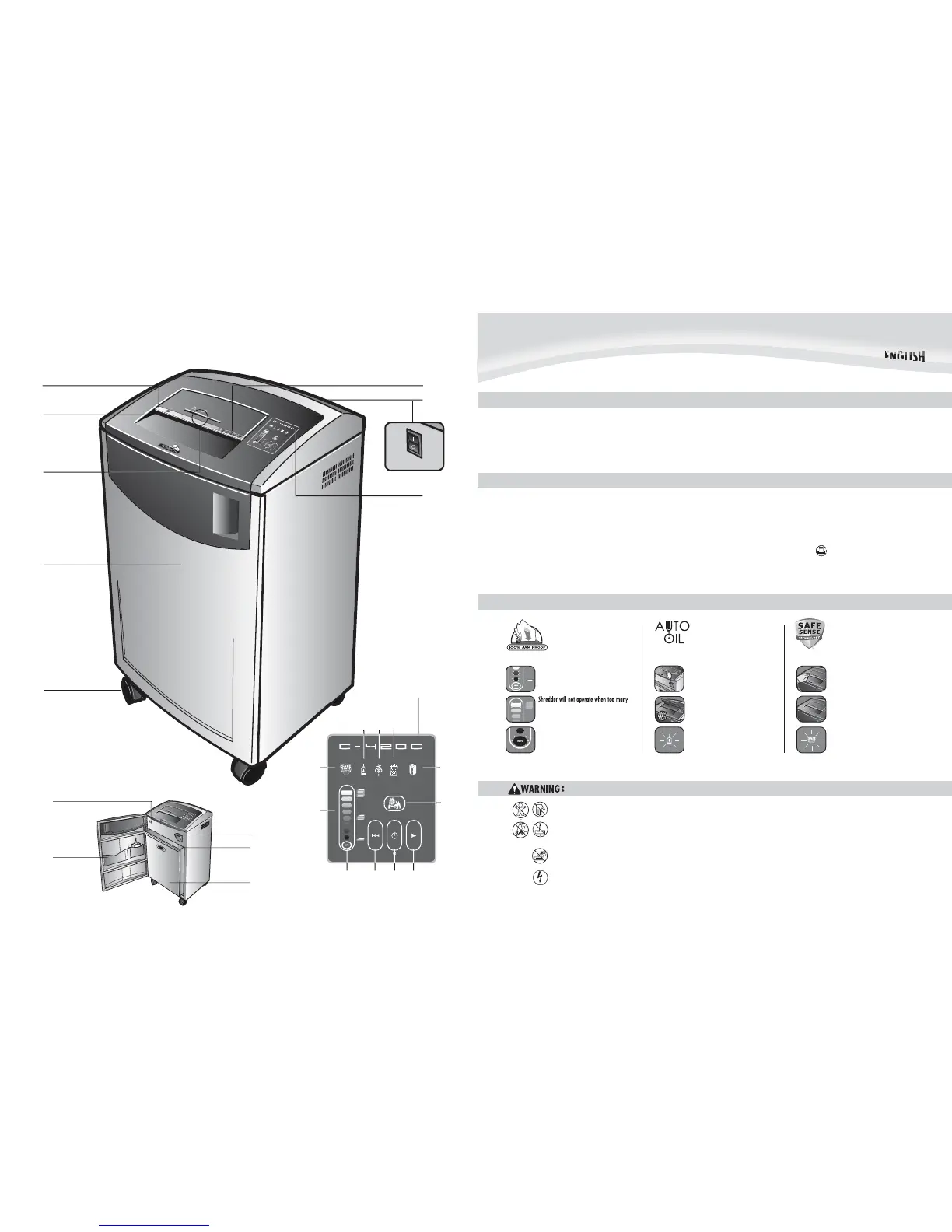
S
A. SafeSens
e
®
Technolo
g
y
B. Pa
p
er entr
y
C. CD/Card entr
y
D. Doo
r
E.
C
aster
s
F
. See safety instructions
G. Disconnect
p
ower switc
h
H.
B
as
k
e
t
I
.
O
i
l
reservoi
r
J
.
A
ccessor
y
tra
y
K
. Oil drain plu
g
(inside
)
L
.
S
a
f
e
S
ense
®
overri
d
e switc
h
M
. Control
p
ane
l
1. S
h
eet capacity in
d
icator
2
.
S
afe
S
ens
e
®
indicator (
y
ellow
)
3. Oil low indicator
(
red
)
4. Pa
p
er
j
am (re
d
)
5. Bin full
(
red
)
6. Door open (re
d
)
7. Bulldo
g
function ke
y
8. Auto
(
blue
)
9. Reverse
10. On/off (
g
reen
)
11. Forwar
d
KEY
A
DVANCED PR
O
D
U
CT FEAT
U
RE
S
J
am Proof S
y
stem
E
liminates frustratin
g
jams by
p
reventing over
l
oa
d
s an
d
powering
t
hrough mis
f
ed paper.
S
heet ca
p
acit
y
indicator tells
y
ou
wh
en you
h
ave too many s
h
eets or
t
oo
f
ew to maximize productivity
AUTO
Auto
O
il
Automaticall
y
oils the cutters to enhance
per
f
ormance and extend shredder li
f
e.
S
afe
S
ens
e
®
Technolo
g
y
Sto
p
s shredder immediatel
y
when
h
an
d
s are too c
l
ose to t
h
e opening.
Shredder will sto
p
automaticall
y
and
in
d
icator wi
ll
l
ig
h
t up w
h
en
h
an
d
s are too
c
l
ose to t
h
e opening
S
h
re
dd
er wi
ll
resume norma
l
operation
when hands are no lon
g
er near the openin
g
Flashin
g
indicator warns when
S
afe
S
ense
®
technolo
g
y has been shut off
AUTO
s
heets are fed into
p
a
p
er entr
y
(red
l
ight). Reduce sheet quantity and re
f
eed
I
f misfed, shredder will automaticall
y
ad
just to power t
h
roug
h
or reverse
o
u
t
pape
r
TECHNICAL EXPLANATI
ON
O
il is automaticall
y
in
j
ected onto
c
utters a
pp
roximatel
y
ever
y
500
sh
eets or 20 passes at capacity
L
ow oil indicator li
g
hts up when the
o
il reservoir needs to be re
f
illed
TECHNICAL EXPLANATI
O
N
T
ECHNICAL EXPLANATI
O
N
Add
s
hr
edde
r
o
il t
o
se
lf-
co
nt
a
in
ed
1
2 oz. (355 m
l
.) reservoir

Related product manuals