12
12
PS-77C
s
14
14
14
14
14
12
70S
70S
70S
12
14
70S
12
14
70S
12
14
70S
70S
70S
70S
12
14
70S
12
12
PS-77C
s
14
14
14
14
14
12
70S
70S
70S
12
14
70S
12
14
70S
12
14
70S
70S
70S
70S
12
14
70S
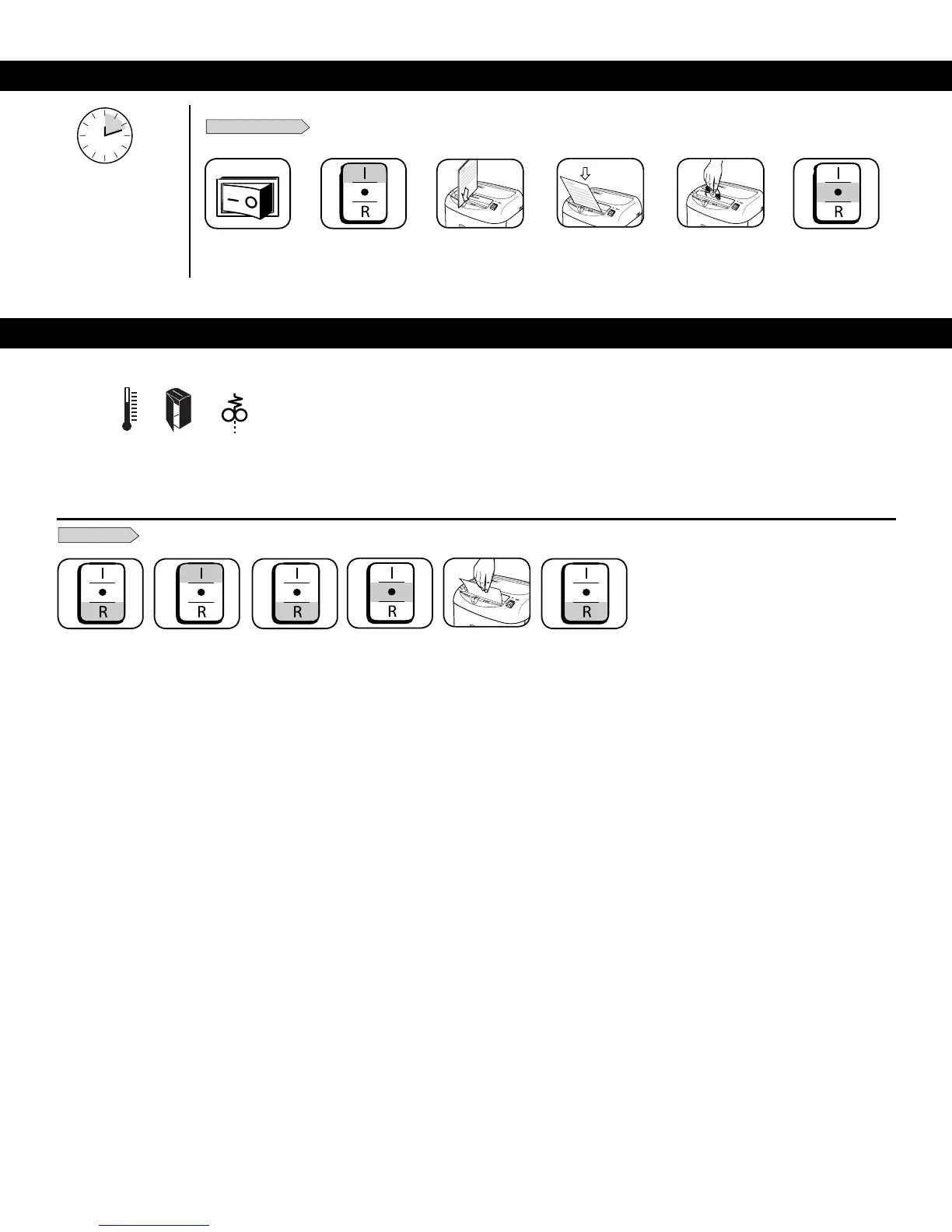
Feedpaperstraightinto
paper entry and release
or
4
Feedintocard/CD
entry and release
Whenfinished
shredding set
toOFF(O)
6
5
Gentlypulluncut
paper from paper
entry. Plug in.
12
12
PS-77C
s
14
14
14
14
14
12
70S
70S
70S
12
14
70S
12
14
70S
12
14
70S
70S
70S
70S
12
14
70S
2
PressAuto-On(I)
PAPER OR CD/CARD
BASIC SHREDDING OPERATION
1
Checkpaperamount
3
Plug in and put
disconnect power
switchinON(I)position
Continuous operation:
10-12-minute maximum
NOTE: Shredder runs briefly
after each pass to clear entry.
Continuous operation beyond
10-12-minutes will trigger
20-minute cool down period.
5
1
Press and hold
Reverse (R)
PAPER JAM
2
Alternateslowlybackandforth
3 6
Press and hold
Reverse (R)
SettoOff(O)
and unplug
4
TROUBLESHOOTING
A. Overheat Indicator: WhentheOverheatIndicatorisilluminated,theshredderhasexceededitsmaximum
operatingtemperatureandneedstocooldown.Thisindicatorwillremainilluminatedandtheshredderwill
notoperateforthedurationoftherecoverytime.SeeBasicShreddingOperationformoreinformation
about the continuous operation and recovery time for this shredder.
B. Bin Open:Theshredderwillnotrunifthebinisopen.
Whenilluminated,closethebintoresumeshredding.
C. Remove Paper:Whenilluminated,pressreverse(R)andremovepaper.
Reducepaperquantitytoanacceptableamountandrefeedintopaperentry.
A B C





 To Next Page