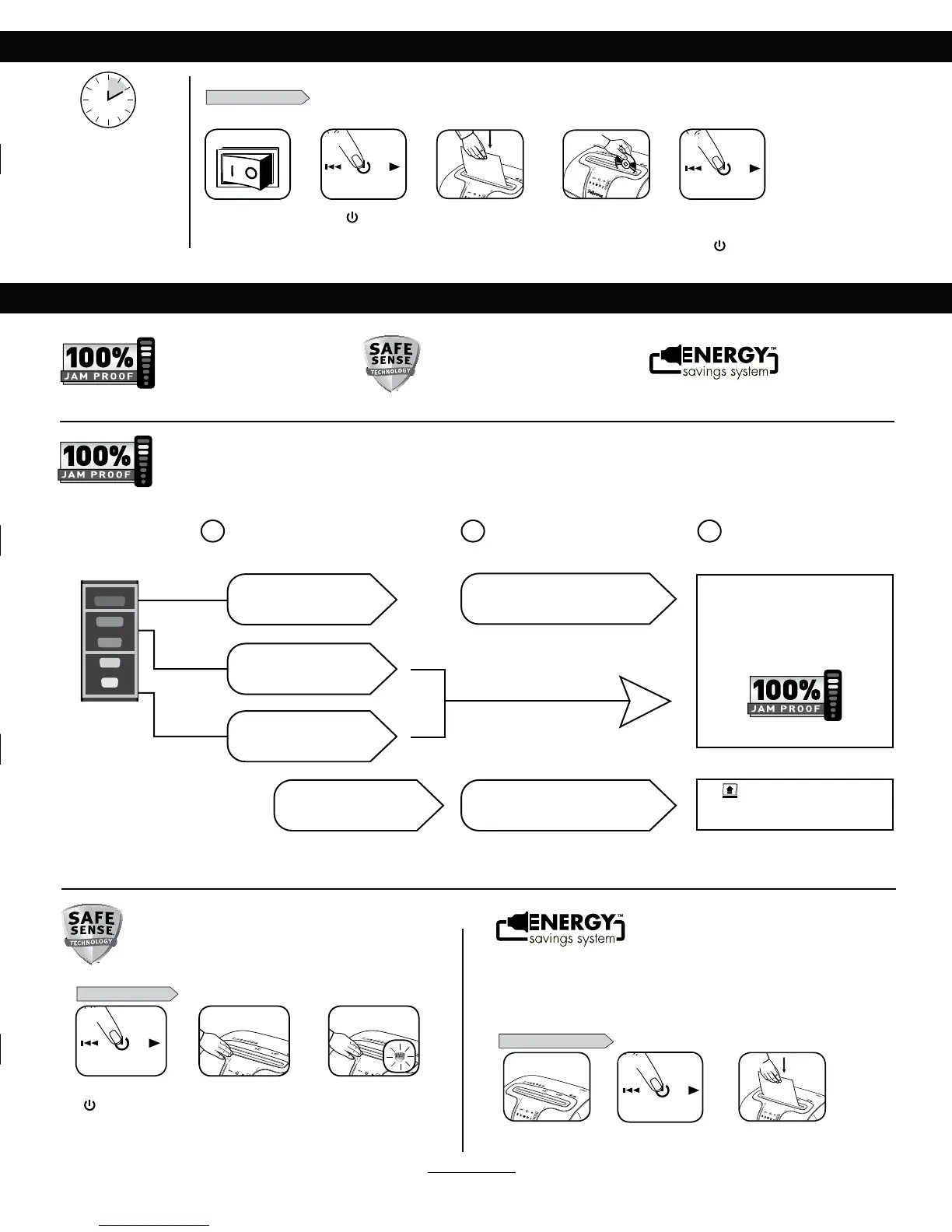
JAM PROOF SYSTEM OPERATION*
*100% Jam Proof when used in accordance with user manual
Advanced Jam Prevention- Electronically
NFBTVSFTQBQFSUIJDLOFTTUPQSFWFOUQBQFSKBNT
Remove several sheets until
indicator is below red.
Continue 100% Jam
Proof Shredding
If a misfeed
occurs:
If
illuminates after paper has been
reversed, press reverse and remove paper.
Otherwise, regular shredding will resume.
1 2 3
6QUP3&%5PPNBOZ
sheets have been inserted.
6QUP(3&&/.PSFTIFFUT
can be added.
6QUP:&--081SPEVDUJWJUZ
is optimized.
All indicators light up and
shredder pauses for 3-6 seconds
8BJUGPSGMBTIJOHUPTUPQBGUFSBVUPNBUJDDPSSFDUJPO
is complete. Regular shredding will resume.
Press ( ) ON to
activate (blue)
PAPER OR CD/CARD
BASIC SHREDDING OPERATION
Feed paper straight into
paper entry and release
or
Plug in and put
disconnect power
switch in ON (I) position
Continuous operation:
10-minute maximum
NOTE: Shredder runs briefly
after each pass to clear entry.
Continuous operation beyond
10-minutes will trigger
20-minute cool down period.
Hold CD/card at edge,
feed right side of entry
and release
8IFOGJOJTIFE
shredding set to
OFF (
)
SafeSense
®
is active and
working properly
Touch test area and
look for the SafeSense
®
indicator to illuminate
Turn the shredder ON
( ) to activate SafeSense
®
SAFESENSE
®
TECHNOLOGY
SET-UP AND TESTING
3
ADVANCED PRODUCT FEATURES
Eliminates paper jams and powers through tough jobs.
Stops shredding immediately when hands
touch the paper opening.
Jam Proof System
&MJNJNBUFTQBQFSKBNTBOEQPXFST
UISPVHIUPVHIKPCT
Patented SafeSense
®
Technology
Stops shredding immediately when
hands touch the paper opening
WHEN IN SLEEP MODE
In sleep mode
To get out of sleep mode
touch control panel
insert paper
21 3
4
5
2 3
1
or
1
3
2
ENERGY SAVING SYSTEM
t 4BWFTFOFSHZJOGPVSXBZTFOFSHZFGGJDJFOUFMFDUSPOJDTKBNQSFWFOUJPOTUBOECZNPEFBOE
sleep mode.
t 4MFFQ.PEFTIVUTEPXOTISFEEFSBGUFSNJOVUFTPGJOBDUJWJUZ
Optimal energy efficiency 100% of the
time – in use and out of use.
Energy Saving System
Optimal energy efficiency
100% of the time – in use
and out of use.
For more information about all of Fellowes Advanced Product Features go to www.fellowes.com







 To Next Page