3
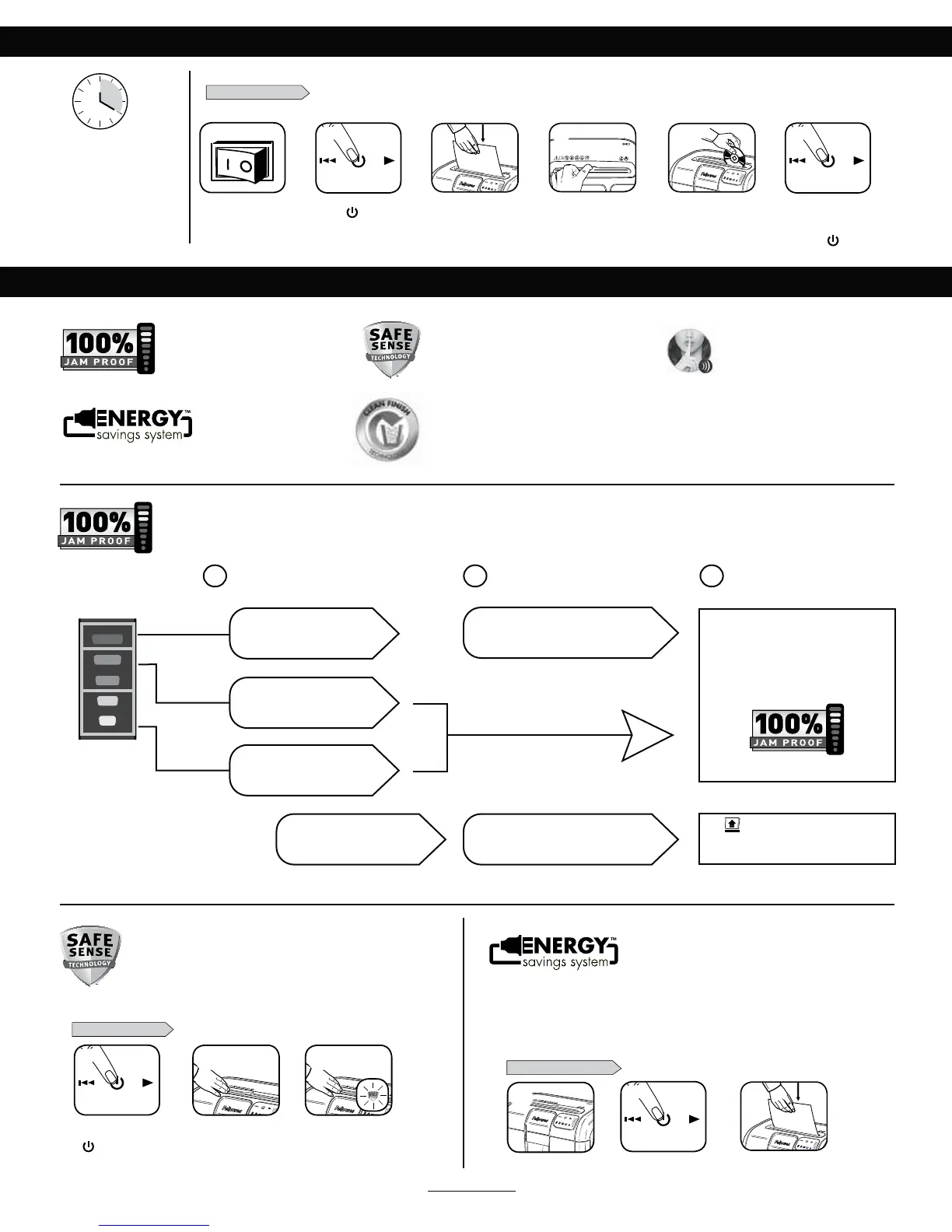
JAM PROOF SYSTEM OPERATION*
*100% Jam Proof when used in accordance with user manual
"EWBODFE+BN1SFWFOUJPO&MFDUSPOJDBMMZ
measures paper thickness to prevent paper jams:
Remove several sheets until
indicator is below red.
Continue 100% Jam
Proof Shredding
If a misfeed
occurs:
If illuminates after paper has been
reversed, press reverse and remove paper.
0UIFSXJTFSFHVMBSTISFEEJOHXJMMSFTVNF
1 2 3
6QUP3&%5PPNBOZ
sheets have been inserted.
6QUP(3&&/.PSFTIFFUT
can be added.
6QUP:&--081SPEVDUJWJUZ
is optimized.
All indicators light up and
shredder pauses for 3-6 seconds
8BJUGPSGMBTIJOHUPTUPQBGUFSBVUPNBUJDDPSSFDUJPO
is complete. Regular shredding will resume.
Press ( 0/UP
activate (blue)
PAPER OR CD/CARD
BASIC SHREDDING OPERATION
5PTISFE$%TTMJEF
CD flap into place
Feed paper straight into
paper entry and release
Plug in and put
disconnect power
TXJUDIJO0/*QPTJUJPO
Continuous operation:
20-minute maximum
NOTE: Shredder runs briefly
after each pass to clear entry.
Continuous operation beyond
20-minutes will trigger
20-minute cool down period.
Hold CD at edge,
feed into CD entry
and release
8IFOGJOJTIFE
shredding set
UP0''
)
SafeSense
®
is active and
working properly
5PVDIUFTUBSFBBOE
look for the SafeSense
®
indicator to illuminate
5VSOUIFTISFEEFS0/
( )to activate SafeSense
®
SAFESENSE
®
TECHNOLOGY
SET-UP AND TESTING
ADVANCED PRODUCT FEATURES
Eliminates paper jams and powers through tough jobs.
Stops shredding immediately when hands touch
the paper opening.
Jam Proof System
&MJNJNBUFTQBQFSKBNTBOEQPXFST
through tough jobs.
Patented SafeSense
®
Technology
Stops shredding immediately when
hands touch the paper opening.
SilentShred™
Technology
4JMFOU4ISFEOPJTFRVBMJUZ
shreds without noisy disruptions.
Energy Saving System
0QUJNBMFOFSHZFGGJDJFODZ
100% of the time – in use
and out of use.
Clean Finish
Automatically controls and contains
shreds to prevent shredding messes.
WHEN IN SLEEP MODE
In sleep mode
5PHFUPVUPGTMFFQNPEF
touch control panel
insert paper
ENERGY SAVING SYSTEM
t 4BWFTFOFSHZJOGPVSXBZTFOFSHZFGGJDJFOUFMFDUSPOJDTKBNQSFWFOUJPOTUBOECZNPEFBOE
sleep mode.
t 4MFFQ.PEFTIVUTEPXOTISFEEFSBGUFSNJOVUFTPGJOBDUJWJUZ
Optimal energy efficiency 100% of the
time – in use and out of use.
1
or
3
5
2 6
or
1
3
2
4
32
1
For more information about all of Fellowes Advanced Product Features go to www.fellowes.com






 To Next Page