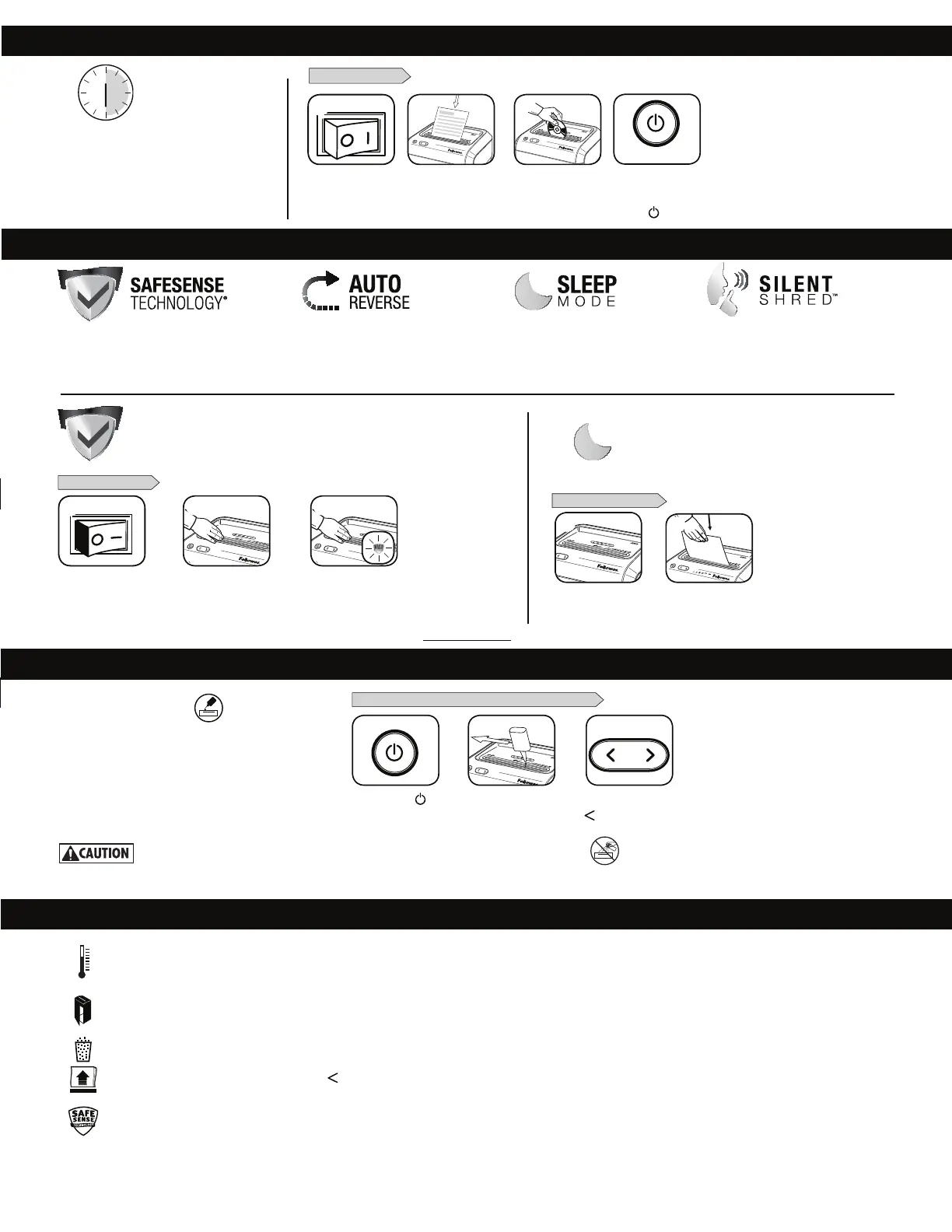
BASIC SHREDDING OPERATION
3
When finished
shredding set to
OFF (
)
)
PAPER, CARD or CD
Feed paper straight
into paper entry
and release
23
Plug in and put
disconnect power switch
in ON (I) position
4
Continuous operation:
Up to 30 minutes maximum
NOTE: Shredder runs briefly after each pass to clear
entry. Continuous operation beyond 30 minutes will
trigger
50-minute cool down period.
ADVANCED PRODUCT FEATURES
Hold card/CD at edge.
Feed into center of
entry and release
SafeSense
®
Technology
Stops shredding immediately when
hands touch the paper entry.
SilentShred™
Technology
Shreds without noisy disruptions.
Sleep Mode
Energy saving feature shuts down
the shredder after 2 minutes
of inactivity.
Auto Reverse
Stops and reverses paper
if a jam occurs.
SAFESENSE
®
TECHNOLOGY OPERATION
Stops shredding immediately when hands touch the paper opening.
For more information about all of Fellowes Advanced Product Features go to www.fellowes.com
SafeSense
®
is active and
working properly
Touch test area and
look for the SafeSense
®
indicator to illuminate
SET-UP AND TESTING
1
Turn the shredder ON
oto activate SafeSense
®
SLEEP MODE OPERATION
Energy saving feature shuts down the shredder after
2 minutes of inactivity.
WHEN IN SLEEP MODE
In sleep mode
insert paper
2
PRODUCT MAINTENANCE
* Only use a non-aerosol vegetable oil in long nozzle container such as Fellowes 35250
Press and hold forward
(
) 2-3 seconds
Set to Off ( )
*Apply oil across entry
TROUBLESHOOTING
Overheat Indicator: When the Overheat Indicator is illuminated, the shredder has exceeded its maximum operating temperature and needs to cool down. This
indicator will remain illuminated and the shredder will not operate for the duration of the recovery time. See Basic Shredding Operation for more information about
the continuous operation and recovery time for this shredder.
Bin Full: When illuminated, the shredder waste bin is full and needs to be emptied. Use Fellowes waste bag 36052.
Remove Paper: When illuminated, press reverse ( )and remove paper. Reduce paper quantity to an acceptable amount and refeed into paper entry.
SafeSense
®
Indicator: If hands are too close to the paper entry, the SafeSense
®
indicator will illuminate and the shredder will stop shredding.
Door Open Indicator: The shredder will not run if the cabinet door is open. When illuminated, close the door to resume shredding.
All cross-cut shredders require oil for peak performance.
If not oiled, a machine may experience diminished
sheet capacity, intrusive noise when shredding and could
ultimately stop running. To avoid these problems, we
recommend you oil your shredder each time you empty
your waste bin.
OILING SHREDDER
FOLLOW OILING PROCEDURE BELOW AND REPEAT TWICE
2
1
32
13
11
or







 To Next Page