CAPABILITIES
ENGLISH
Model 99Ms
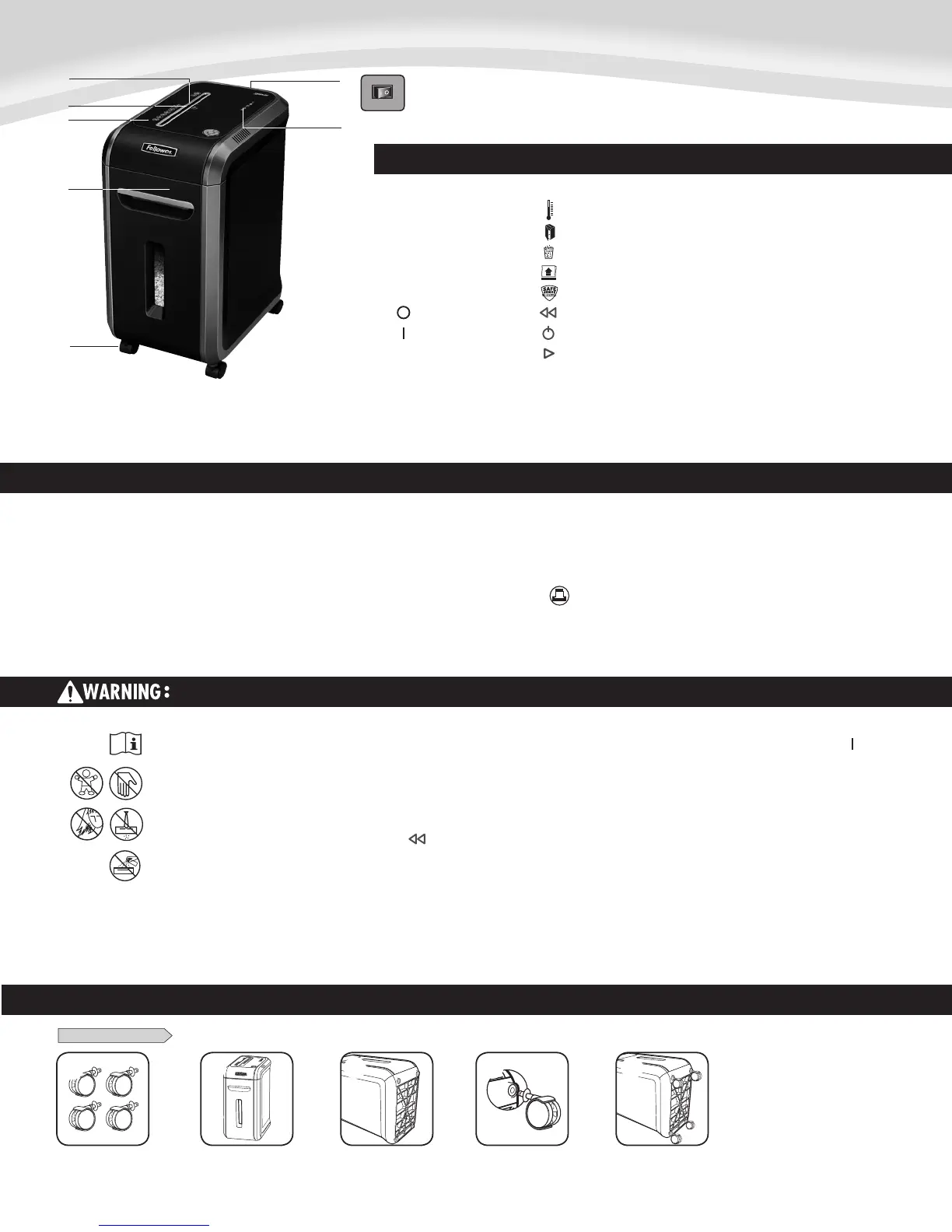
KEY
G. Control Panel and LEDs
1. Overheat (red)
2. Bin open (red)
3. Bin full (red)
4. Remove Paper (red)
5. SafeSense
®
indicator (yellow)
6. Reverse
7. ON/OFF (blue)
8. Forward
A.
B.
C.
F.
D.
E.
G.
Will shred: Paper, credit cards and staples
Will not shred: Adhesive labels, continous form paper, transparencies, newspaper,
cardboard, paper clips, CD/DVDs, laminates, file folders, X-rays or plastic other than noted
above
Paper shred size:
Micro-Cut .......................................................................................................... 2 x 14mm
Maximum:
Sheets per pass ........................................................................................................... 12*
Paper entry width ........................................................................................9 in. (230mm)
* 8.5 in. x11 in., 20lb., (75g) paper at 120V/60 Hz, 6.5Amps; heavier paper, humidity or other than
rated voltage may reduce capacity. Maximum recommended daily usage rates: 1000 sheets per day,
50 credit cards. 12 sheets per pass to avoid jams.
Fellowes SafeSense
®
shredders are designed to be operated in home and office environments ranging
between 50 – 80 degrees Fahrenheit (10 – 26 degrees Celsius) and 40 – 80% relative humidity.
BASIC SET UP
CASTER INSTALLATION
1
2
3
4
5
A. SafeSense
®
Technology
B. Paper entry
C. See safety instructions
D. Pullout bin
E. Casters
F. Disconnect power switch
1. OFF
2. ON
IMPORTANT SAFETY INSTRUCTIONS — Read Before Using!
• Operation,maintenance,andservicerequirementsarecoveredintheinstruction
manual. Read the entire instruction manual before operating shredders.
• Keepawayfromchildrenandpets.Keephandsawayfrompaperentry.Alwaysset
to off or unplug when not in use.
• Keepforeignobjects–gloves,jewelry,clothing,hair,etc.–awayfromshredder
openings. If object enters top opening, switch to Reverse ( ) to back out object.
• Neveruseaerosolproducts,petroleumbasedlubricantsorotherflammable
products on or near shredder. Do not use canned air on shredder.
• Donotuseifdamagedordefective.Donotdisassembleshredder.
Do not place near or over heat source or water.
• ThisshredderhasaDisconnectPowerSwitch(F)thatmustbeintheON()
position to operate shredder. In case of emergency, move switch to OFF (O)
position. This action will stop shredder immediately.
• Avoidtouchingexposedcuttingbladesundershredderhead.
• Shreddermustbepluggedintoaproperlygroundedwalloutletorsocketofthe
voltage and amperage designated on the label. The grounded outlet or socket
must be installed near the equipment and easily accessible. Energy converters,
transformers, or extension cords should not be used with this product.
• FIREHAZARD–DoNOTshredgreetingcardswithsoundchipsorbatteries.
• Forindooruseonly.
• Unplugshredderbeforecleaningorservicing.






 To Next Page