ENGLISH
Model SB-89Ci
4
3
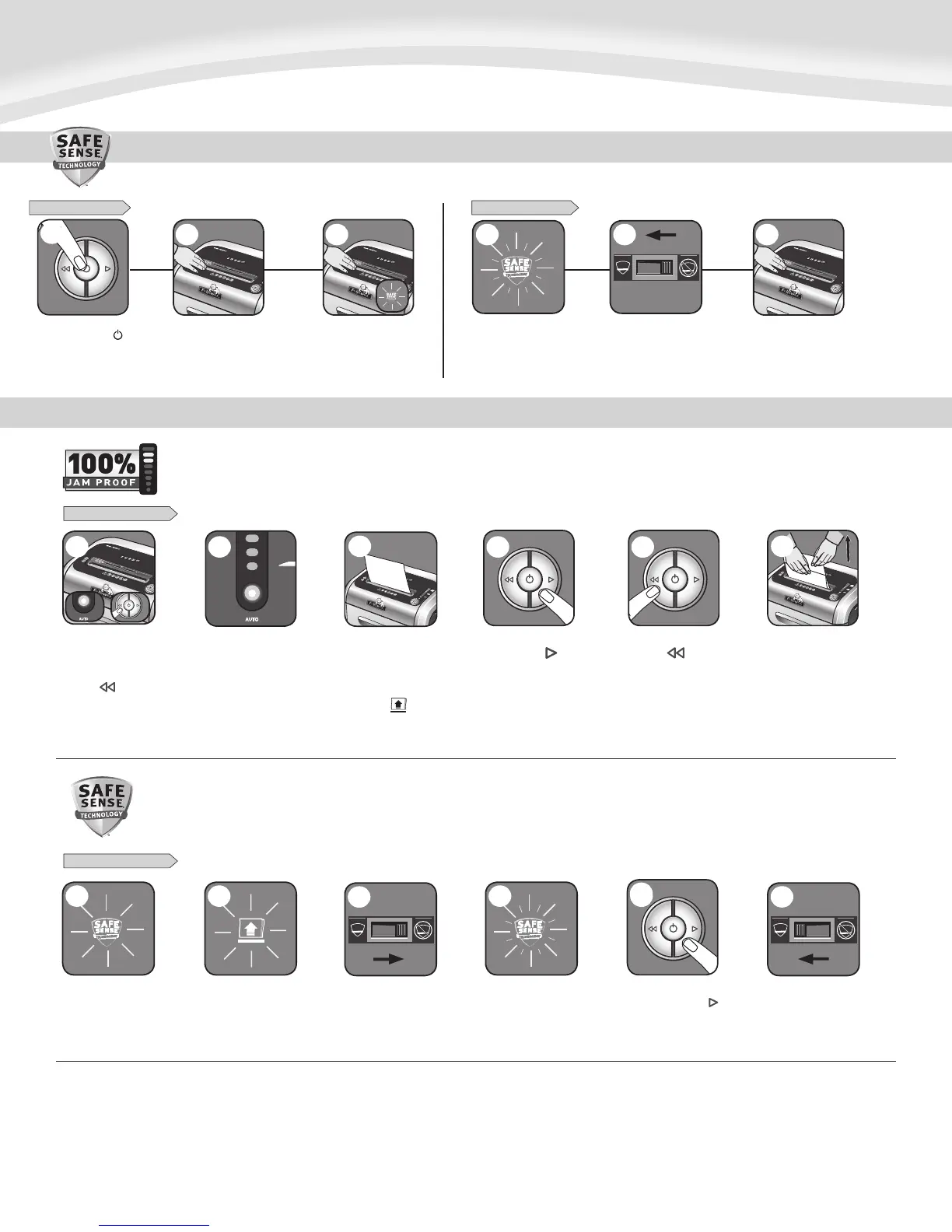
Should you choose to disable
the system, press and hold
the auto button (blue) and
reverse ( ) key at the
same time
DISABLING THE FEATURE
Once disabled, the blue
Auto light is no longer
illuminated (To re-engage,
repeat step 1)
Shredding can continue with
the system disabled, however a
paper jam may occur with
too many sheets and Remove
Paper icon ( ) will illuminate
DISABLING THE FEATURE
Should the SafeSense
®
indicator stay lit without
touching the opening
The shredder will stop and
SafeSense
®
will need to be
deactivated
To deactivate, shift override
switch to the “not active“
position
Once deactivated, the
indicator will flash and
the SafeSense
®
feature
will not function
To clear paper, press
and hold forward ( )
key until paper is
shredded
Once the paper is cleared,
reactivate the SafeSense
®
feature (To re-engage,
see Operations)
If steps 4 and 5 do not clear
jam, reverse paper all the
way out, remove several
sheets and refeed
6
1
3
2 4
5
6
ADVANCED PRODUCT FEATURE MAINTENANCE AND TROUBLESHOOTING
JAM PROOF SYSTEM*
Eliminates frustrating jams by preventing overloads and powering through misfed paper.
SAFESENSE
®
TECHNOLOGY
Stops shredder immediately when hands are too close to the opening.
1
2
If jam occurs, press and
hold forward ( ) key until
the document is completely
through the shredder
3
5
If not cleared, press
reverse ( ) briefly
(repeat steps 4 and 5
until shredded)
3
5
5
3
4
SafeSense
®
is active and
working properly
SAFESENSE
®
TECHNOLOGY OPERATION
Stops shredder immediately when hands are too close to the paper entry.
Touch test area and
look for the SafeSense
®
indicator to illuminate
Turn the shredder ( )
On to activate SafeSense
®
SafeSense
®
is deactivated when
indicator is flashing
Shift override switch to
the “active” position,
reactivating SafeSense
®
Confirm the indicator is no longer
flashing and retest by putting
your hand on the test area
SET-UP AND TESTING
2 3 1 2
FLASHING INDICATOR
1
3
* 100% Jam Proof when used in accordance with user manual



 To Next Page