2
Press ( ) ON to
activate (blue)
PAPER OR CD/CARD
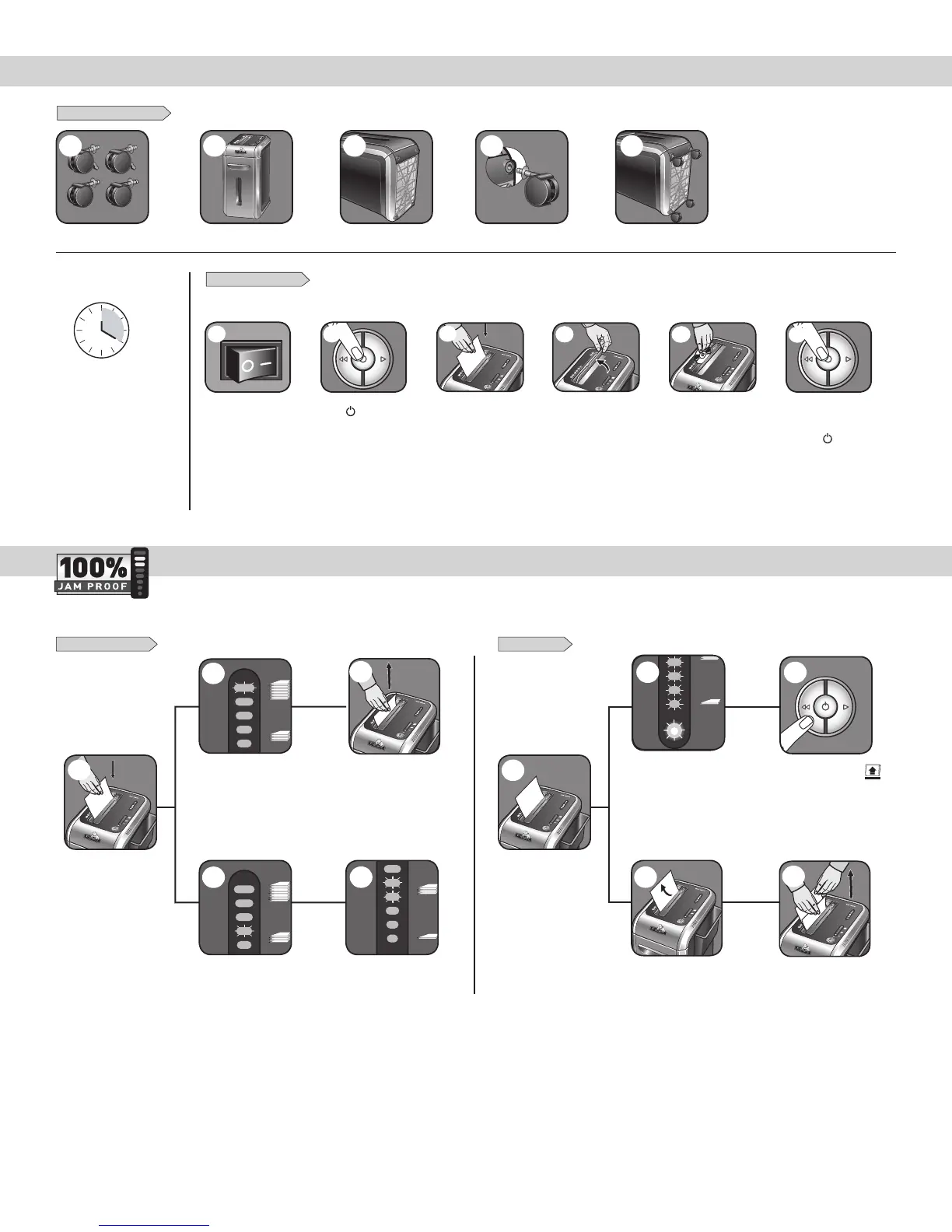
BASIC SET UP AND SHREDDING OPERATION
1
To shred CDs rotate
CD flap into place
4
JAM PROOF SYSTEM OPERATION*
Eliminates frustrating jams by preventing overloads and powering through misfed paper.
Feed into paper entry
and release
Shredder will take fewer sheets,
but if indicator is below yellow,
you can add more sheets without
fear of jamming
2
Increase the number of sheets
being fed up to the top yellow light
tomaximizeyourproductivity
If there is too much paper for
the shredder to power through,
it will reverse the paper out for
easy removal
Reduce paper quantity to an
acceptable amount and refeed into
paper entry
If too many sheets, indicator will
light up to red and shredder will
not take paper
Remove several sheets until the
indicator is below red and the
shredder will take the paper
3
SET-UP AND TESTING MISFED PAPER
2
3
2 3
1
3
Feed into paper
entry and release
1
3
Plug in and put
disconnect power
switch in ON (I) position
Continuous operation:
20-minutemaximum
NOTE: Shredder runs briefly
after each pass to clear entry.
Continuous operation beyond
20-minutes will trigger
40-minute cool down period.
HoldCD/cardatedge,
feedintoCD/Cardflap
entry and release
5
When finished
shredding set
to OFF (
)
6
2
2
If paper is misfed and
stops shredding, all
indicator lights will
illuminate and shredder
willpausefor3-6
seconds
Automatic correcting action
will power through the misfed
paper, so shredding can
continue (do not add more
paper during flashing)
2
If Remove Paper icon ( ) is
illuminated, press reverse and
remove paper
*100% Jam Proof when used in accordance with user manual
CASTER INSTALLATION
1 2 3 4 5
3



 To Next Page