1110
EN
Figure 5 Figure 6
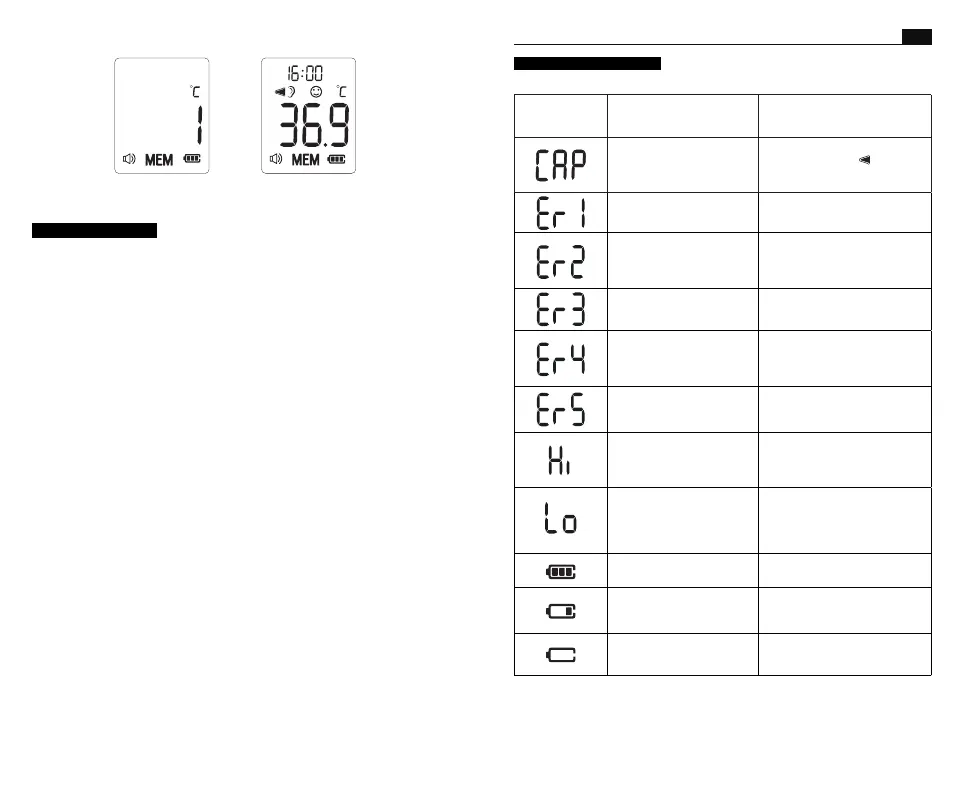
Situation and Symbols
Troubleshooting
Probe guard not installed.
Make sure the earmuffs are on
correctly, then the ( ) icon will
appear on the screen and you
can take a measurement.
Measurement before
thermometer is ready
Take a measurement until the
"ER1" symbol is not on the display.
The ambient temperature is
not within the range between
10°C and 40°C (50°F~104°F).
Place the thermometer in a room
for at least 30 minutes at room
temperature between 10°C and
40°C (50°F~104°F).
The thermometer is placed
incorrectly or unsteady.
Read Illustration For Use
thoroughly and take a new
temperature measurement.
The thermometer showing a
rapid ambient temperature
change.
Allow the thermometer to rest in
a room for at least 30 minutes at
room temperature: between 10°C
and 40°C (50°F~104°F).
The thermometer is not
functioning properly.
Unload the battery, wait for 1
minute and repower it. If the
message reappears, contact the
retailer for service.
In Ear mode: Temperature
taken is higher than
43.0°C(109.4°F).
Read Temperature Taking Hints
Thoroughly, then check the
integrity of the probe cover
and take a new temperature
measurement.
In Ear mode: Temperature
taken is lower than 32.0 °C
(89.6°F).
Read Temperature Taking
Hints thoroughly , then make
sure the probe cover and lens
filter are clean, then take a new
temperature measurement.
The thermometer is
functioning correctly.
Please use the thermometer as
usual.
The low battery indicator
is on, but you can still
use the thermometer for
measurements.
The thermometer will take
a proper measurement but
batteries must be replaced soon.
The thermometer may not
work due to low battery.
Replace two new alkaline
batteries, size AA.
Error message Problem Solution
Care and cleaning
1. Probe covers are intended for single use only. Absent, damaged,
perforated, or soiled probe covers can lead to inaccurate temperature
readings.
2. The probe window must be kept clean, dry, and undamaged at
all times to ensure accurate readings. The accuracy of temperature
readings can be affected by damage to the probe window, or the
presence of dirt and earwax on the probe window.
3. Fingerprints, earwax, dust and other soiling compounds reduce
transparency of the window and result in lower temperature readings.
If the thermometer is accidentally placed in the ear without a probe
cover installed, the window must be cleaned immediately.
4. The probe window is the most delicate part of the thermometer. To
safely clean the window, gently wipe its surface with a cotton swab
slightly moistened with isopropyl alcohol and immediately wipe dry
with a clean cotton swab. After cleaning, allow at least 5 minutes
drying time before taking temperatures.
Note: Do not use any chemical other than isopropyl alcohol to clean
the probe window.
5. Use a soft, dry cloth to clean the thermometer display and exterior.
6. Do not put the thermometer into water directly.
7. Store the thermometer and probe cover in a dry location, free from
dust and contamination, and away from direct sunlight.
8. Periodic cleaning of the device following use to prevent patient
cross infection.
-Use a soft cloth slightly moistened with a 75% isopropyl alcohol
solution to wipe the thermometer and probe. Do not use abrasive
cleaners.
9. Ensure that children do not use the instrument unsupervised; some
parts are small enough to be swallowed.
10. Do not remove or modify the equipment without prior permission.
11. Put the thermometer back into the original packaging after using.


 To Next Page
 Loading...