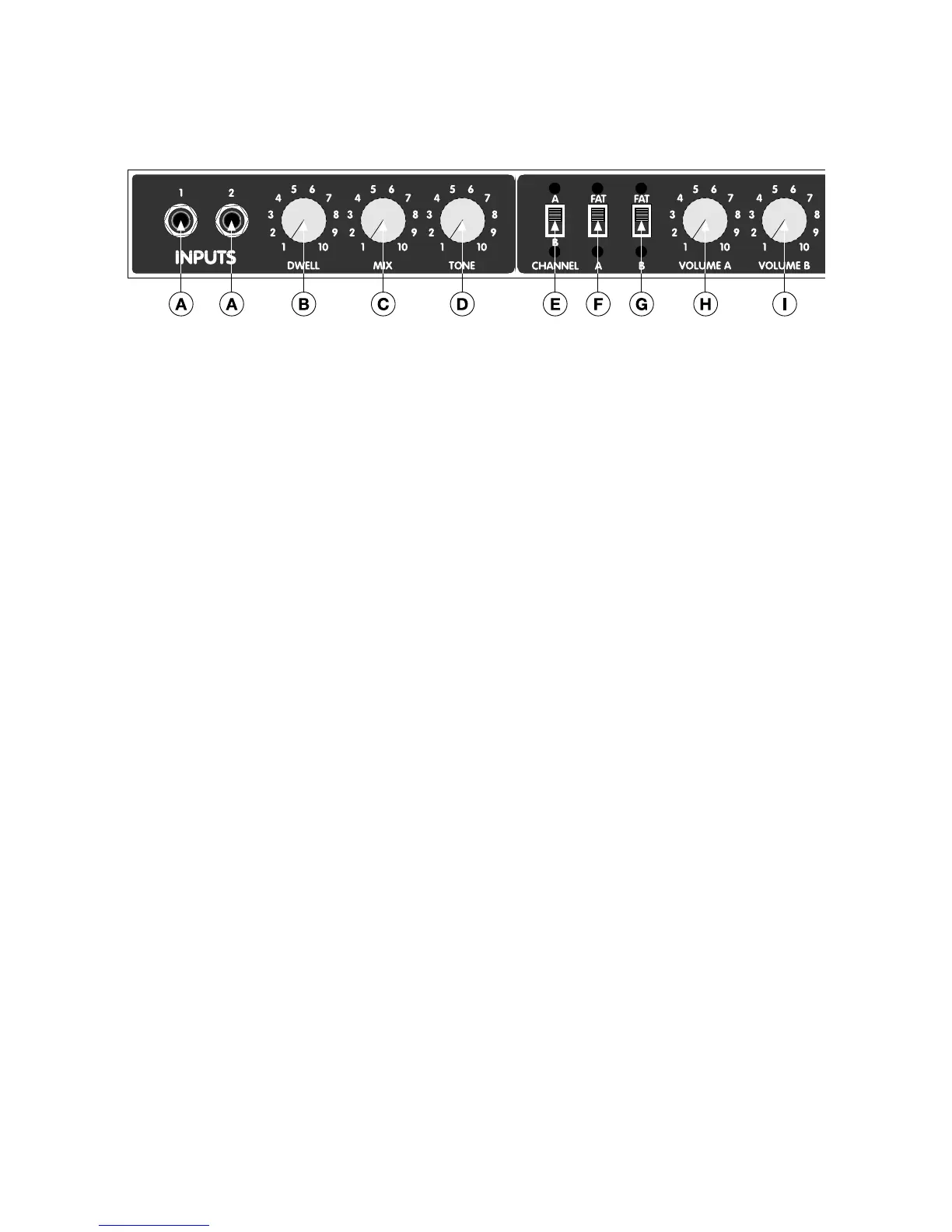
DUAL PROFESSIONAL FRONT PANEL FUNCTIONS
A. INPUTS - Input 1 is the main guitar input for the Dual Professional. Input 2 will work as a 6dB
lower gain, low-Z input for hot, active pickups or as a passive output to link amplifiers in a multi-
amp set up. For example, when using a Dual Professional with a ‘59 Bassman, where you do
not wish to have reverb on the Bassman, first plug the guitar into the Dual Professional input 1.
Then connect a cord between Dual Professional input 2 and the Bassman® input 1, either chan-
nel. Now you can play both amps simultaneously.
B. DWELL - This Adjusts the length of the reverb by varying how hard the springs in the reverb pan
are driven.
C. MIX - Controls the depth or strength of the reverb.
D. TONE - Adjusts the brightness of the reverb.
E. CHANNEL A/B - Allows front panel selection of CHANNEL A or CHANNEL B.
SPECIAL NOTE: This switch is deactivated by plugging in the footswitch.
F. FAT A - Adds a 3dB boost in gain on the A CHANNEL only.





 To Next Page