PC
OK, I am connected, how do I send MIDI music from my computer to the G-DEC?
A computer typically lets you direct a MIDI file to several different places. By default, most computers
send MIDI data to the computer soundcard. If you were to “play” a MIDI file right now, you probably
would hear audio coming from your computer speakers. We will need to re-direct the MIDI data to the G-
DEC.
To send MIDI data to the G-DEC you must tell the computer to direct the MIDI data to the MIDI connector
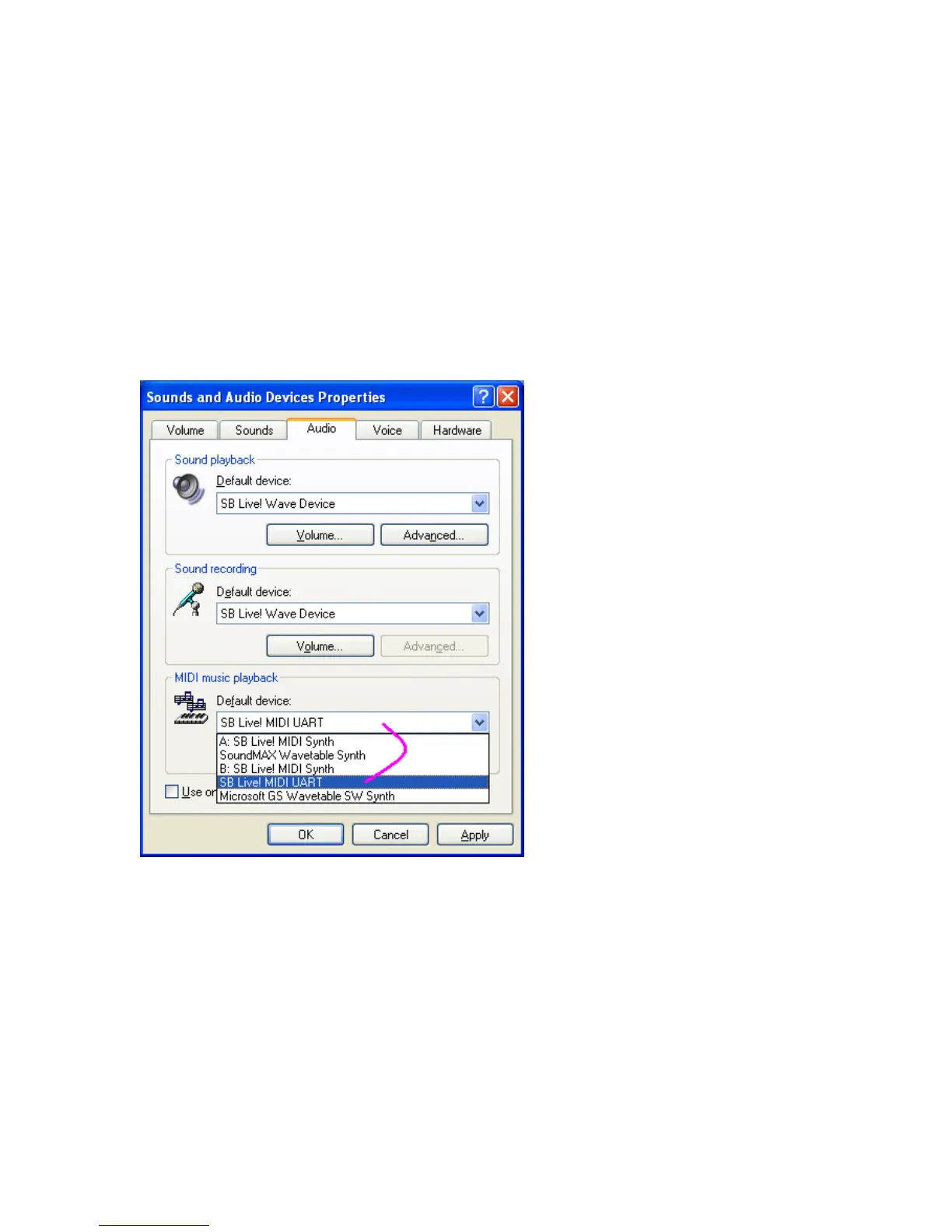
you have attached to the G-DEC. Figure 4 shows the Windows XP control panel that selects MIDI ports.
In XP you find this panel in “Control Panel/Sounds and Audio Properties.” Figure 4 shows that the MIDI
file will be sent out through the “SB Live! MIDI UART” to the G-DEC. SB Live! is the name of the
soundcard and the MIDI UART is the hardware device that will transmit the signal. Figure 5 is an
alternate configuration for those who wish to use a USB/MIDI adapter to connect to the G-DEC. In Figure
5 the device is the USB MIDI 1x1. This is the name that M-Audio gave the driver for its Uno product.
Figure 4 Selecting the soundcard port to send MIDI to G-DEC







 To Next Page