7
• FOUR-BUTTON FOOTSWITCH •
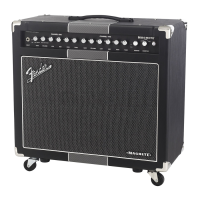
• CONTROL PANEL •
A. INPUT Plug your guitar in here.
B. +/ Press to activate dB of input attenuation as indicated
by the button LED. This provides cleaner response when used
with pre-amplified or high-output instruments.
C. GAIN Adjusts the channel one preamp gain level. Pull this
knob out for additional channel one high-frequency preamp
response.
D. VOLUME Adjusts the channel one volume. Pull this knob out
to select the "Channel One Boost" channel for an extra boost of
preamp gain; also switchable from the Machete footswitch or
by using MIDI commands.
If the footswitch or MIDI is used to select the channel one
gain boost, the in/out position of the VOLUME knob may not
accurately indicate whether the channel one boost is selected.
The "CHANNEL ONE GAIN BOOST" LED on the footswitch will
always light up when the channel one boost is active.
E. LOW / MID / HIGH Adjusts the channel one tone.
F. NOTCH Adjusts the channel one mid-frequency attenuation
for a variety of American and British tonal flavors:
FREQUENCY
G. GAIN Adjusts the channel two preamp gain level.
H. VOLUME Adjusts the channel two volume.
I. LOW / MID / HIGH Adjusts the channel two tone.
J. NOTCH Adjusts the channel two mid-frequency attenuation
for a variety of American and British tonal flavors.
K. CHANNEL SELECT Press to switch between channel one
and channel two. Illuminates when channel two is active.
L. REVERB Adjusts the reverb level for both channels.
M. DAMPING Adjusts speaker damping, or the resonance
interaction between the power amplifier and the speaker.
N. POWER INDICATOR Illuminates when power is on to the unit.
Press to switch channels, instead
of using the control panel CH2
switch {K}.
Press to switch the channel one
gain boost on/o, instead of pulling
out the VOLUME knob {D}.
Press to switch the eects
loop on/o.
Press to switch the reverb
eect on/o.
You can connect the
"open" jack to a second
Machete footswitch (op-
tional) to enable identical
footswitch functions from
two remote locations!
Connect either jack on
the footswitch to the
FOOTSWITCH jack {Z}
on the rear panel of the
amplier using the sup-
plied cable to enable the
remote footswitch func-
tions described below.
Treble
Emphasis
Bass
Emphasis







 To Next Page