EasyManua.ls Logo

Fender MUSTANG 3 - User Manual

Fender MUSTANG 3
13 pages
Print Icon
To Next Page IconTo Next Page
Loading...
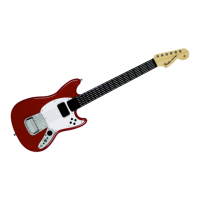
FENDER MUSTANG PRO-GUITAR
MIDI$User$Guide$$
REVISION: 01
Date: 07/16/10
Question and Answer IconNeed help?

Do you have a question about the Fender MUSTANG 3 and is the answer not in the manual?

Summary

Introduction

What is MIDI?

Explains MIDI as a language for digital musical instruments and communication between devices.

Features

Lists the key features of the Rock Band 3 Fender Mustang Pro-Guitar as a MIDI device.

Getting Started

Control Surface Functions in MIDI Mode

Fret Board

Simulates fretting action with 102 buttons for note generation.

Strings

Six velocity-sensitive strings used for generating MIDI notes.

LED Indicators

Four LEDs indicate various guitar states and user actions.

Synth Mode Control

Button to enable or disable Synth Mode functionality.

Shift Function

Provides secondary functions for other control buttons.

Foot Controller Function

Assigns functions like Expression, Channel Volume to the foot controller port.

Octave and Program Controls

Buttons to change the current octave and MIDI program number.

Connection Ports

MIDI Out Port

Outputs MIDI Data from the guitar to other devices.

Pedal Port

Connects optional pedals for enhanced functionality like expression or modulation.

Working in a MIDI Studio

Connecting to a Personal Computer

How to connect the guitar to a PC for MIDI sequencing or software synthesizers.

Connecting to a MIDI Sound Module

Connects the guitar to external sound modules via a MIDI cable.

External Pedal Functionality

Pedal Controls

Functions (Expression, Volume, Modulation) and MIDI assignments for pedals.

Play Modes

Strum Mode

Default mode requiring string strumming to generate notes based on frets.

Synth Mode

Mode where changing frets generates notes, independent of strumming.

Understanding the Controls

Change Octave

Adjusts MIDI note value by +/- 12 per change, up to 4 steps from default.

Change Program

Adjusts MIDI program value (instrument sounds) from 1 to 127.

Panic Function

Immediately stops all current MIDI notes across all channels.

Accelerometer

Accelerometer MIDI Mapping

Maps rotational motion (X, Y, Z axes) to MIDI functions like Modulation or Pitch Bend.

Default Settings

LED Indicators

LED Behavior Overview

Explains how the four player LEDs indicate internal states and acknowledge user actions.

Turning Guitar On;Off

Describes LED feedback for powering the guitar on and off.

Synth Mode LED Feedback

Details LED response when switching to Synth Mode.

Accelerometer X Axis LED

Describes LED indication for toggling Accelerometer X Axis output.

FAQ

Overview

The Rock Band 3 Fender Mustang Pro-Guitar is a versatile musical instrument that functions both as a video game controller and a genuine MIDI device for studio use or live performances. It's designed to integrate seamlessly into a MIDI studio setup, allowing users to control software sequencers, synthesizers, and standalone hardware sound modules.

Function Description:

The primary function of the Rock Band 3 Fender Mustang Pro-Guitar is to act as a MIDI controller. MIDI, or Musical Instrument Digital Interface, is a language that enables digital musical instruments and compatible devices to communicate. Unlike audio, MIDI messages trigger sounds from MIDI-compatible sound modules. When a key is pressed on the guitar, MIDI data is sent from its MIDI Output port, traveling via a 5-PIN MIDI cable to other MIDI devices, which then trigger sounds through an audio system.

The guitar offers two main play modes: Strum Mode and Synth Mode.

  • Strum Mode is the default. To generate MIDI notes, the user must strum a string. The MIDI note produced is based on the fret held down closest to the strings. Hammer-ons and pull-offs are not supported in this mode.
  • Synth Mode eliminates the need for strumming to generate notes. Changing the held fret will also generate a note. The velocity of generated notes is based on the last strum of the fret's string. To play an open string in Synth Mode, a string must be strummed.

The guitar also supports external pedal functionality via a TRS Port, allowing for the connection of an optional analog Expression Pedal and/or digital Stomp Switch. The analog expression pedal can be assigned three functions: Expression, Channel Volume, and Modulation, which can be changed using the directional pad buttons.

Important Technical Specifications:

  • Strings: 6 velocity-sensitive strings.
  • Fret Buttons: 102 simulated fret buttons.
  • Connectivity: MIDI Out Port for sending MIDI data, TRS Port for connecting stomp and/or expression pedals.
  • Power: Battery Powered (requires 3 AA batteries).
  • MIDI Channels: Transmits on MIDI Channels 1 - 6.
  • Default Mode: Strum.
  • Accelerometer: Disabled by default, but can be enabled for X, Y, and Z axis control.
  • Default Program: Value 28 (Electric Guitar – Clean).
  • Default Analog Pedal Function: Expression.

Usage Features:

The Rock Band 3 Fender Mustang Pro-Guitar offers several control surface functions in MIDI mode:

  • Fret Board (1): 102 buttons to simulate fretting action.
  • Strings (2): 6 velocity-sensitive guitar strings.
  • LED Indicators (3): 4 LEDs to indicate various guitar states or user actions.
  • Synth Mode (4): Enables/Disables Synth Mode.
  • Shift (5): Provides secondary functions for other buttons.
  • Foot Controller (6): Changes pedal function to foot controller.
  • Channel Volume (7): Changes pedal function to channel volume.
  • Expression (8): Changes pedal function to expression.
  • Octave Increment (9): Increases the current octave number.
  • Program Decrement (10): Decreases the current program number.
  • Program Increment (11): Increases the current program number.
  • Octave Decrement (12): Decreases the current octave number.

Understanding the Controls:

  • Change Octave: Incrementing or decrementing octave adds or subtracts 12 to the current MIDI note value. A maximum of 4 changes can be made in either direction from the default. Notes falling outside the MIDI note range of 0-127 will assume values of 0 or 127 respectively. Pressing both octave increment and decrement buttons simultaneously resets the base octave to default.
  • Change Program: The default Program value of 28 (Electric Guitar – Clean) is adjustable from 1 to 127 using the Program increment and decrement buttons. Pressing both Program increment and decrement buttons simultaneously resets the Program value to default. Program changes are transmitted on channels 1-6.
  • Panic Function: To immediately stop all notes across all channels, press buttons 4, 5, and 8 simultaneously.
  • Accelerometer: Rotational motion of the guitar can activate certain MIDI functions. These functions are toggled by specific button combinations:
    • X Axis (Modulation): Buttons 5 and 12.
    • Y Axis (Expression): Buttons 5 and 11.
    • Z Axis (Pitch Bend): Buttons 5 and 9.

LED Indicators:

The four Player LEDs provide visual feedback on internal states and user actions.

  • LED Key:
    • Blank square: LED Off
    • Filled square: LED On
    • X in square: LED Unchanged
  • Examples of LED behavior:
    • Turning Guitar ON (Xbox 360: hold Guide button for 2 seconds; PS3/Wii: slide power switch to ON) results in a continuous display count.
    • Turning Guitar OFF (Xbox 360: hold Guide button for 2 seconds; PS3/Wii: slide power switch to OFF) results in a continuous display count.
    • Synth Mode activation results in a continuous display count with specific LED patterns (e.g., 100ms intervals).
    • Toggling Accelerometer X Axis (Modulation) Output shows a continuous display count, with different patterns for enable/disable. Similar patterns apply for Y and Z axes.
    • Pressing Octave or Program increment/decrement buttons results in a 1x display count with specific LED patterns and durations (e.g., 100ms, 200ms).
    • Resetting Octave or Program settings also results in a 1x display count with specific LED patterns.

Connectivity:

  • Connecting to a Personal Computer: To use the guitar as a controller for MIDI sequencing software or a computer's onboard MIDI synthesizer, connect the guitar's MIDI output port to a MIDI Interface (e.g., USB MIDI Sport 1x1) or a sound card/audio interface equipped with a MIDI input port. Audio output will be provided by the sound card or audio interface. Users should consult their software's user guide for proper connectivity.
  • Connecting to a MIDI Sound Module: Connect one end of a 5-Pin MIDI cable to the guitar's MIDI Out port and the other end to the MIDI In port on a sound module. Audio output will be provided by the sound module. Users should consult the sound module's user guide for proper connectivity.

Maintenance Features:

  • Battery Replacement: The guitar requires 3 AA batteries, which are placed in a compartment on the bottom side of the guitar. This is essential for MIDI mode functionality.

The Rock Band 3 Fender Mustang Pro-Guitar is designed to be a comprehensive and user-friendly MIDI controller, bridging the gap between gaming and musical instrument functionality.

Fender MUSTANG 3 Specifications

General IconGeneral
BrandFender
ModelMUSTANG 3
CategoryVideo Game Controller
LanguageEnglish

Related product manuals