EasyManua.ls Logo

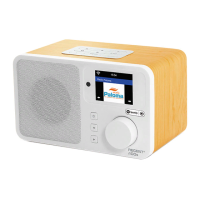
Ferguson Regent I100 - User Manual

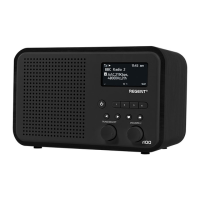
Ferguson Regent I100
31 pages
Print Icon
To Next Page IconTo Next Page
Loading...
Regent
®
i100
Radio internetowe
z FM/DAB+/Bluetooth
Instrukcja obsługi
Prosimy o uważne zapoznanie się z treścią tego podręcznika
przed użyciem urządzenia.

Questions and Answers

  • M
    michael63Aug 10, 2025
    What to do if Ferguson Internet Radio keeps buffering?
    • P
      Paul YoungAug 11, 2025
      If your Ferguson Internet Radio frequently stops to buffer, the issue might be with your broadband connection. Check your DSL modem to ensure the broadband line isn't experiencing a high error rate or disconnections. If problems persist, contact your broadband supplier.
  • S
    Samantha MarshAug 17, 2025
    Why Ferguson Regent I100 Radio can connect to the network but not play stations?
    • M
      Mariah PetersAug 17, 2025
      Your Ferguson Radio might connect to the network but fail to play stations because: * The station may not be broadcasting at that time (it could be in a different time zone). * The station's server might be overloaded with too many listeners. * The station may have reached its maximum listener limit. * The link on the radio might be outdated, but it updates automatically every day.
  • W
    wardmelissaAug 23, 2025
    How to improve poor DAB/FM Radio reception on Ferguson?
    • A
      Austin MccarthyAug 23, 2025
      To improve DAB/FM radio reception on your Ferguson radio: * Extend the aerial fully and adjust its direction for the strongest signal. * Ensure other electrical equipment isn't too close to the radio, as it may cause interference.
  • C
    Chelsea FranklinAug 29, 2025
    How to fix no DAB/FM reception on Ferguson Radio?
    • S
      Samantha LongAug 29, 2025
      To resolve no DAB/FM reception on your Ferguson Radio: * Perform a 'Factory Reset' on the radio and extend the antenna. * Move the radio closer to a window.
  • P
    pam95Nov 3, 2025
    How to fix Ferguson Regent I100 not connecting to Wi-Fi?
    • S
      Stephen ContrerasNov 4, 2025
      If your Ferguson Radio isn't connecting to Wi-Fi, here are some things to check: * Make sure other devices on the same network can access the internet. * Verify a DHCP server is available or configure a static IP address on the radio. * Ensure your firewall isn't blocking ports 80, 443, 8008 (TCP and UDP) and 53 (DNS). * If your router restricts access by MAC address, find the radio's MAC address under Configuration > Information > Network > Wi-Fi MAC and add it to your router's allowed list. Remember that wired and wireless networks have separate MAC addresses. * Check the distance to the router and optimize its location, or see if a computer can connect to the network in the radio's location. * If the encryption method is not supported, change the encryption method on your...

Summary

Safety Precautions

Device Controls Overview

Remote Control Functions

Pre-Operation Setup

Wi-Fi Security Code Input

Network Connection Setup

Configure Network Wizard

Wizard for setting up Wi-Fi connection.

Add;Remove Access Point

Manage available Wi-Fi access points.

Internet Radio Stations

Skytune Radio Stations

Access thousands of global radio stations via the internet.

Station Search Function

Filter stations by inputting characters.

Listening History

Stores up to 99 recently listened stations.

Favourite Station Management

Preset Favourite Station

Add current station to the favourite list.

Recall Favourite Station

Access saved favourite stations.

Edit Favourite List

Manage (move, delete) saved favourite stations.

Media Centre Features

Music Streaming via Network

Stream music from network devices via UPnP/DLNA.

Create My Playlist

Create custom playlists from available music files.

DAB Radio Reception

FM Radio Reception

Bluetooth Audio Streaming

Auxiliary Audio Input

Alarm Clock Setup

Sleep Timer Configuration

System Configuration Settings

Network Settings

Configure Wi-Fi network settings, signal, IP, and DNS.

Wi-Fi Channel Selection

Select Wi-Fi channels based on country for optimal performance.

Date and Time Settings

Set time zone, time format, and date format.

Language Selection

Change the device's menu language.

DAB Radio Setup

Scan and manage DAB radio stations.

FM Radio Setup

Select region and scan FM radio stations.

Playback Mode Settings

Set playback modes for UPnP/DLNA streaming.

Display Brightness Control

Adjust screen brightness levels.

Reset to Default Settings

Restore all settings to factory defaults.

Manage Favourites via PC

Troubleshooting Common Issues

Helpful Tips for Usage

Internet Radio Re-buffering Solution

Troubleshoot continuous buffering during internet radio playback.

Understanding Stream Buffering

Explanation of the buffering process for streams.

Technical Specifications

Package Contents

WEEE and Recycling Information

Ferguson Regent I100 Specifications

General IconGeneral
Radio typePortable
Tuner typeDigital
FM band range87.5 - 108 MHz
DAB band range174.928 - 239.2 MHz
Supported radio bandsDAB, DAB+, FM
RMS rated power5 W
ManualYes
Security algorithmsWEP, WPA, WPA2
Docking station includedNo
Apple docking compatibility-
Total Harmonic Distortion (THD)20 %
Impedance4 Ω
Driver unit76.2 mm
Number of built-in speakers1
Subwoofer driver diameter (imperial)3 \
Display typeLCD
Wi-Fi standards802.11b, 802.11g, Wi-Fi 4 (802.11n)
Bluetooth version4.2
Headphone connectivity3.5 mm
ColorationMonochromatic
Product colorBlack
Volume controlRotary
Power sourceAC
AC input voltage100 - 240 V
DC input voltage5 V
AC input frequency50 - 60 Hz
Weight and Dimensions IconWeight and Dimensions
Depth115 mm
Width185 mm
Height110 mm

Related product manuals