This document describes the FERREX® 900W Planer, model number PPL9001.A, a corded power tool designed for planing wooden materials.
Function Description
The FERREX® 900W Planer is intended for planing firmly supported wooden materials, such as beams and boards. It is also suitable for beveling edges and rebating. The tool is exclusively intended for home use and is not designed for trade or commercial use. It features a 900W motor and operates at a no-load speed of 18000 /min.
Important Technical Specifications
- Rated voltage: 220-240V ~ 50Hz
- Rated power: 900W
- No load speed: 18000 /min
- Max cutting depth: 3 mm
- Max cutting width: 82 mm
- Max rebate depth: 11 mm
- Protection degree: /II (Double insulation)
- Net weight: 3.25 kg
- Product dimensions: 300165175 mm
- Product code: 704518
- Compliance: AS/NZS 62841.1, AS/NZS 62841.2.14 (Safety), CISPR 14-1 (EMC)
Usage Features
The planer offers several features to enhance usability and performance:
1. Cutting Depth Adjustment:
- The cutting depth adjustment knob (11) allows for precise control over the planing depth, ranging from 0-3mm.
- The planing depth scale (10) provides clear indication of the selected depth.
- For most applications, a cutting depth of 0-2mm is recommended for a good surface finish. Small depths of cut and repeated planing are advised.
2. Dust Extraction:
- The planer is equipped with two dust extraction ports (4), allowing for connection of either a dust bag (6) or a vacuum adapter (not supplied).
- A dust extraction guide switch (12) allows the user to select whether chips are discharged to the left or right side.
- The dust bag (6) can be easily attached and emptied by unzipping it.
- For efficient removal of dust and shavings, an external dust extraction machine or household vacuum cleaner can be connected via a vacuum adapter.
3. Baseplate Stand:
- A baseplate stand (22) is integrated into the rear of the planer. When the planer is set down, this stand lifts the cutting blades (20) approximately 10mm from the surface, protecting them from damage.
- During planing, the stand is pushed away by the end of the wood, allowing continuous operation. Users should always ensure the stand is free to move on the base plate (8).
4. Parallel Guide (7):
- The parallel guide is used to control the width of the cut or to provide added stability when planing materials up to 82mm wide.
- Assembly: The angle bracket (7d) is placed on the parallel guide body (7a), and secured with a locking nut (7c) and locking screw (7b).
- Fitting: The parallel guide locking knob (9) is inserted through the angle bracket (7d) and into a hole on the side of the planer head, then tightened. The parallel guide should be fitted on the left side of the planer head.
- Adjustment: The locking screw (7b) can be loosened to slide the parallel guide (7) forwards or backwards to the desired position, then securely tightened.
- When in use, the parallel guide should be held firmly against the edge of the workpiece.
5. Rebate Guide (14):
- The rebate guide allows for setting rebate depths from 0 to 11mm.
- Fitting: The rebate guide locking knob (13) is inserted through the slot on the rebate guide (14) and into a hole on the right side of the planer head, then tightened.
- Adjustment: By loosening the rebate guide locking knob (13) and sliding the rebate guide (14) up and down, the desired rebate depth can be set. The width of the rebate is controlled by the parallel guide (7).
- For best results, the blade (20) must be properly aligned with the front base.
6. Edge Chamfering:
- The V-groove (23) on the front base plate (8) enables chamfering of workpiece edges.
- The workpiece must be clamped and supported. The V-groove is placed over the edge to be chamfered, ensuring blades are not touching. The planer is then pushed forward with steady pressure, maintaining a constant angle.
7. On/Off Trigger (3) and Lock-off Button (2):
- To start the planer, the lock-off button (2) must be depressed and held, then the on/off trigger (3) is squeezed.
- Releasing the on/off trigger (3) switches the planer off.
Maintenance Features
Regular maintenance is crucial for the planer's safety, performance, and longevity.
1. Blade Fitting and Changing:
- Safety First: Always disconnect the power cord and wear gloves before changing blades.
- Blade Type: The blade (20) has two cutting edges and can be reversed. When both edges are dull, the blade must be replaced. Dull or worn blades cannot be reground or re-sharpened and must be replaced with blades designated for this model.
- Removal: Place the planer upside down. Rotate the blade drum (17) to expose the blade (20) and clamping screws (19). Loosen the three clamping screws (19) using the 8mm wrench (15). Push the blade (20) sideways out of the blade holder (18) with the wrench tip or a screwdriver. If stuck, a sharp blow with a piece of wood can help loosen it.
- Installation: Clean the blade (20) and blade seat. Slide the new blade (20) into the blade holder (18) with the correct orientation (tapered edge must match original orientation). Ensure the blade is level with the holder (18). Re-tighten the three clamping screws (19).
- Blade Alignment Check: After replacement, use a ruler to check if the blades (20) are parallel with the rear base plate (8). If not, adjust the blades using the 2.5mm hex key (16) by loosening the clamping screws (19) and turning the socket head screw (21) clockwise to raise the blade or anti-clockwise to lower it, then re-tighten the clamping screws.
2. Drive Belt Replacement:
- Safety First: Disconnect the power plug and wear gloves.
- Removal: Loosen the three screws (b) and remove the belt cover (5). Remove the worn drive belt from the large drive pulley (c) and small pulley (d).
- Installation: Clean both pulleys thoroughly. Place the new drive belt (e) onto the drive pulley (d) and turn it manually clockwise while pushing the belt onto the large pulley (c). Ensure the drive belt runs exactly along the length grooves of the small pulley (d) and large pulley (c).
- Re-position the belt cover (5) and securely tighten it with the three screws (b).
3. Carbon Brushes:
- Carbon brushes are wearing components and are not covered under warranty.
- When carbon brushes wear out, the planer will spark or stop. Discontinue use immediately.
- Replace both carbon brushes at the same time by taking the planer to a service agent. Continuing to use the planer with worn brushes can cause permanent damage.
4. Cleaning and Storage:
- Always read safety instructions before cleaning.
- Clean the device and accessories with a lint-free, damp cloth and mild soap solution. Do not use alcohol, acetone, benzene, aggressive cleaning agents, hard brushes, or metal objects.
- Ensure no water penetrates inside the housing.
- Dry all parts thoroughly before storage.
- Store the device and accessories in its carry case, in a dust-free, moisture-free, and sunlight-protected location, out of reach of unauthorized persons.
Warranty:
The FERREX® 900W Planer comes with a 3-year warranty against defects in workmanship and parts from the date of purchase. This warranty is in addition to consumer rights under Australian Consumer Law. Replacement parts and accessories are available for purchase.

 Need help?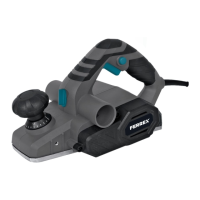

 To Next Page
 General