EasyManua.ls Logo

Festool CT-F I - User Manual

Festool CT-F I
2 pages
Print Icon
To Next Page IconTo Next Page
Loading...
Operation of the Bluetooth remote control and battery
Pair the remote control to the mobile dust extractor (without Bluetooth battery pack)
Set the switch on the mobile dust extractor to AUTO.
Press the green pair button on the mobile dust extractor
for 3 seconds until a quickly rotating blue light appears.
The dust extractor will be in pairing mode for 60 seconds.
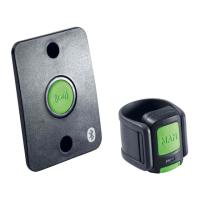
Briefl y press the large button (MAN) on the
top of the remote control once. The mobile
dust extractor is now paired.
Disconnect the remote control
from the mobile dust extractor:
Then simultaneously press both
green buttons on the remote control
until a magenta light on the remote
control appears. The remote control
is then disconnected.
Set the switch on the mobile dust extractor to AUTO.
Briefl y press the green pair button on the mobile
dust extractor until a rotating blue light appears. The
dust extractor will be in pairing mode for 60 seconds.
Switch on the power tool with the Bluetooth
battery pack. The mobile dust extractor is
now paired to the tool.
Disconnect the battery pack
from the mobile dust extractor:
Turn off the mobile dust extractor
(Set the switch to 0 position)
Disconnect the mains plug of the
mobile dust extractor
Insert the Bluetooth battery pack
into the charger
NOTE:
No more than fi ve remote controls can be paired to one mobile dust extractor.
A remote control can only be connected to one mobile dust extractor. The remote control can only be paired
with another mobile dust extractor once it has been disconnected to the fi rst.
Only one battery pack at a time and no more than fi ve remote controls can be paired simultaniously to
one mobile dust extractor.
When the max. number of devices is reached, then the device that has not been used for the longest time is deleted.
Briefl y press the small green pair button on the
front of the remote control until a rotating blue light
appears around the authorization button on the
mobile dust extractor. The dust extractor will be in
pairing mode for 60 seconds.
Switch on the power tool with the Bluetooth
battery pack. The mobile dust extractor is
now paired to the tool.
Disconnect the battery pack
from the mobile dust extractor:
Turn off the mobile dust extractor
(Set the switch to 0 position)
Disconnect the mains plug of the
mobile dust extractor
Insert the Bluetooth battery pack
into the charger
Subject to changes and errors. All images are non-binding.Produced for Festool GmbH, 73240 Wendlingen, Germany, January 2018 (EN)
Pair the cordless power tool to the mobile dust extractor (with Bluetooth battery pack)
Pair the cordless power tool to the mobile dust extractor using the remote control.
www.festool.com/bluetooth

Other manuals for Festool CT-F I

Question and Answer IconNeed help?

Do you have a question about the Festool CT-F I and is the answer not in the manual?

Summary

Pair Remote Control to Dust Extractor (No Battery Pack)

Pairing Remote Control

Steps to pair the remote control to the mobile dust extractor without a Bluetooth battery pack.

Disconnecting Remote Control

Procedure to disconnect the remote control from the mobile dust extractor.

Pair Cordless Power Tool with Battery Pack

Pairing Power Tool via Battery Pack

How to pair a cordless power tool using its Bluetooth battery pack to the mobile dust extractor.

Disconnecting Battery Pack

Steps for disconnecting the battery pack from the mobile dust extractor.

Pair Cordless Power Tool Using Remote Control

Pairing Power Tool via Remote Control

Process for pairing a cordless power tool to the mobile dust extractor using the remote control.

Disconnecting Power Tool (Remote Method)

Steps to disconnect the power tool from the dust extractor when paired via remote control.

Important Pairing Notes and Device Management

Pairing Limitations

Information on the maximum number of remote controls and tools that can be paired with one dust extractor.

Automatic Device Deletion

Explanation of how the oldest unused device is deleted when the maximum number of paired devices is reached.

Overview

This document describes the operation and pairing procedures for Festool mobile dust extractors with Bluetooth remote controls and battery packs, enhancing the functionality of cordless power tools. The system allows for seamless integration between dust extraction and power tool operation, improving efficiency and user convenience.

Function Description

The Festool system enables wireless communication between a mobile dust extractor and either a dedicated remote control or a cordless power tool equipped with a Bluetooth battery pack. This connectivity allows for automatic activation of the dust extractor when the connected power tool is switched on, or manual activation via the remote control. The primary function is to provide on-demand dust extraction, ensuring a cleaner working environment and prolonging the life of tools and consumables by effectively managing dust and debris.

Pairing the Remote Control to the Mobile Dust Extractor (without Bluetooth battery pack)

This procedure outlines how to establish a wireless connection between a Festool remote control and a mobile dust extractor that does not use a Bluetooth battery pack for activation.

  1. Set the switch on the mobile dust extractor to AUTO: This prepares the dust extractor for pairing mode.
  2. Press the green pair button on the mobile dust extractor for 3 seconds: Hold the button until a quickly rotating blue light appears. This indicates that the dust extractor is in pairing mode, which will remain active for 60 seconds.
  3. Briefly press the large button (MAN) on the top of the remote control once: This action initiates the pairing process from the remote control side.
  4. Confirmation: Once these steps are completed, the mobile dust extractor and the remote control are paired.

Disconnecting the Remote Control from the Mobile Dust Extractor:

To disconnect a paired remote control from the mobile dust extractor:

  1. Simultaneously press both green buttons on the remote control: Hold until a magenta light appears on the remote control.
  2. Confirmation: The magenta light indicates that the remote control is successfully disconnected.

Pairing the Cordless Power Tool to the Mobile Dust Extractor (with Bluetooth battery pack)

This procedure details how to connect a cordless power tool, equipped with a Bluetooth battery pack, to a mobile dust extractor for automatic activation.

  1. Set the switch on the mobile dust extractor to AUTO: This prepares the dust extractor for pairing.
  2. Briefly press the green pair button on the mobile dust extractor: Press until a rotating blue light appears. The dust extractor will be in pairing mode for 60 seconds.
  3. Switch on the power tool with the Bluetooth battery pack: Activating the power tool initiates the pairing process.
  4. Confirmation: The mobile dust extractor is now paired to the tool, and will activate automatically when the tool is switched on.

Disconnecting the Battery Pack from the Mobile Dust Extractor:

To disconnect a Bluetooth battery pack from the mobile dust extractor:

  1. Turn off the mobile dust extractor: Set the switch to the "0" position.
  2. Disconnect the mains plug of the mobile dust extractor: This ensures the dust extractor is completely powered down.
  3. Insert the Bluetooth battery pack into the charger: This action effectively unpairs the battery pack from the dust extractor.

Pairing the Cordless Power Tool to the Mobile Dust Extractor using the Remote Control

This method allows for pairing a cordless power tool with a Bluetooth battery pack to the mobile dust extractor via the remote control.

  1. Briefly press the small green pair button on the front of the remote control: Press until a rotating blue light appears around the authorization button on the mobile dust extractor. The dust extractor will be in pairing mode for 60 seconds.
  2. Switch on the power tool with the Bluetooth battery pack: Activating the power tool initiates the pairing process.
  3. Confirmation: The mobile dust extractor is now paired to the tool.

Disconnecting the Battery Pack from the Mobile Dust Extractor (via remote control method):

The disconnection process is identical to the previous method:

  1. Turn off the mobile dust extractor: Set the switch to the "0" position.
  2. Disconnect the mains plug of the mobile dust extractor: Power down the dust extractor.
  3. Insert the Bluetooth battery pack into the charger: This action unpairs the battery pack.

Important Technical Specifications and Usage Features:

  • Bluetooth Connectivity: The core technology enabling wireless communication between devices.
  • Automatic Activation: The dust extractor automatically turns on when the connected power tool is activated, streamlining workflow and reducing manual intervention.
  • Manual Control: The remote control provides manual override and activation capabilities for the dust extractor.
  • Pairing Time Limit: The dust extractor remains in pairing mode for 60 seconds, requiring quick action during the pairing process.
  • Visual Indicators: Rotating blue lights indicate pairing mode, while magenta lights confirm disconnection, providing clear feedback to the user.
  • AUTO Mode: The dust extractor must be set to "AUTO" mode for pairing and automatic operation.

Maintenance Features and Limitations:

  • Maximum Remote Controls: No more than five remote controls can be paired to one mobile dust extractor.
  • One-to-One Remote Control Pairing: A remote control can only be connected to one mobile dust extractor at a time. To pair it with a different dust extractor, it must first be disconnected from the current one.
  • Simultaneous Battery Pack/Remote Control Pairing: Only one battery pack at a time and no more than five remote controls can be paired simultaneously to one mobile dust extractor.
  • Device Deletion: When the maximum number of devices is reached, the device that has not been used for the longest time is automatically deleted to accommodate new pairings. This ensures efficient management of connected devices.

The Festool system emphasizes user convenience and efficiency, providing a robust solution for dust management in professional and DIY settings. The clear pairing and unpairing instructions, combined with the intelligent device management features, make this system a valuable addition to any workshop.

Festool CT-F I Specifications

General IconGeneral
BrandFestool
ModelCT-F I
CategoryRemote Control
LanguageEnglish