17
BR 10 GB
5 Operation
5.1 Operating with switching
adapter
Plug in switching adapter
[1-9]
in connecting sock-
et
[1-2]
and power outlet.
5.2 Operating with external Fes-
tool battery pack [2A] + [2B]
The device can operate with any Fes-
tool battery pack from the BP, BPC or
BPS series. When connected to the
external Festool battery pack, the de-
vice only consumes power from this
battery pack.
CAUTION
Always attach the battery
pack completely. If not, it may acci-
dentally fall out of the battery bay,
causing injury to you or someone
around you.
CAUTION
Do not force attach the bat-
tery pack. If the battery pack does not
slide in smoothly and does not en-
gage, it is not being inserted correct-
ly.
CAUTION
For optimal performance,
we recommend connecting to an 18V
Li-Ion battery pack.
5.3 Switch on/off
To switch on: Press the power but-
ton
[1-5]
.
The radio is ready for operation.
To switch off: Press and hold the
power button
[1-5]
for a second.
5.4 Volume control
Press the volume control
[a]
and
[k]
to adjust the desired
volume.
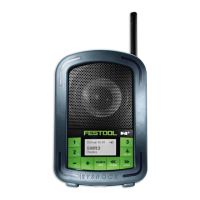
[b]
Preset button 2
Bluetooth mode: Play and
pause
[c]
Preset button 1
Bluetooth mode: Call button
[d]
Clock time (only with RDS)
[e]
Battery status indicator
[f]
Preset button 3
Bluetooth mode: Pair button
[g]
Preset button 4
Bluetooth mode: Reset button
for Bluetooth pairings
[h]
Tuning control - up
Bluetooth mode: next track
[i]
Tuning control - down
Bluetooth mode: previous track
[j]
Source button
[k]
Volume control +


 To Next Page