Clear Personal Data
After pressing the “Clear Personal Data Settings” button
on the touchscreen the following settings will be avail-
able:
• Clear Personal Data
When this feature is selected it will remove personal data
including Bluetooth devices and presets. To Clear Per-
sonal Data press the “Yes” or “No” button on the
touchscreen.
UCONNECT RADIOS
For detailed information about your Uconnect radio,
refer to your Uconnect Supplement Manual.
iPod/USB/MEDIA PLAYER CONTROL
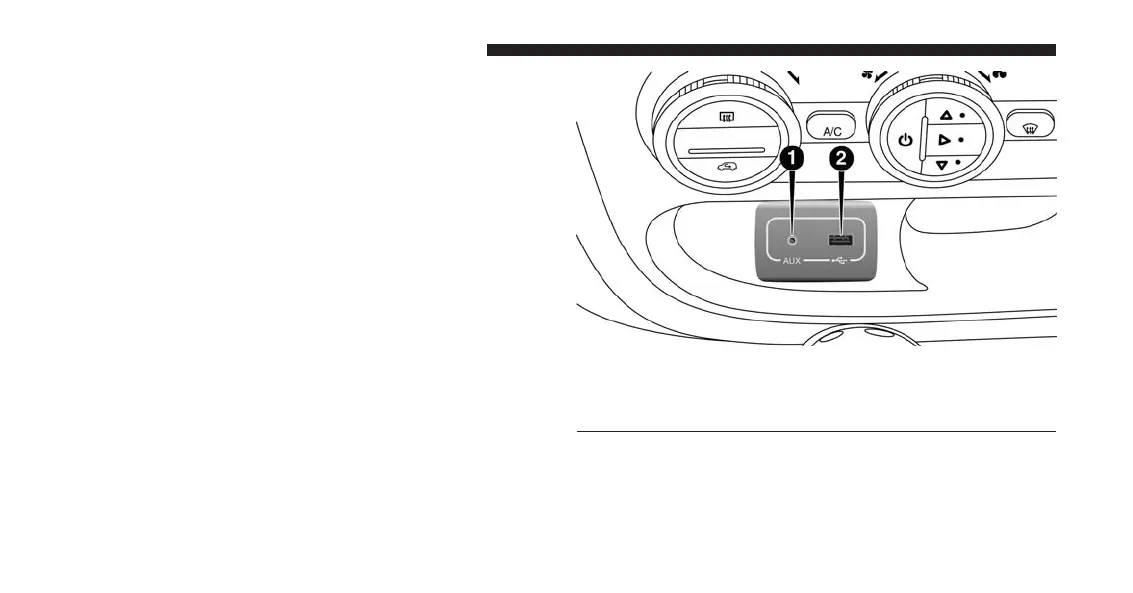
This feature allows an iPod or external USB device to be
plugged into the AUX Jack or USB port.
Refer to the Uconnect 5.0/6.5 User’s Manual for iPod and
external USB support capability.
AUX Jack And USB Port
1 — AUX Jack
2 — USB Port
226 UNDERSTANDING YOUR INSTRUMENT PANEL


 To Next Page