20
SAFETY
DEVICES
CORRECT USE
OF THE CAR
WARNING
LIGHTS AND
MESSAGES
IN AN
EMERGENCY
CAR
MAINTENANCE
TECHNICAL
SPECIFICATIONS
INDEX
DASHBOARD
AND CONTROLS
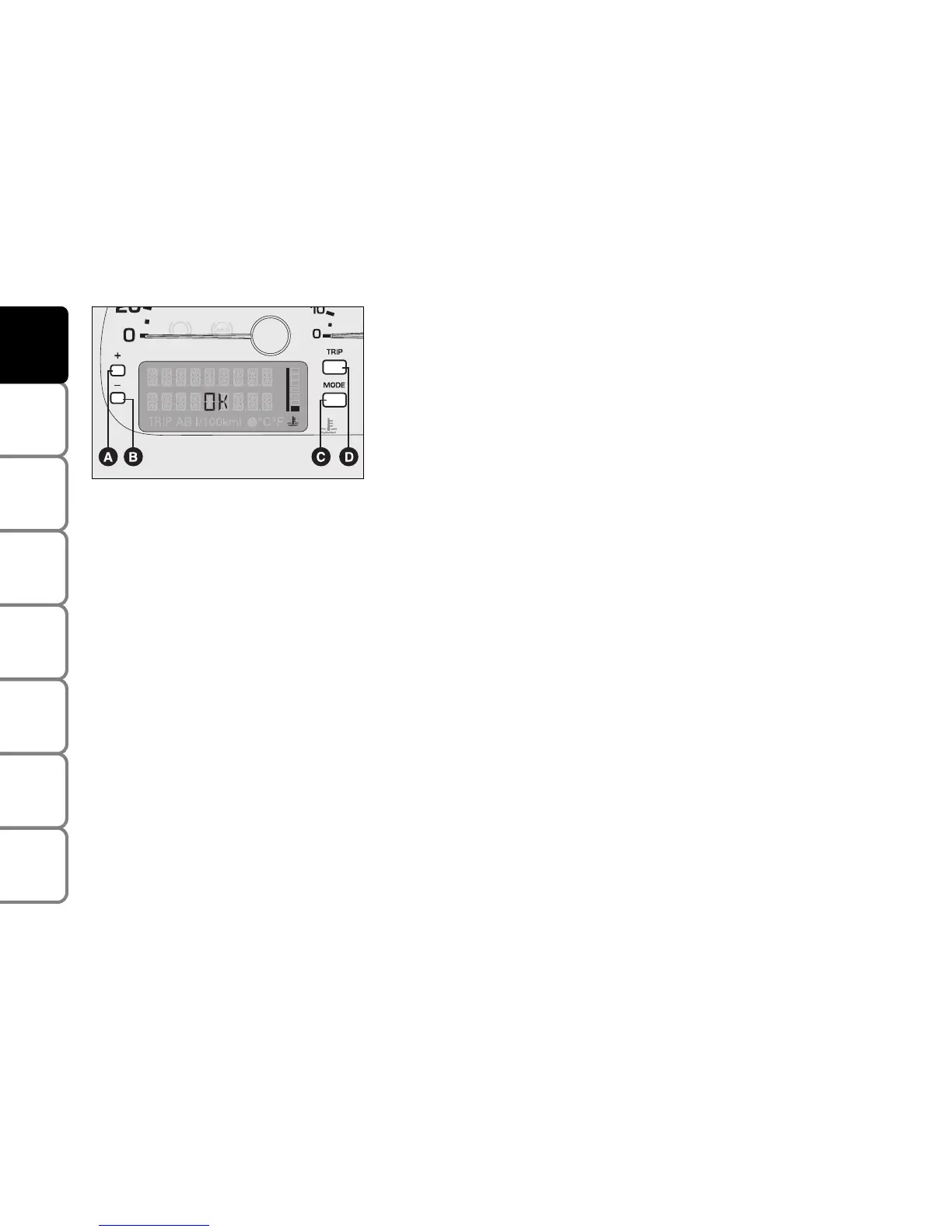
C - MODE button
Press for less than 1 second (short pulse), indicated with MODE 1 in the
following diagrams: to enter the Menu and to go to the different settings
or to confirm the required option.
Press for more than 2 seconds (long pulse), indicated with MODE 2 in
the following diagrams: to confirm the required option and go back to
the standard screen.
D - TRIP button
Press for less than 1 second (short pulse), indicated with TRIP 1 in the
following diagrams: to scroll TRIP display screens.
Press for more than 2 seconds (long pulse), indicated with TRIP 2 in the
following diagrams: to reset the Trip computer and start a new trip.
IMPORTANT During setting operations, characters that flash can either
be changed or confirmed.
F0E0044m


 To Next Page