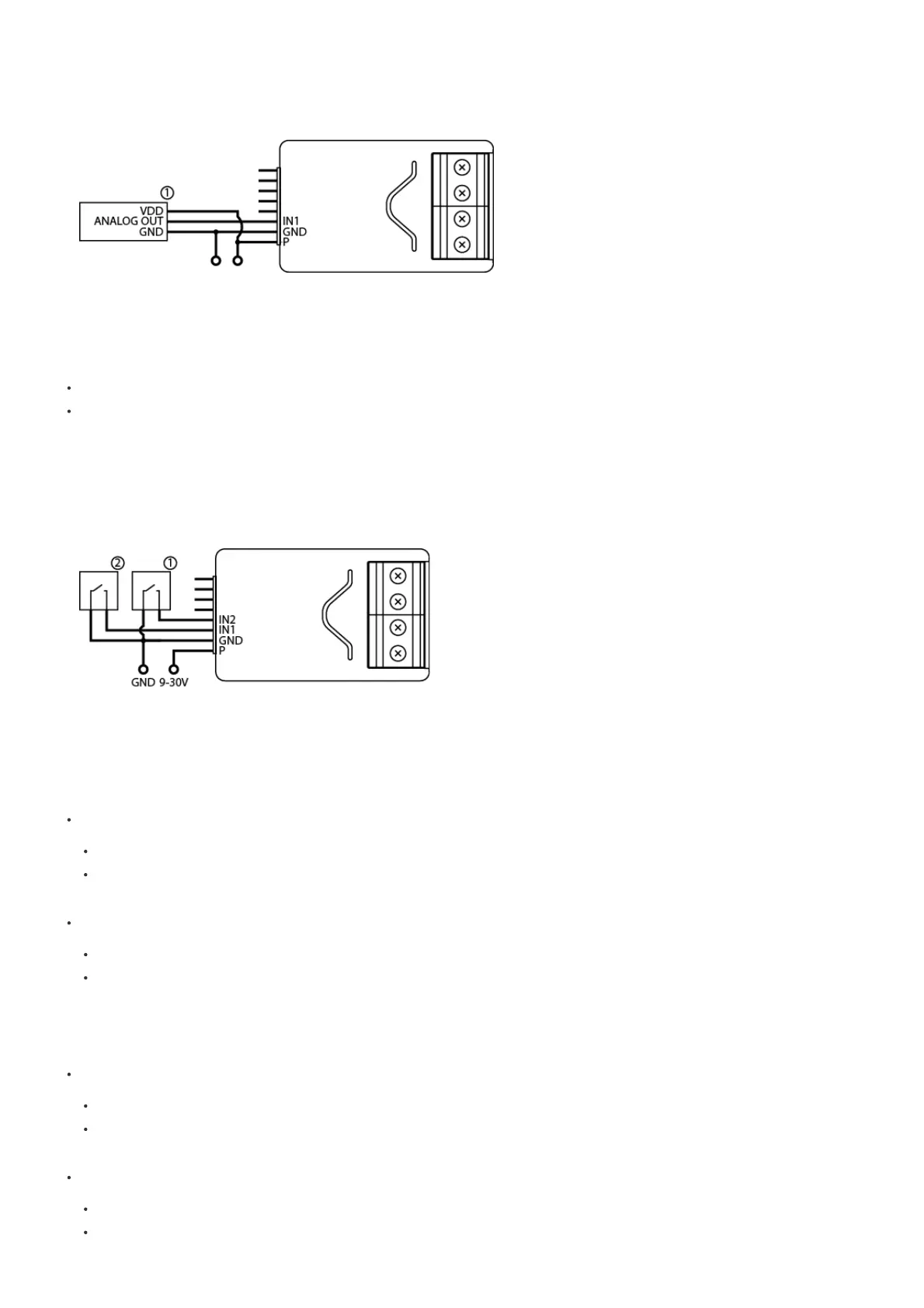
You can connect up to 2 analog sensors IN1/IN2 terminals.
1. Disconnect Power
2. Connect with the diagram below
3. Verify the correctness of connection.
4. Power the device.
5. Add the device to the Z-Wave network.
6. Change values of parameters:
Connected to IN1: change parameter 20 to 4
Connected to IN2: change parameter 21 to 4
Connection with binary sensor or button
You connect normally opened or normally binary sensors to IN1/IN2 terminals.
1. Disconnect Power
2. Connect with the diagram below
3. Verify the correctness of connection.
4. Power the device.
5. Add the device to the Z-Wave network.
6. Change values of parameters
6.1 Binary sensor
Connected to IN1:
Normally close: change parameter 20 to 0
Normally open: change parameter 20 to 1
Connected to IN2:
Normally close: change parameter 21 to 0
Normally open: change parameter 21 to 1
6.2 Button
Connected to IN1:
Monostable: change parameter 20 to 2
Bistable: change parameter 20 to 3
Connected to IN2:
Monostable: change parameter 21 to 2
Bistable: change parameter 21 to 3


 To Next Page