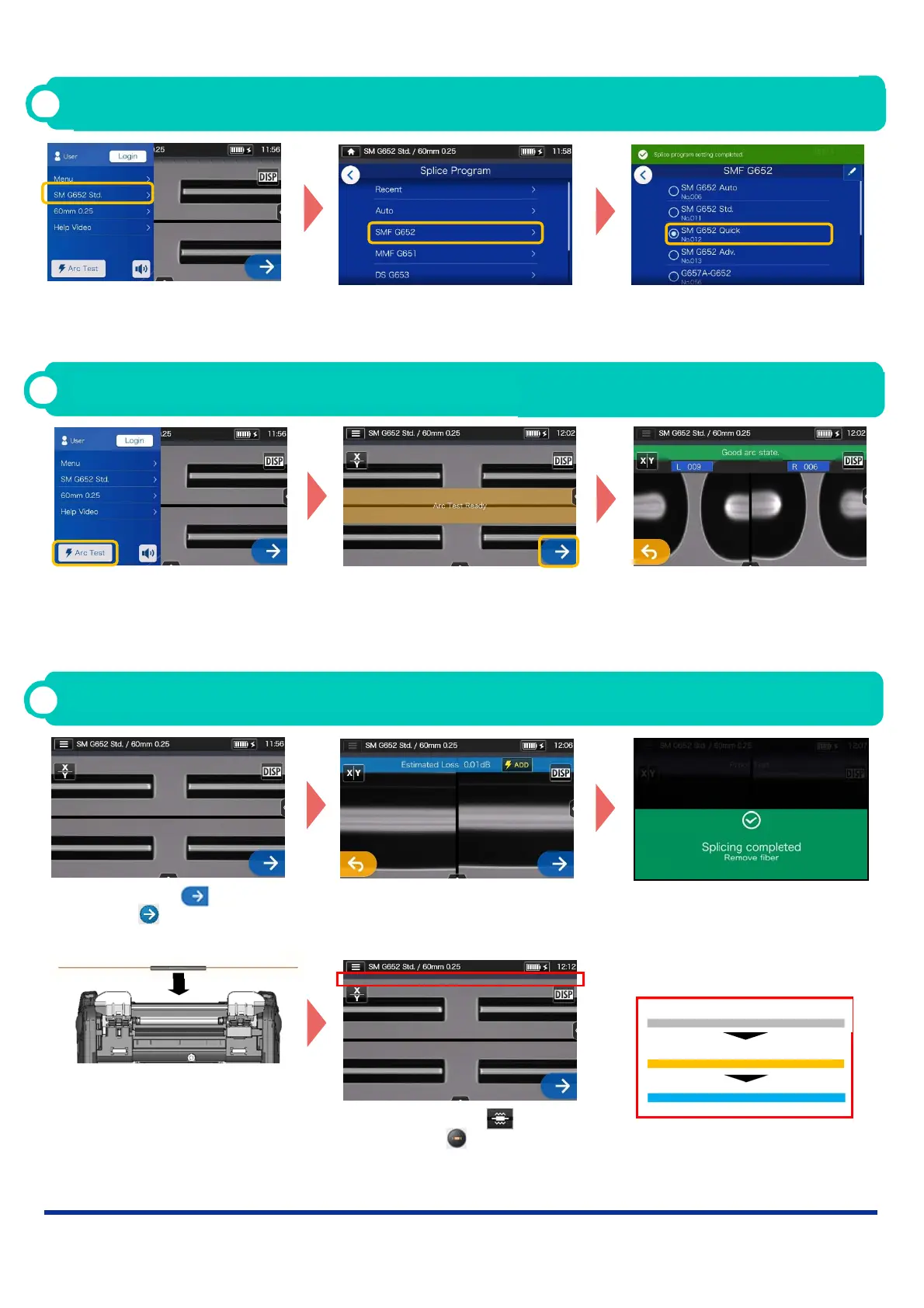
2. Fusion splicing is completed.
3. Open the wind hood. A proof
test is automatically carried
out.
4. Remove the fiber from the
splicer. Center the protection
sleeve over the splice and
load the fiber in the heat
shrink oven.
Operating Procedures
1
Splice program setting
1. Tap the Splice program label
on the Settings panel.
2. Select fiber category. 3. Tap the splice program you
would like to use.
* Setup and change the Heater program in the same procedures as described above.
Heater progress bar
Heating in progress
Cooling
Standby
5. Tap Heater icon or press
Heater key to start the
heating process.
1. Tap Set icon or press
Set key to start the
splicing process.
2 Perform an arc test
1. Tap “Arc Test”.
2. After “Arc Test Ready
appears, tap Set icon. An
arc test is started.
3. When the splicer shows
“Good arc state”, prepare fiber
again to proceed to the
splicing process. *Fibers are
not spliced in the arc test.
* Repeat fiber preparation and arc tests
until “Good arc state.” is displayed.
Operating Procedures
3
Start splicing process / Start heating cycle
OME1724079-9/Ver.1.00
*AS24F879*



 To Previous Page