This document provides a comprehensive user manual for the Fidek Public Address Constant Voltage Amplifiers, covering models FPA-801U, FPA-1501U, FPA-2501U, FPA-3501U, and FPA-12001U. It details the features, package contents, safety instructions, function descriptions of both front and rear panels, troubleshooting, and operation guidelines.
Features
The Fidek Public Address Constant Voltage Amplifiers are designed for public address systems, offering a range of features for versatile audio management.
Audio Inputs and Control:
- AUX 1 and AUX 2 Inputs: These inputs utilize RCA plugs, allowing connection to various audio sources such as CD players, tuners, and tape decks. Each AUX input features independent volume control, providing flexibility in managing different audio signals.
- Microphone Inputs: The amplifiers are equipped with three microphone inputs. Microphone 1 has a priority function, meaning it can interrupt other ongoing broadcasts for emergency announcements. All microphone inputs have independent volume control, allowing for precise adjustment of each microphone's level.
- Tone Adjustment: The amplifiers include high and low bass adjustment controls for all microphones and AUX inputs (AUX1, AUX2, and MP3). This enables users to fine-tune the treble and bass frequencies to achieve optimal sound quality. Rotating the treble or bass knob clockwise increases the respective frequency, while counter-clockwise rotation attenuates it.
Output and Monitoring:
- Constant Voltage Output: The amplifiers provide 70V and 100V constant voltage outputs, suitable for public address systems with distributed speakers.
- Monitor Output: A dedicated monitor output is included for monitoring the audio signal.
- Partition Output (FPA-2501U/3501U/12001U): For models FPA-2501U, FPA-3501U, and FPA-12001U, there are broadcast partition selection options (CH1, CH2, CH3, CH4, CH5). These allow users to select different 100V channels to meet the requirements of various partitioned broadcasting zones.
Performance and Protection:
- High Pass Filtering: A 40Hz high pass filtering function is integrated, which moderately attenuates bass signals below 400Hz. This helps in optimizing sound clarity, especially in voice-centric public address applications.
- Level Display: The amplifiers feature a level display with LED indicators. Two red LEDs indicate power status: the "POWER" light illuminates when the unit is on, and the "PROTECT" light indicates standby or protective mode. Four green LEDs indicate signal presence, while one orange LED signals signal overload, prompting the user to reduce the volume.
- Cooling System: An intelligent fan cooling system is implemented with two speed ranges (fast and slow). The fan automatically adjusts its speed based on the radiator's temperature, speeding up when the temperature is high to effectively lower the surface temperature and prevent overheating.
- Overload and Short Circuit Protection: The FPA series amplifiers include automatic recovery short circuit protection. If a short circuit occurs, the amplifier will automatically resume operation once the issue is resolved.
- Overheat Protection: An overheat protection circuit activates if the internal temperature exceeds 100°C, disconnecting the load from the affected channel. The unit will automatically restart when the temperature cools below 100°C.
Usage Features
Front Panel Controls:
- Power Switch Button (1): Controls the AC power supply. The power indicator lights up when "on" and switches off when "off."
- Auxiliary 1 Voice Control Knob (2): Adjusts the volume of the AUX1 input channel. Clockwise rotation increases volume, counter-clockwise rotation attenuates it.
- Auxiliary 2 Voice Control Knob (3): Adjusts the volume of AUX2 and MP3 inputs. Clockwise rotation increases volume, counter-clockwise rotation attenuates it.
- Tweeter Tone Adjustment Knob (4): Adjusts the treble for microphones, AUX1, AUX2, and MP3. Clockwise rotation raises the treble, counter-clockwise rotation attenuates it.
- Bass Tone Control Knob (5): Adjusts the bass for microphones, AUX1, AUX2, and MP3. Clockwise rotation lifts the bass, counter-clockwise rotation attenuates it.
- Microphone Input Holes (6, 7, 8): Dedicated input jacks for Microphone 1, Microphone 2, and Microphone 3. Microphone 1 has priority, automatically attenuating music during announcements.
- Power-driven Display Lamp (9): Indicates whether the power supply is on or off.
- Protect Power Standby Lights (10): Illuminates for approximately 3 seconds on boot, indicating standby mode. If it remains lit for an extended period, it signifies a malfunction, and the unit should be powered off for professional inspection.
- Level Indicator (11, 12, 13, 14): Displays the strength of the music signal.
- Overload Lamps (15): Indicates if the input signal is too large, suggesting the volume should be reduced to prevent sound distortion.
- Microphone Volume Control Knobs (16, 17, 18): Independently adjust the volume for Microphone 1, Microphone 2, and Microphone 3. Clockwise rotation increases volume, counter-clockwise rotation decreases it.
- MP3 Broadcast Storm (19): Refers to the MP3 player functionality, with more details provided in the player description.
- Broadcast Partition Selection (20 - FPA-2501U/3501U): Allows selection of different 100V constant voltage channels (CH1-CH5) for partitioned broadcasting.
Amplifier Description (MP3 Player Section):
- SD/MMC Card Jack (1): For inserting SD/MMC memory cards.
- Power Indicator (2): Indicates the power status of the MP3 player.
- Previous Song and Volume Reduction Button (3): Navigates to the previous track and decreases volume.
- Play/Pause Button (4): Toggles playback and pause.
- Next Song with Volume Plus Button (5): Navigates to the next track and increases volume.
- Mode Selection (6): (No function specified in this manual).
- USB Device Input Jack (7): For connecting USB devices.
Rear Panel Connections:
- AUX1 Socket (1): Input for AUX1, with a sensitivity of 400mv.
- AUX2 Socket (2): Input for AUX2, with a sensitivity of 600mv.
- Audio Output (3): Provides an audio output signal.
- AC Power Socket (4): Connects to the main AC power supply.
- Hot Air Outlet of the Fan (5): The fan's exhaust point. The fan speed is temperature-controlled, increasing when the temperature exceeds 50 degrees Celsius.
- Power Amplifier Output Binding Post (6): Can be directly connected to 4-16Ω ordinary speakers.
- 70V Output Binding Post (7): Connects to special 70V speakers.
- 100V Output (8): Provides 100V output when the corresponding channel is selected on the front panel.
- 100V Partition Output (9): Provides 100V output for selected partition channels.
- Fan (10 - FPA-12001U): The cooling fan for the FPA-12001U model.
Operation Guidelines:
- Verify Connections: Ensure all connections are correct and the backplate voltage matches the mains voltage.
- Check Audio Output: Confirm that the audio output voltage matches the speaker input voltage.
- Impedance Matching: Ensure the total system impedance is greater than or equal to the amplifier's nominal impedance.
- Power Plug: After verifying connections, plug in the power cord.
- Signal Source and Sensitivity: Turn on the signal source and adjust the sensitivity selection switch to match the signal source's sensitivity.
- Power On Sequence: Set the gain control to minimum, then turn on the amplifier. The power light will illuminate, and the "PROTECT" LED will turn off after approximately 3 seconds. Then, adjust the gain control to an appropriate position, and the signal light will turn on, indicating the amplifier is in work mode.
- Gain Adjustment: Adjust the gain control to a suitable position where the "CLIP" indicator LED flickers occasionally but does not stay lit for extended periods.
- Power Off Sequence: Always turn off the amplifier first, then shut off the signal source.
Maintenance Features
Troubleshooting Guide:
The manual includes a comprehensive troubleshooting section to help users diagnose and resolve common issues:
Automatic Protection Systems:
- Overload and Short Circuit Protection: The FPA series features automatic recovery short circuit protection. The amplifier will automatically resume operation once the short circuit condition is resolved. The fan speed also adjusts automatically to maintain a safe internal temperature.
- Overheat Protection: If the internal temperature exceeds 100°C, the overheat protection circuit activates, disconnecting the load from the affected channel. The unit will automatically restart once the temperature drops below 100°C.
These features and guidelines ensure reliable operation and straightforward maintenance for the Fidek Public Address Constant Voltage Amplifiers.

 Need help?
 General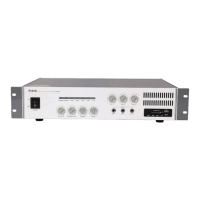

 To Next Page