7
Earbuds Sync
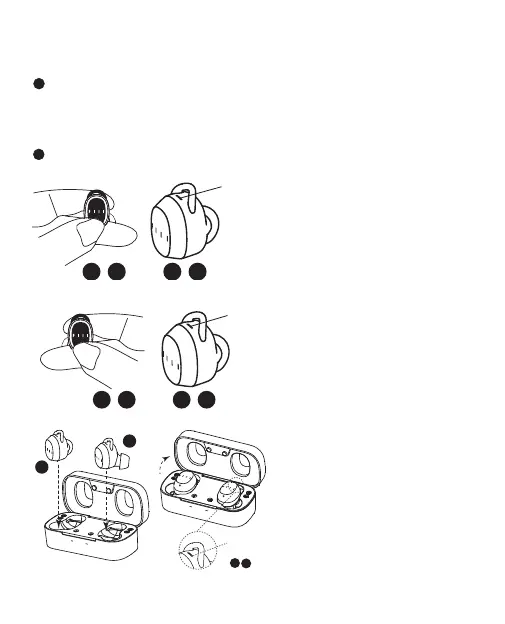
Manual Sync
Auto-Sync
Please refer to page5 “Get Started”, the left and right earpbuds will
automatically get synced after Step2.
Step 1 - Power O earbuds
Press and hold both earbuds at
the same time, do not release your
ngers until both red lights are on.
Step 2 - Reset Sync
Press and hold the earbuds again,
do not release your ngers until the
purple light comes on.
Note: Please hold your nger until
purple light and ignore all other lights
during above process.
Step 3 - Reconnect bluetooth
① Put earbuds back in the charging
case and close it;
② Delete the "FIIL T1 X" in your
bluetooth device list;
③ Repeat the "Search Connection" in
Bluetooth Pairing(Page 6);.
*Notes: If a purple light comes on
in earbud during ③, please do not
connect Bluetooth but repeat ① and
wait a little longer, or repeat "Step 2
-Reset Sync".
red
light
purple
light
L
R
blue
flash


 To Next Page