Additionally, canned aerosol simulated smoke (canned smoke agent)
may be used for smoke entry testing of the smoke detector. Tested and
approved aerosol smoke products are:
MANUFACTURER MODEL
Home Safeguard Industries 25S
SDi CHEK02 and CHEK06
SDi SOLOA4
SDi SMOKESABRE-01
When used properly, the canned smoke agent will cause the smoke detector
to go into alarm. Refer to the manufacturer’s published instructions for proper
use of the canned smoke agent.
Canned aerosol simulated smoke (canned smoke agent) formulas will vary by
manufacturer. Misuse or overuse of these products may have long term ad-
verse effects on the smoke detector. Consult the canned smoke agent manufac-
turer’s published instructions for any further warnings or caution statements.
C. Direct Heat (63-1053 only)
A hair dryer, heat gun, or test apparatus designed for this purpose should
be used to test the thermistors. Direct the heat toward either of the two
thermistors, using care to avoid damaging the plastic housing. The detec-
tor will reset only after it has had sufficient time to cool. Make sure that
both thermistors are tested individually.
A detector that fails any of these tests should be cleaned as described under
CLEANING, and retested. If the detector fails after cleaning, it must be replaced.
When testing is complete, restore the system to normal operation and notify
the proper authorities that the system is back in operation.
CLEANING
Before removing the detector, notify the proper authorities that the smoke
detector system is undergoing maintenance and will be temporarily out of
service. Disable the zone or system undergoing maintenance to prevent un-
wanted alarms.
1. Remove the detector to be cleaned from the system.
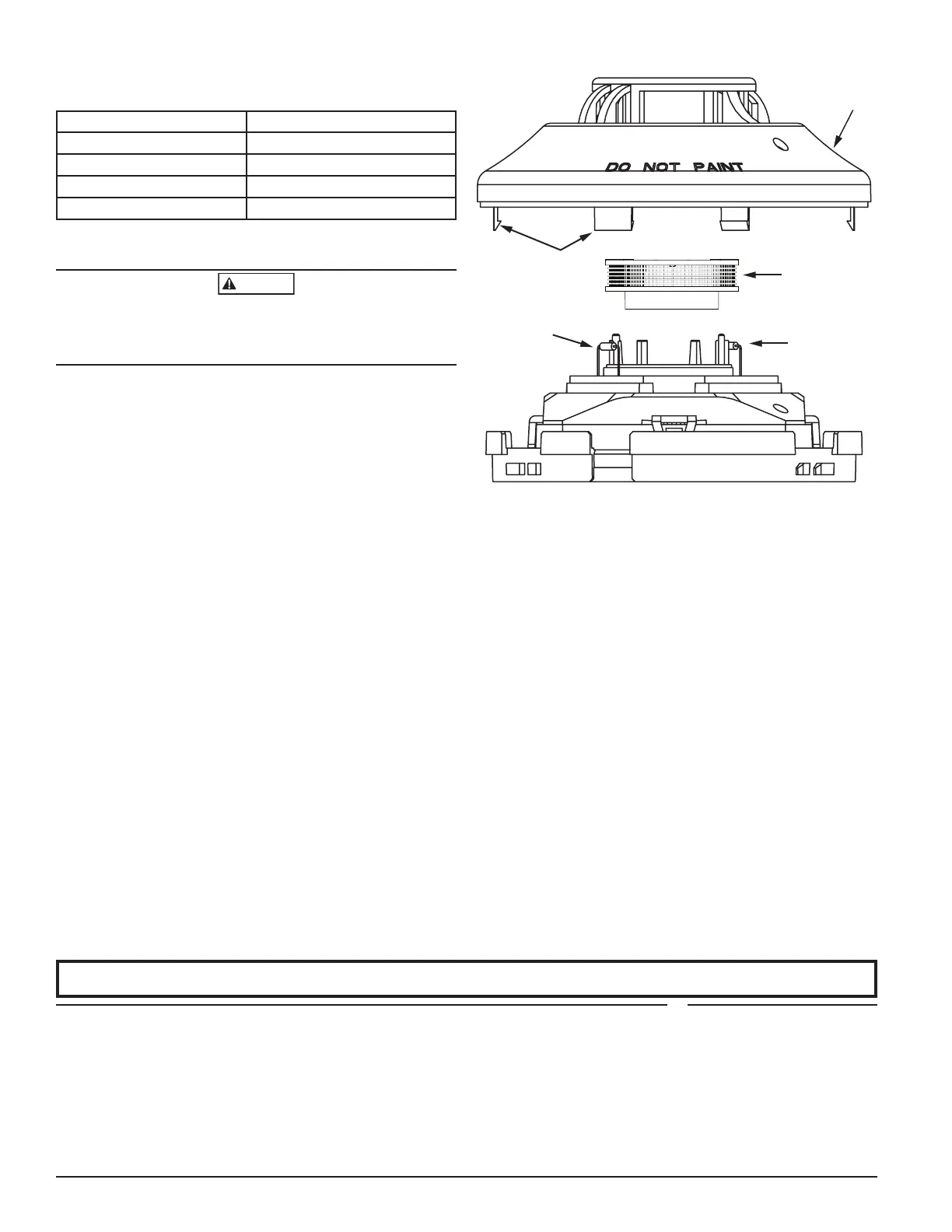
2. Remove the detector cover by pressing firmly on each of the four removal
tabs that hold the cover in place.
3. Vacuum the screen carefully without removing it. If further cleaning is
required continue with Step 4, otherwise skip to Step 7.
4. Remove the chamber cover/screen assembly by pulling it straight out.
5. Use a vacuum cleaner or clean compressed air to remove dust and debris
from the sensing chamber.
6. Reinstall the chamber cover/screen assembly by sliding the edge over the
sensing chamber. Turn until it is firmly in place.
7. Replace the cover using the LEDs to align the cover and then gently
pushing it until it locks into place. Make sure that the thermistors do not
become bent under the cover on 63-1053 models.
8. Reinstall the detector.
9. Test the detector as described in TESTING.
10. Reconnect disabled circuits.
11. Notify the proper authorities that the system is back on line.
2 I56-2475-010
©2020 FIKE. 3/25/2020
FIGURE 2. DETECTOR ASSEMBLY
COVER
REMOVAL TABS
SENSING
CHAMBER
SENSING
CHAMBER
COVER AND
SCREEN
SENSOR
COVER
THERMISTORS-
HEAT SENSING
MODELS ONLY
C0349-02
SPECIAL NOTE REGARDING SMOKE DETECTOR GUARDS
Smoke detectors are not to be used with detector guards unless the combina-
tion has been evaluated and found suitable for that purpose.
SPECIAL APPLICATION
When configured at the fire alarm control panel, this detector is capable of op-
erating in a special application mode such that it has a higher sensitivity than
is normally allowed by UL 268 for areas where early warning is important. In
this mode, the detector does not comply with the Cooking Nuisance Smoke
Test. Detectors (Sampling ports) set to the special application mode are not
suitable for use in areas where cooking appliances may be used. If cooking
appliances are used within the protected space, a normal application detector
or normal application mode must be used for that area.
Special application mode is not for general use and the detector may be more
prone to false alarms if used in unsuitable environments. While no list is
all-inclusive, some examples of unsuitable environments for special applica-
tion mode are areas with airborne particulate or aerosols including sawing,
drilling, and grinding operations, textile or agricultural processing, or areas
with engines that are not vented to the outside. A complete list of aerosol and
particulate sources is available in the Annex of NFPA 72.
Suitable environments for special application mode could include early warn-
ing for hospitals, museums, assisted living and other areas that do not have
airborne particulate or aerosols.
Refer to the fire alarm control panel documentation for information on how to
configure the detector for special application mode.
FCC STATEMENT
This device complies with part 15 of the FCC Rules. Operation is subject to the following two conditions: (1) This device may not cause harmful interference,
and (2) this device must accept any interference received, including interference that may cause undesired operation.
NOTE: This equipment has been tested and found to comply with the limits for a Class B digital device, pursuant to Part 15 of the FCC Rules.
These limits are designed to provide reasonable protection against harmful interference in a residential installation. This equipment gener-
ates, uses and can radiate radio frequency energy and, if not installed and used in accordance with the instructions, may cause harmful interfer-
ence to radio communications. However, there is no guarantee that interference will not occur in a particular installation. If this equipment does
cause harmful interference to radio or television reception, which can be determined by turning the equipment off and on, the user is encouraged to
try to correct the interference by one or more of the following measures:
– Reorient or relocate the receiving antenna.
– Increase the separation between the equipment and receiver.
– Connect the equipment into an outlet on a circuit different from that to which the receiver is connected.
– Consult the dealer or an experienced radio/TV technician for help.
Please refer to insert for the Limitations of Fire Alarm Systems
DEVICE AND SYSTEM SECURITY
Before installing this product ensure that the
tamper seal on the packaging is present and
unbroken and the product has not been tampered
with since leaving the factory. Do not install this
product if there are any indications of tampering.
If there are any signs of tampering the product
should be returned to the point of purchase.
It is the responsibility of the system owner to
ensure that all system components, i.e. devices,
panels, wiring etc., are adequately protected to
avoid tampering of the system that could result
in information disclosure, spoofing, and integrity
violation.



 To Previous Page
 Loading...