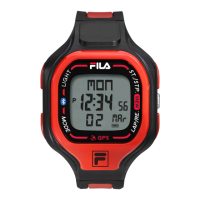
How to Set the Daily Alarm
• To select the setting display, hold down the [MODE] button for
2 seconds in the Daily Alarm Mode, and then the 'minute'
digits will start flashing.
• In setting display, press the [S/S] button to move the flashing
following the adjacent diagram to select among different
settings.
• During one of the settings (minute, hour) is flashing, press the
[L/R] button to change the number; hold down the [L/R] button
to change the number at a higher speed.
• When the setting is completed, press the [M] button once to
exit the setting display. The Watch will also exit the setting
display if NO key-stoke has been activated for 1 minute.
Daily Alarm Mode - Setting the Daily Alarm
7
Setting Sequence
Daily Alarm Display
hold [M] [M]
[S/S]
Increase
the number
Increase
the number
at a higher
speed
[L/R]
hold [L/R]
hour
minute
Pacer Mode
• This Watch includes a pacer function which generate regular
beeps at a pre-defined rate. That pre-defined rate can be set
within in a range from 40 to 180 beats per minute (bpm).
• The pacer will sound more beeps within a minute for a higher
bpm rate (e.g. 80) setting than a lower bpm rate (e.g. 30)
setting.
Pacer Mode
• When the Pacer Display is selected, the beeping rate is
exhibited on the 2nd row of the display.
How to Use the Pacer
• When the pacer has been set with a beeping rate, for example
65 bpm, press the [L/R] button once will start the beeping.
• During the Watch is beeping, press the [L/R] button once again
to stop the beeping.
Example 1: Set 30 as the Pacer Beeping Rate.
Example 1: Set 80 as the Pacer Beeping Rate.
pacer beeping
rate (in beats
per minute)
0 1 2 3 minutes
start
0 1 2 3 minutes
start
Pacer Mode - Pacer Display
8
How to Use the Watch as a Pacer Watch
To use the Watch as a pacer watch following the below steps:
• When the pacer Display is selected, press the [L/R] to turn on
the pacer function.
• When Pacer function is on, press the [M] button to switch the
display to Chronograph Mode, and then press the [S/S]
button once will start the pacer and chronograph function at
the same time.
• Then the watch will became a Pacer Watch which the
chronograph is counting and the pacer is beeping at the
pre-defined rate.
• During the Pacer Watch is counting and beeping, press the
[S/S] button once will stop the beeping and counting.
Pacer Mode - Using the Watch as a Pacer Watch
10
Pacer Mode
Pacer OFF
Chronograph Mode
Chronograph Mode
Pacer Watch Started
Chronograph Mode
Pacer Watch Stopped
Pacer Mode
Pacer ON
[S/S]
[L/R] [M]
counting
stop
counting
65 beeps/
minute
Pacer Display
hold [M] [M]
Increase
the number
Increase
the number
at a higher
speed
[L/R]
hold [L/R]
To Set the Pacer Beeping Rate
• To select the setting display, hold down the [M] button for 2
seconds in the Pacer Display, and then the beeping rate digits
will start flashing.
• In the setting display, press the [L/R] button to change the
number; hold down the button to change the number at a
higher speed.
• When the setting is completed, press the [M] button once to
exit the setting display. The Watch will also exit the setting
display if NO key-stoke has been activated for 1 minute.
Pacer Mode - Setting the Pacer Beeping Rate
9
5 bpm
per step
Setting Sequence
40
180
Chronograph Display
'All Zero'
Elapsed time, Accumulative
Elapsed time and Lap time
current lap
running time
accumulative
running time
(1/100 second)
accumulative
running time
(second)
accumulative
running time
(hour)
accumulative
running time
(minute)
1. Elapsed time
[S/S] [S/S]
[S/S] [S/S] [S/S] [S/S]
[S/S] [L/R]
lap 1
time
lap 2 lap 3
[L/R] [L/R]
2. Accumulative elapsed time
3. Lap times
Chronograph Mode - Chronograph Mode
11
Chronograph Mode
This Watch includes a stopwatch function which measures:
• Elapsed time, accumulative elapsed time (multi-phase elapsed
time) and Lap time (get a elapsed time without stopping the
counting).
The measuring capacity of the chronograph:
• Measuring unit: 1/100 second.
• Measuring range: 9 hours, 59 minutes and 59.99 second.
• Lap Memory: a maximum of 50 laps.
Chronograph Display
When the Chronograph Display is selected, the Watch will show the
following items on the display:
• During the chronograph is counting: The current lap time and
the accumulative elapsed respectively.
NOTE: The current lap time will be the same as the accumulative
elapsed time for lap 1.
• During the chronograph is stopped: The current lap time and lap
number are exhibited on the 1st row, and the accumulative
elapsed time is exhibited on the 2nd row.
• During the Lap Display is displaying: The current lap number
and the lap time is exhibited on the 1st and 2nd row respectively.
File: 38-152_manual_eng_op.ai
19-01-2016
(FRONT)
Paper size: 280mm(W) x 350mm(H)
Finish size: 70mm(W) x 70mm(H)
FCA011CH
www.fila.com/watch
FM-755.1
38-131
FILActive
Design of the Watch
1
Thank you for selecting the Fila Watch. This User Guide is the
recommended source of information about your Watch.
Please read it carefully and follow all the instructions.
[EL]
[M]
[S/S]
[L/R]
EL Button [EL]
• To turn on the EL back light for about 3 seconds.
Mode Button [M]
• Change to different modes.
• To decrease the setting value.
Lap/Reset Button [L/R]
• To view and activate 'lap' or 'reset' function during Chronograph
Mode.
• To select between different timer displays. To load or clear the
starting value for the timer(s).
• To activate the 'start' or 'stop' Pacer function during Pacer mode.
• To set the hourly chime function ON or OFF.
• To increase the setting value.
Start/Stop Button [S/S]
• To 'start' or 'stop' the Chronograph Mode and Timer Mode.
• To select among the setting items during setting display.
• To switch between 12 and 24 hour format.
Specifications
2
Current Time Mode
• Time System: am, pm, hour,
minute
• Time Format: 12-hour or
24-hour
• Calendar: Month date and day
of week display
(Auto-Calendar function for
leap year and day of week)
Alarm Mode
• Daily alarm and hourly chime
• Alarm sound: 20 seconds
Chronograph Mode
• Resolution: 1/100 second
• Measuring Range: 9 hours
minutes 59 minutes 59.99
seconds
• Lap memory: 50 lap memories
Countdown Timer
• Timer: 4 timers
• Resolution: 1 second
• Measuring Range:
23 hours 59 minutes
• Timer Sounds: the Watch
will beep once when a
timer counts to the last 1
and 0 second.
Pacer Mode
• Setting Range:
40 bpm to 180 bpm
• Setting step: 5 bpm
Dual Time Mode
• Time System: AM, PM,
hour, minute, second
Back Light
• Back Light Type:
Electro-Luminescent(EL)
back light
MANUAL
User
R
E
S
E
T
S
T
O
P
L
I
G
H
T
M
O
D
E
5
0
L
A
P
M
E
M
O
R
Y
Major Function Modes
3
Current Time Mode Daily Alarm Mode
Dual Time Mode Pacer Mode
CountdownTimer Mode Chronograph Mode
[M]
[M][M]
[M][M]
Current Time Mode - Current Time Display
4
Current Time Display
When the Current Time Mode is selected, the Watch will show the
following items on the display:
• The day of week and date of the current time are exhibited on
the 1st row of the display.
• The current time (hour, minute) is exhibited on the 2nd row of
the display.
• The current time (second) is exhibited on the 3rd row of the
display.
How to Switch between 12 and 24 hour format
• To switch between month-day and day-month format, hold
down the [S/S] button following the adjacent diagram.
To Set the Hourly Chime ON/OFF
• To set the hourly chime between ON or OFF, press the [L/R]
button following the adjacent diagram.
• When the chime indicator ' ' is appeared on the display, the
chime is ON. During the hourly chime is ON, the Watch will
sound 'beep beep' every hour on the hour (e.g. 1:00 00, 2:00
00, 3:00 00)
12 hours Display
Chime OFF
12 hours Display
Chime OFF
24 hours Display Hourly chime ON
day of week
AM/PM
indicator
date
(day, month)
date
(day, month)
hourly
chime
indicator
current time
(hour, minute,
secord)
hold [S/S]
[S/S] [L/R]
How to Set the Current Time
• To select the setting display, hold down the [M] button for
2 seconds in the Current Time Mode, and then the 'Second'
digits will start flashing.
• In setting display, press the [S/S] button to move the flashing
following the adjacent diagram to select among different
settings.
• During one of the settings (minute, hour, year, month, day) is
flashing, press the [L/R] button to change the number (hold
down the button to change the number at a higher speed).
• When the second digits start flashing, press the [L/R] button to
reset them to zero.
• When the setting is completed, press the [M] button once to
exit the setting display. The Watch will also exit the setting
display if NO key-stoke has been activated for 1 minute.
Setting Sequence
Current Time Mode
hour year
monthminute
second day
hold [M] [M]
[S/S]
[S/S]
Increase
the number
Increase
the number
at a higher
speed
[L/R]
hold [L/R]
[S/S]
[S/S]
[S/S]
[S/S]
Current Time Mode - Setting the Current Time
5
Daily Alarm Mode - Daily Alarm Mode
6
Daily Alarm Mode
• This Watch includes a daily alarm function for the current time.
• When the daily alarm is ON, the Watch will beep for 20
seconds at the alarm time every day.
Daily Alarm Display
When the Daily Alarm Mode is selected, the Watch will show the
following items on the display:
• The current time (hour, minute) is exhibited on the 1st row of
the display.
• The daily alarm time (hour, minute) is exhibited on the 2nd row
of the display.
To Set the Daily Alarm ON/OFF
• To set the daily alarm between ON and OFF, press the [L/R]
button in the Daily Alarm Display.
• When the daily alarm indicator ' ' is appeared, the daily
alarm is ON.
To Test the Daily Alarm Sound
• To test the alarm sound, hold down the [S/S] button in the
Daily Alarm Display. The Watch will beep as long as the
button is hold.
Daily Alarm OFF
Daily Alarm Display
[L/R]
alarm time
(hour, minute)
current time
(hour, minute)
Daily Alarm ON
daily
alarm
indicator
38-152


 To Next Page
 Need help?

 General