faster speed to technical shooting (quick motion).
- Gimbal calibration: Gimbal calibration can solve issues like
gimbal drifting and horizontal problem caused by environment
and temperature. Click the “start” and follow relevant notices
to make calibration.
- Adjust horizon: Place the Palm2 horizontal and adjust the
gimbal horizon manually.
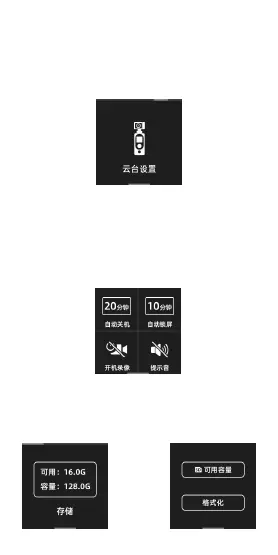
5.6.6 System Settings
- Timing shutdown: Time the Palm2 to turn off automatically
if it doesn’t work during this time.
- Auto-lock screen: Time for the Palm2 to lock the screen (to
prevent accidently touching and changing settings) and it will
not cut down shooting. Click the screen to unlock.
- Boot video: The palm2 takes video automatically and all
parameters are same as set.
- Storage: Show information of micro SD card including
storage left, available photo left. Or set to hide these info.
Click to finish relevant settings or format the SD card.


 To Next Page
 Loading...