9
Time-lapse
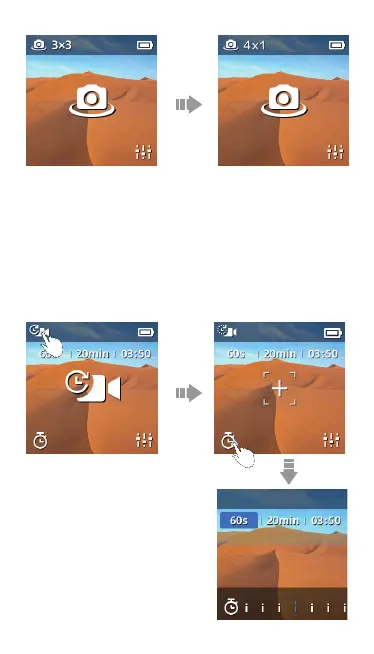
·Click the top left time-lapse icon to switch between:
【Time-lapse】【Motion-lapse】
·1s | 5min | 00:05 means the shooting interval is 1 second and takes
5mins to shoot a time-lapsed video with the total length of 5 seconds
·Click the icon on the bottom left to adjust shooting interval and shooting
length.
· When in 【Motion-lapse】 mode, please click “+” to select an object via
screen or joystick. It is available to choose 2 to 9 objects. And then press
power button to take the video.
Interval



 To Next Page