2
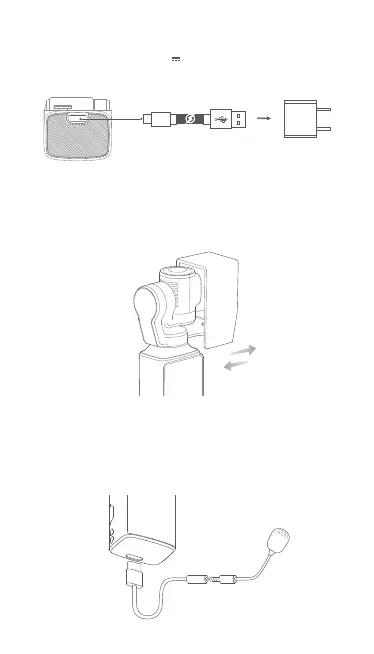
USB-C Cable
(Not included)
To charge PALM, please connect a 5V 2A USB adapter (not included) to the USB-C
port with the provided USB cable. The status LED is off when the battery is fully charged.
2.Charging
3.Equiping and Removing Gimbal Cover
1.Please equip and remove the gimbal cover as shown when the camera is turned off.
The cover must be removed before turning on the camera.
2.When the PALM is turned off, its gimbal automatically stays in right angle for 8
seconds so as to easily equip the cover.
Remark:Gimbal is the key for precise control. To avoid damaging the gimbal, please be
gentle while equipping or removing
(The type-C to 3.5mm cable sold separately)
4.The equipment of external MIC
MIC(Not included)
1.Please use the type-C to 3.5mm adapter to connect the PALM with external MIC
2.Please refer to the following description to connect the base with MIC.



 To Next Page