7
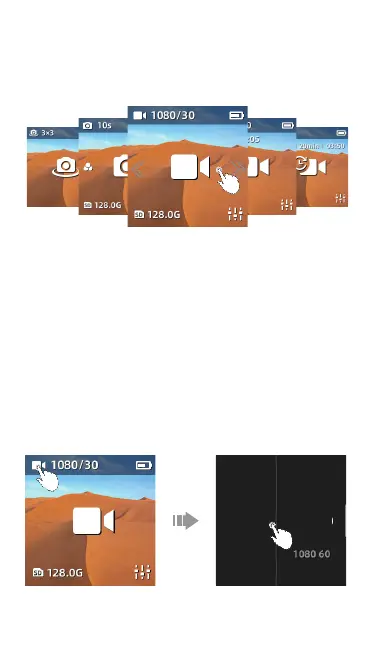
5.2 Switching to Shooting Mode
5.3 Adjust Secondary Parameter
Video
When in preview page, swipe left or right to switch to the different shooting mode.
Five shooting modes are available:
【Panorama】【Photo】【Video】【Slow-motion】【Time lapse】
When in preview page, click the shooting mode icon on the top left corner to adjust
secondary parameter or to switch shooting mode.
·Click the top left video camera icon to enter to the secondary parameter setting
page.
·Scroll to select items or parameter.
·These items can be adjusted: 【Output】【Pic-Quality】【Color】【MIC】
·Swipe left or press the power button to exit setting page.
2.7K 30
2.7K 30
Pic-Qua
Output



 To Next Page