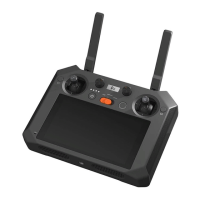
1. Custom button: The system defaults one click to return to the menu, double click to return to the
main interface (Home button function), and long press for 2 seconds to display all the applications
in use. (Identifier: C1)
2. Antenna: Transmit control signal and video image
3. Scale knob: Logo silkscreen AUX1
4. Scale knob: Logo silkscreen AUX2
5. Flight control joystick: The system defaults to the Mode 2 (U.S. setup)
6. Custom key: Fn composite function (identification: C2):
1 . Zoom: C2+Right wheel
2 .Pairing: Press and hold C1+C2 for 5 seconds at the same time. When entering the pairing, the
battery indicator will be in the form of a marquee until the pairing is successful. If the pairing fails
within 60 seconds, the pairing mode will be exited
3. Forced shutdown: Press and hold the power button for 8 seconds
7. Display: Touch screen, screen size is 5.5-inch, resolution 1920*1080p, maximum brightness 1000cd/m²
8. Speaker: For playing the system voice, key prompt tone
9. 1/4" screw hole: For remote control to fix tripod
10. Cooling holes: For cooling the remote control
11. Microphone
12. Drone light control buttons: Long flight light, fill light custom button (short press to turn on/off the
auxiliary light, long press for 1.5 seconds to turn on/off the long flight light


 To Next Page