
 Need help?
Do you have a question about the Finalmouse Starlight-12 and is the answer not in the manual?
Identifies the micro-USB port for charging and data transfer on the mouse.
Details the ON (Down) and OFF (Up) positions of the mouse's power switch.
Advises on operating temperature, humidity, and avoiding disassembly or modifications.
Confirms compliance with FCC Rules and Industry Canada license-exempt RSS standards.
This document describes the Finalmouse Starlight-12, a wireless gaming mouse available in small and medium sizes. It provides instructions for setup, usage, and safety, along with details on its features and indications.
The Finalmouse Starlight-12 is designed for gaming, offering a lightweight and responsive experience. Its primary function is to provide precise cursor control and input for computer interaction, particularly in gaming environments. The mouse connects wirelessly to a computer via a dongle, ensuring a clutter-free setup. It also supports a wired mode for charging and data transfer, which can be used if preferred or when the battery is low.
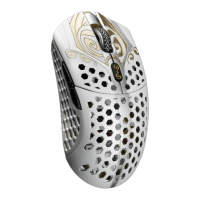
The package contents include the mouse itself, a dongle for wireless connectivity, a USB charging and data cable, and a card. The mouse features a distinctive design with a perforated shell, which contributes to its lightweight nature.
The mouse is equipped with several buttons for various functions:
Setting up the Finalmouse Starlight-12 involves a few simple steps:
For optimal wireless performance, it is recommended to use the mouse within 12-24 inches (30-61 cm) of the dongle. Additionally, to minimize interference, the mouse should be kept greater than 6 feet (1.8 meters) away from sources of 2.4GHz signals, such as Wi-Fi routers.
The Finalmouse Starlight-12 provides clear indications regarding its power status:
When the mouse is connected in wired mode (via the USB cable), the indicator light will flash orange if it is charging, or display a solid green if it is fully charged.
To ensure maximum safety and longevity of the device, users are advised to follow these guidelines:
The device complies with FCC Rules (Part 15) and Industry Canada license-exempt RSS standard(s), meaning its operation is subject to two conditions: it may not cause harmful interference, and it must accept any interference received, including interference that may cause undesired operation.
Finalmouse states that it will not be liable for any lost profits, loss of information or data, special, incidental, indirect, punitive, or consequential damages arising from the distribution, sale, resale, use, or inability to use the mouse. The company's liability will not exceed the retail purchase price of the mouse.
The terms of use are governed by the laws of the jurisdiction where the mouse was purchased. If any term is found to be invalid or unenforceable, it will be excluded without invalidating the remaining terms. Finalmouse reserves the right to amend any term at any time without notice.
 General
| Weight | 42-47g (depending on size) |
|---|---|
| Material | Magnesium alloy |
| Polling Rate | 1000Hz |
| Buttons | 6 |
| Connection | Wireless |
| DPI | Up to 20000 |
| Switch Type | Omron switches |

 To Next Page