This document is the user manual for the Finer Form Indoor Exercise Bike, SKU: FF-TB022301. It provides instructions for assembly, operation, and maintenance of the exercise bike, along with safety guidelines and warranty information.
Function Description:
The Finer Form Indoor Exercise Bike is designed for at-home or light commercial use, providing a cycling workout experience. It allows users to adjust resistance, track workout data, and maintain a comfortable riding position. The unit operates based on the drive theory of cycling, where resistance is controlled by an adjusting knob and braking is achieved by pressing the knob. It is suitable for leisure fitness in various small spaces like homes or offices.
Important Technical Specifications:
- Max User Weight: 260 lbs (120 kg)
- Standards Compliance: EN 957-1:2005 and EN 957-10:2005
- Power Source for Digital Monitor: 2 AAA batteries (for replacement when display color fades)
- Crank Torque: 30 to 35 pounds (for regular inspection)
- Pedal Installation: Left pedal (35L) turns counter-clockwise, Right pedal (35R) turns clockwise.
- Handlebar Bolt: M10*25L (32) with Flat Washer (31)
Usage Features:
- Adjustable Resistance: The resistance can be adjusted by turning the Adjusting Knob.
- Braking System: Pressing the Adjusting Knob activates the brake, stopping the bike immediately, especially during aggressive exercise.
- Adjustable Seat: The seat height and position (forward/backward) can be adjusted using the Seat Support, Seat Post, and Seat Slider to find a suitable position for the user's body size. The seat angle can also be adjusted for best riding experience.
- Adjustable Handlebar: The handlebar height can be adjusted using the Handlebar Post to match the user's body size.
- Base Levelers: Four base levelers allow the equipment to be leveled on uneven surfaces, ensuring stability during exercise.
- Digital Monitor: The bike includes a digital monitor (85) that displays various workout data:
- Speed / Average Speed / Max Speed
- Time
- Distance
- Calories / RPM
- Pulse / Average Pulse / Max Pulse
- Monitor Operation:
- Setting Target Parameters: Users can press the MODE button to select a window (TIME, DIST, CAL) and then use the RESET button to clear the value or SET button to adjust the flashing value. Holding the button allows for quick increases.
- Checking Exercise Data: During a workout, the MODE button can be pressed to cycle through and check the values in each window.
- Pulse Recovery Function:
- Hold the hand pulse detector to display the current heart rate.
- Once the pulse is displayed, stop exercising and press RECOVERY to enter pulse recovery mode.
- A 1-minute countdown will begin, along with the pulse rate.
- After the countdown, the monitor will display a pulse recovery level from F1 (fastest recovery) to F6 (slowest recovery).
- Press RECOVERY again to exit this function.
- Tablet Holder: The bike is equipped with a tablet holder (80) for convenience during workouts.
- Bottle Holder: A bottle holder (74) is included to keep hydration accessible.
- Pedal Cages/Straps: Users should always wear shoes and tighten pedal cages and straps. For spin shoes, ensure the buckle is fully inserted and do not remove feet until the pedal stops circling.
- Safety Precaution (Post-Exercise): After exercising, the adjustment control knob should be turned clockwise (+) to increase tension, preventing the pedals from rotating freely when not in use.
Maintenance Features:
- Regular Inspection:
- Upon assembly, inspect all hardware (bolts, nuts, washers) for correct positioning and tightness.
- Regularly inspect major moving parts that require proper torque, including seat supports, pedals, handlebar, base leveler, belt, tension wheel, and pedal crank.
- Check the Crank with a 30 to 35 pounds torque wrench regularly to ensure it is locked.
- Check the pedal with a pedal wrench regularly to ensure it is locked.
- Check the seat adjustment slider and handlebar adjustment slider regularly to ensure they are locked and not slipping or shaking.
- Tighten handlebar bolts (32) during monthly maintenance.
- Lubrication: Lubricate all moving parts on a monthly basis.
- Cleaning:
- Wipe down the bike at the end of each workout, focusing on areas where perspiration settles.
- Raise all posts to the highest setting to expose moisture.
- Consider using mildly alkaline or neutral cleaning liquids.
- Avoid using water or oil-based cleaning liquids to prevent surface damage.
- Water Bottle Cages: Check and tighten screws on water bottle cages to prevent damage from oversized bottles.
- Battery Replacement: Replace the 2 AAA batteries in the digital monitor when the display color fades.
Safety Guidelines:
- Always wear shoes when exercising.
- Do not place fingers or other objects into moving parts.
- Do not wear loose clothing that could become tangled.
- Keep children away from the bike; it is designed for adults.
- Consult a physician before starting any exercise program.
- Stop exercising immediately and consult a physician if experiencing pain, chest tightness, irregular heartbeat, shortness of breath, faintness, or discomfort.
- Ensure the equipment is flat and stable on the floor before exercising.
- Do not leave the seat until all parts have come to a complete stop after braking.
- When adjusting height, ensure the L-shape Pop Pin (23) is properly inserted into the hole for both the handlebar and seat.
- When installing pedals, ensure a 90° angle between the crank and pedal. If it feels stuck, unscrew and try again; do not force it to avoid damaging the thread. Tighten pedals once a month.
Warranty:
- Main Frame: 3 Years
- Other Components (e.g., cranks, pedals, flywheel spindle, bearings, digital monitor): 180 Days
- The warranty is non-transferable and limited to non-commercial use of Finer Form products purchased in the United States.
- It does not cover damage from accidents, unauthorized repairs, vandalism, misuse, abuse, or alteration.
- To obtain service, contact customer service at info@finerform.com, including order number, name, phone number, and a brief statement of the issue.

 Need help?
 General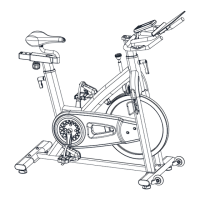

 To Next Page