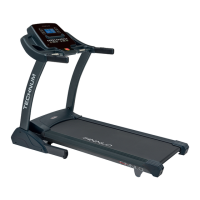
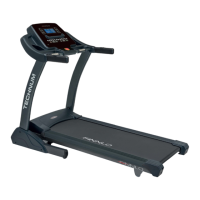
This document describes the FINNLO ENDURANCE TFT treadmill, model Art. Nr.: 3503, ID: 111211. It is designed for home use and complies with EN ISO20957-1/6 Class HB standards.
Function Description
The FINNLO ENDURANCE TFT is a fitness treadmill designed for cardiovascular training and strengthening major muscle groups. It features a comprehensive computer system with a TFT display, allowing users to select various training programs, monitor their progress, and access multimedia functions. The treadmill supports both manual and program-driven workouts, including heart rate-oriented training. It is equipped with a motor that controls the running belt speed and an incline motor for adjusting the incline angle, simulating different terrains. The device also includes safety features such as an emergency stop key and a folding mechanism for space-saving storage.
Important Technical Specifications
- Model: FINNLO ENDURANCE TFT (Art. Nr.: 3503, ID: 111211)
- Classification: Class HB according to EN ISO20957-1/6
- Usage: Exclusively for home use; not for commercial or medical/therapeutic purposes.
- Maximum User Weight: 160 kg
- Power Supply: The treadmill must be connected to a mains voltage that matches the specifications on the type plate. It should not be plugged into a multi-socket with other high-power devices like TVs or computers.
- Motor: Includes a drive motor for the running belt and an incline motor for incline adjustment.
- Display: TFT display with touch functionality.
- Connectivity: Bluetooth for music playback and app connections (Kinomap, Zwift), USB ports for music playback from USB sticks and charging mobile devices (2000mA charging power).
- Safety Features: Emergency stop key, automatic shutdown in case of emergency, gas shock cylinder for assisted folding/unfolding.
- Running Belt: Lubrication reminder function (every 300 km), adjustable tension and centering.
Usage Features
Starting Procedure:
- Switch on the power switch located on the rear motor cover.
- Ensure the safety key is correctly placed; the treadmill will not start otherwise.
- Attach the safety key cord to your clothing before starting exercise.
- To start a workout, press the START button. To pause, press STOP/PAUSE once; to stop completely, press it twice.
Computer Functions:
- Display: Shows DISTANCE, INCLINE, STEPS, CALORIES, PULSE, TIME, and SPEED.
- Direct Selection Buttons: Quick access to specific incline (3-6-9-12) and speed (3-6-9-12-15) levels. These values can be customized by pressing and holding the desired button for 5 seconds, adjusting the value with the handrail buttons, and pressing the button again to save.
- Handrail Controls: Buttons on the handrails allow for incremental adjustment of incline and speed.
- Multimedia:
- USB Input: Play music from a USB stick by inserting it into the lower USB port on the right side of the console.
- Bluetooth Music: Connect mobile devices (select "SYMK" from available Bluetooth devices) to play music. Volume is adjusted via the mobile device. The Bluetooth connection automatically disconnects during phone calls and reconnects afterward.
- Charging: The upper USB port provides 2000mA for charging mobile devices.
- Training Programs:
- Preset Programs: Includes Cardio Check, Hills, Fitness Test, Cross Country, Lose Weight, Interval Training, Speed Drill, Hill and Back, Power Walk, Pyramid, Glute Workout, and Calorie Burn. Each program is divided into 16 sections.
- USER Program (U1-U10): Allows users to set and save custom speed and incline settings.
- HRC (Heart Rate Control): Set age, target time, and target heart rate. Requires a chest belt.
- Workout (Countdown Mode): Choose countdown modes for time, distance, or calories.
- Virtual Active: Select virtual terrains (canyons, beaches, grasslands) and adjust speed/incline.
- Energy Saving Function: The treadmill enters sleep mode after 15 minutes of inactivity. To reactivate, remove and reinsert the safety key.
- Handpulse Function: Hold the pulse sensors for about 5 seconds to display heart rate (for reference only, not medical data).
- Touch Tones: Turn touch tones on/off by pressing speed+ and speed- simultaneously for 3 seconds on the home page.
Folding and Unfolding:
- Folding: Ensure incline is at 0%. Hold the rear frame and lift the running surface until it audibly clicks into place.
- Unfolding: Press the unlock lever with your foot and gently guide the running surface downwards. The gas shock cylinder will assist in a controlled descent.
Moving the Treadmill:
- Set incline to 0%.
- Switch off the treadmill at the main switch.
- Unplug the power cord.
- Fold the running surface until it clicks.
- Tilt the treadmill backward and roll it on its transport wheels to the desired location.
Emergency Stop:
In an emergency, pull out the safety key, grab both handrails, and jump onto the side rails, waiting for the running belt to stop completely.
Maintenance Features
General Care:
- Cleaning: Use a vacuum cleaner for the running belt. For heavy soiling, use a damp cloth and water; avoid harsh cleaning agents. Ensure no moisture enters the computer.
- Perspiration: Components in contact with perspiration should be cleaned with a damp cloth.
Lubricating the Running Belt:
- Frequency: The computer reminds to lubricate every 300 km. It is also recommended to lubricate before first use.
- Procedure: Unplug the treadmill. Lift the running belt on one side and apply lubricant to the running deck. Use a rag to spread the lubricant evenly. Repeat on the other side.
- Checking Lubrication: With the treadmill off, insert your hand between the belt and the deck. If silicon is still felt, no lubrication is needed. If the belt feels dry, apply silicon spray.
Centering the Running Belt:
- Issue: Uneven foot pressure during training can cause the belt to shift off-center.
- Procedure: Unplug the treadmill. Use the two Allen screws at the rear of the running deck. Turn screws no more than ¼ turn at a time.
- If the belt moves to the right: Turn the left screw clockwise (tighten) and the right screw anticlockwise (loosen) by ¼ turn.
- If the belt moves to the left: Turn the right screw clockwise (tighten) and the left screw anticlockwise (loosen) by ¼ turn.
- Testing: Run the treadmill at 6 km/h for 5 minutes without a user. Repeat centering if necessary.
- Caution: Avoid overtightening the belt, as this can shorten its lifespan.
Tightening the Running Belt:
- Issue: Over time, the running belt tension decreases, causing it to slip when a foot is placed on it.
- Procedure: Turn both Allen screws clockwise by ¼ turn at a time until the slipping stops. Do not overtighten. If the belt runs off-center, adjust it as described in the centering procedure.
Regular Checks:
- Monthly: Lubricate the running deck.
- Every 3 Months: Check all screw connections for tightness and damage.
Warranty:
- Private Use: 36 months warranty on the device, 5 years on the main frame.
- Scope: Covers material or manufacturing defects. Excludes easily breakable parts (e.g., glass, plastic), damage from chemical/electrochemical influences, water, or force majeure.
- Wear Parts: Parts marked with an asterisk (*) in the parts list are wear and tear parts and are not covered by the warranty. They can be ordered from customer service at cost.
- Invalidation: Warranty is void if repairs or modifications are made by unauthorized persons, if non-compatible accessories are used, or if damage results from improper handling or maintenance.

 Need help?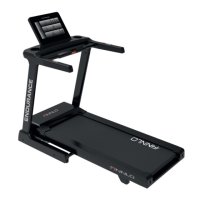

 To Next Page
 General