SYSTEM ORIENTATION
3010R SERIES FRONT PANEL
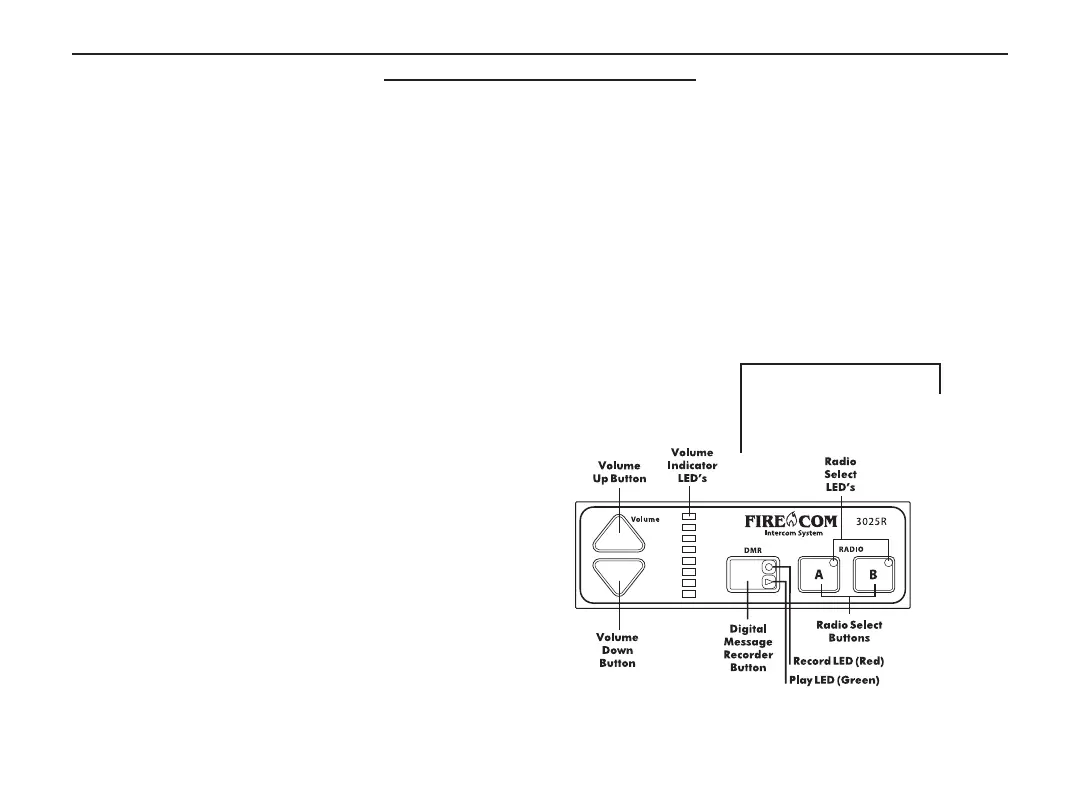
Figure 2 shows the front panel of the 3025R intercom. Listed below are the different items on the front panel and
what they control /signify.
VOLUME UP & VOLUME DOWN BUTTONS
Adjust the master volume for the intercom system.
VOLUME INDICATOR LED'S
8 yellow LED's which indicate the master volume level setting. There are several volume changes between lights.
DIGITAL MESSAGE RECORDER BUTTON (3015R & 3025R ONLY)
Used for saving and playing a message that has been recorded by the digital message recorder (DMR).
PLAY LED (3015R & 3025R ONLY)
A green LED which indicates the digital message
recorder is playing a recorded message.
RECORD LED (3015R & 3025R ONLY)
A red LED which indicates when the digital
message recorder is recording a message.
RADIO SELECT BUTTONS (3020R & 3025R ONLY)
Used to select which radio will be transmitted on when
the PTT on a radio-transmit headset is pressed.
RADIO SELECT LED's (3020R & 3025R ONLY)
Lights up to show the status of the selected / keyed radio.
Green when the radio is selected; red when the radio
is keyed for transmission.
FIGURE 2:
3025R Face Panel
3
Remote Head Manual 12/4/03 10:06 AM Page 5


 To Next Page