14
INSTALLING THE CA CABLES: HM-10 MODULE
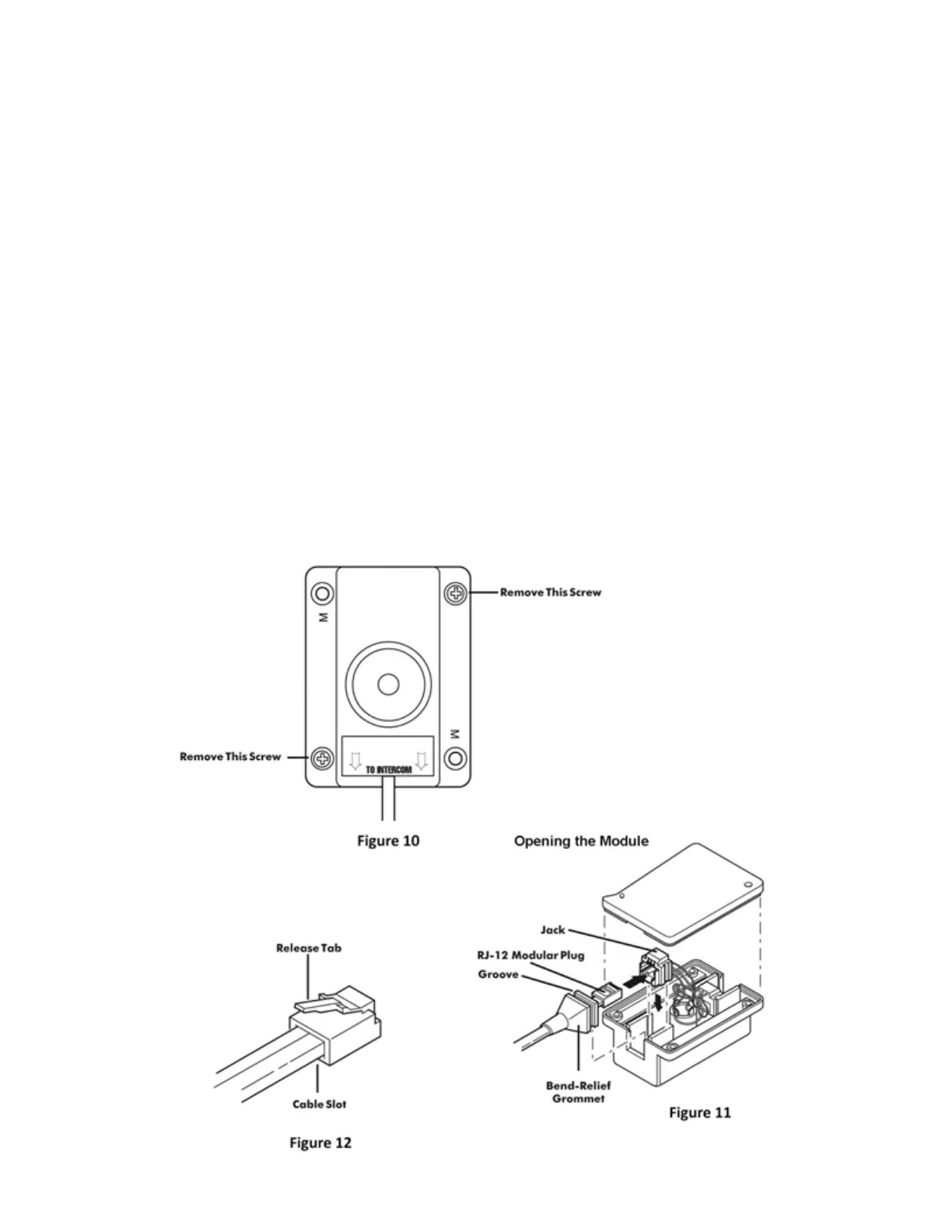
1. Slide a Bend-Relief Grommet over one end of the flat CA Cable, small end first.
2. Attach an RJ-12 Modular Plug to the end of the flat CA Cable (see page 21 for instructions if necessary).
IMPORTANT: ALWAYS make sure the printed side (or smooth side) of the cable is facing away from the release-tab on
the RJ-12 Modular Plug (Figure 12). This ensures proper orientation of the plug on each end of the cable.
1. Remove the screws holding the HM-10 together (Figure 10) and remove the bottom plate of the HM-10.
2. Lift the modular jack slightly out of the HM-10 and insert the RJ-12 Modular Plug into the jack in the HM-10 as
shown in Figure 11.
IMPORTANT: If the CA Cable is routed from the Headset Module to the Intercom, it MUST be inserted into the
Modular Jack on the same side of the HM-10 as the Firecom label. If the CA Cable is part of a daisy-chain, you will
need to remove the plastic tab which covers the access hole to the second Modular Jack on the HM-10. See Daisy-
Chaining the Headset Modules (page 8).
1. Insert the Bend-Relief Grommet into the HM-10 so the groove in the grommet is over the side case of the HM-
10 (Figure11).
2. Replace the bottom plate of the HM-10 and secure with the 2 screws.
3. Mount the HM-10 in place on the apparatus.
4. Route the CA Cables to the rear of the Intercom Unit (or the next Headset Module in a Daisy-Chain).
5. Attach an RJ-12 Modular Plug to the end of the flat CA Cable (see page 21 for instructions if necessary).
6. With the release-tab on the RJ-12 Modular Plug facing up (Figure 12), insert the RJ-12 Modular Plug into a
modular jack on the rear of the Intercom unit (Figure 13).


 To Next Page