POWER
PressthePOWERbuttontoturnkeyboardon.
VOLUME
PresstheVOLUMEbuttonstoadjustthevolume.
TEMPO
Press the TEMPO buttons to adjust tempo on rhythms, programmed
rhythms,anddemosongs.
RHYTHM SELECTION
PressoneoftheRHYTHMbuttons(01-10)toselectaplay-alongrhythm.
TONE SELECTION
Press one of theTONE buttons(01-10) toselect a sound for the keys,
rhythms,ordemosongs.
VIBRATO
PresstheVIBRATObuttontogivethenotesapulsedsound.Pressthis
buttonagaintoswitchofftheVIBRATOfunction.
SUSTAIN
PresstheSUSTAINbuttontomakethekeysholdtheirsoundlonger.Press
thisbuttonagaintoswitchofftheSUSTAINfunction.
DRUM SOUNDS
PressanyoftheDRUMSOUNDSbuttonstoaddpercussiontoyourplaying.
DEMO SONGS
DEMO ONE
Press the DEMOONE button toplay the rstdemo song. Press the
buttonagaintostopthedemosong.Pressthebuttonagaintoplaythe
nextdemosong.
STOP
PresstheSTOPbuttontostopademosongorrhythm.
DEMO ALL
PresstheDEMOALLbuttontoplayallofthedemosongsinorder.
NOTE ACCOMPANIMENT
Press a RHYTHM button. Press the NOTE button to enter accomp-
animentmode.Triggeraccompanimentbyplayinganotewithyourleft
handonthekeyboard(keys1-11).Theaccompanimentwillmatchthe
notesplayedwithyourlefthandandwillchangeaccordingly.Yourright
handisfreetoplaymelodies.
SYNC
The NOTE function can be used with SYNC to start the chord and
rhythm simultaneously.Press SYNC, then NOTE. When you press a
keyintheaccompanimentarea(keys1-11),thesynchedupchordand
rhythmwillbegin.
CHORD ACCOMPANIMENT
Pressa RHYTHM button.PresstheCHORD button toenterchord
accompanimentmode.Theaccompanimentwillmatchthetypeofchords
thatyouplaywithyourlefthand(Major,Minor,7th)andwillchange
accordingly.Yourrighthandisfreetoplaymelodies.
DRUM FILL
Toaddadrumlltoarhythm,presstheFILLbutton.Ashortdrumll
willbeinsertedintothepatternthatisplaying.
RECORD AND PLAYBACK
RECORD
To record your own melody,pressthe RECORD button.Record up to
54notes.
REPLAY
Toplaybackthemelody,presstheREPLAYbutton.
RHYTHM PROGRAM
DRUM PROGRAM
PresstheDRUMPROGRAMbuttontoenterrhythmprogrammode.
Pressanyofthe6DRUMSOUNDSbuttons.Programupto16notes.
DRUM PLAY
PresstheDRUMPLAYbuttontoplaybacktheprogrammedrhythm.
Éteignezlepianoquandvousnel’utilisezpas.
MISE EN CIRCUIT
AppuyezsurPOWERpourmettrelepianoencircuit.
VOLUME
AppuyezsurlesboutonsVOLUMEpourréglezleniveausonore.
TEMPO
Appuyez sur les boutons TEMPO pour régler le tempo des rythmes,
rythmesprogrammésetchansonsdedémo.
SÉLECTION DU RYTHME
AppuyezsurunboutonRHYTHM(01à10)pourchoisirunrythme.
SÉLECTION DE LA TONALITÉ
AppuyezsurunboutonTONE(01à10)pourchoisirlesondesnotes,des
rythmesoudeschansonsdedémo.
VIBRATO
AppuyezsurVIBRATOpourdonnerunsonpulséauxnotes.Appuyezde
nouveausurleboutonpourcouperl’effet.
SOUTIEN
AppuyezsurSUSTAINpourprolongerladuréedusondelanote.Appuyez
denouveausurleboutonpourcouperl’effet.
SONS DE TAMBOUR
AppuyezsurundesboutonsDRUMSOUNDSpourajouterdespercus-
sionsàvotremusique.
CHANSONS DE DÉMO
DÉMO UN
Appuyez sur DEMO ONE pour faire jouer la première pièce de dé-
monstration.Appuyezdenouveausurlatouchepourarrêterladémo.
Appuyezencoresurlatouchepourentendreladémosuivante.
ARRÊT
AppuyezsurSTOPpourcouperlachansondedémoourythme.
DÉMO TOUS
AppuyezsurDEMOALLpourentendretoutesleschansonsdedémo
dansl’ordre.
ACCOMPAGNEMENT DES NOTES
AppuyezsurunboutonderythmesuividuboutonNOTEpourpasser
aumoded’accompagnement.Lancezl’accompagnementenjouantune
notedelamaingauchesurlepiano(notes1à11).L’accompagnement
concorderaauxnotesjouéesdelamaingaucheetchangementencon-
séquence.Vouspouvezjouerdesmélodiesdelamaindroite.
SYNCHRO
La fonction NOTE peut être utilisée avec SYNC pour engager un
accordetunrythmeenmêmetemps.AppuyezsurSYNCpuissurNOTE.
Quandvousjouezunenoted’accompagnement(notes1à11),l’accordet
lerythmeserontsynchronisés.
ACCOMPAGNEMENT D’ACCORD
AppuyezsurRHYTHMsuivideCHORDpourpasseraumoded’accom-
pagnementd’accord.L’accompagnementconcorderaautyped’accords
quevousjouezdelamaingauche(majeur,mineur,7e)etchangeraen
conséquence.Vouspouvezjouerdesmélodiesdelamaindroite.
COMBLAGE DE TAMBOURS
Pourajouteruntambouràunrythme,appuyezsurFILL.Unebrève
séquencedetambourseraajoutéeàlaséquencequevousjouez.
ENREGISTREMENT ET ÉCOUTE
ENREGISTRER
Pourenregistrervotrepropremélodie,appuyezsurRECORD.Jusqu’à
54notespeuventêtreenregistrées.
REJOUER
Pourentendrevotremélodie,appuyezsurREPLAY.
PROGRAMMATION DE RYTHMES
PROGRAMME DE TAMBOURS
Appuyez sur DRUM PROGRAM pour passer au mode de program-
mationdesrythmes.Appuyezsurl’undes6boutonsDRUMSOUNDS.
Vouspouvezprogrammerautantque16notes.
ÉCOUTE DES TAMBOURS
AppuyezsurDRUMPLAYpourfairejouerlerythmeprogrammé.
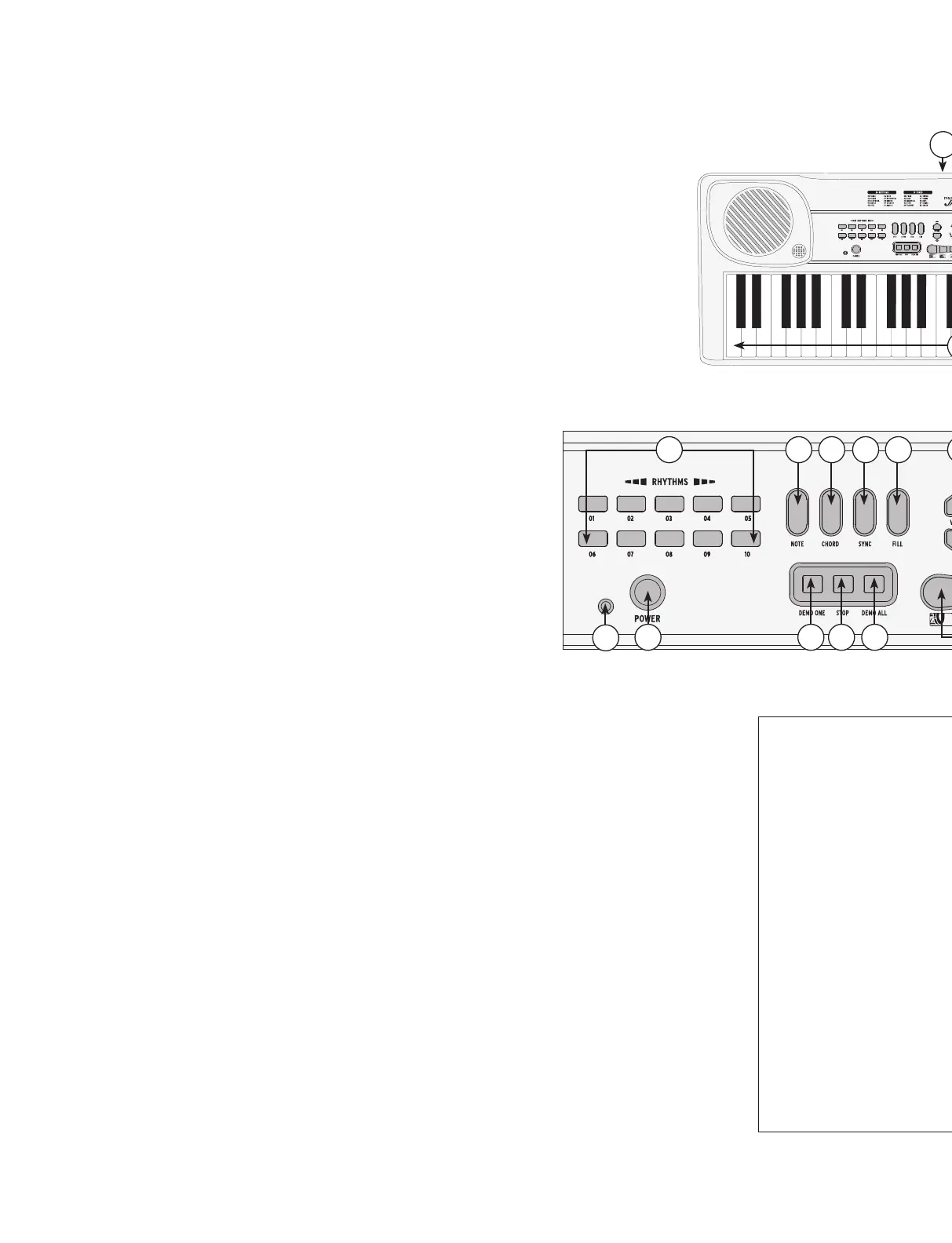
1. POWER
2. POWER INDICATOR LIGHT
3. RHYTHMS
4. NOTE
5. CHORD
6. SYNC
7. FILL
8. DEMO ONE
9. STOP
10. DEMO ALL
11. VOLUME
12. TEMPO
13. RECORD
14. REPLAY
15. DRUM PROGRAM
16. DRUM PLAY
17. DRUM SOUNDS
18. TONES
19. VIBRATO
20. SUSTAIN
21. KEYS
22. MIC INPUT JACK
23. BATTERY COMPARTMENT
24. ADAPTOR JACK
1. BOUTON DE MISE EN CIRCUIT
2. TÉMOIN DE MARCHE
3. RYTHMES
4. NOTES
5. ACCORDS
6. SYNCHRO
7. COMBLAGE
8. DÉMO UN
9. ARRÊT
10. DÉMO TOUS
11. VOLUME
12. TEMPO
13. ENREGISTRER
14. REJOUER
15. PROGRAMME DE TAMBOURS
16. ÉCOUTE DU PROGRAMME
17. SONS DE TAMBOUR
18. TONALITÉS
19. VIBRATO
20. SOUTIEN
21. NOTES
22. PRISE DE MICRO
23. LOGEMENT DES PILES
24. PRISE TRANSFORMATEUR
CONTROL PANEL
13
1615
14
1 8 9 10
2
5 6 74 11 12 18
17
3
19
20
21
2224
23


 To Next Page
 Loading...