OTDR-File Save
Press (Save) key to save �ile after test
complete, pop up the keyboard, enter the name of
the �ile, and press Enter to save the �ile. If the
automatic save (otdr) function is turned on in
"System Settings", it will be saved automatically
after the test complete without manual operation.
Auto-save function
Enter the system settings, open the auto-saving
function, the instrument will automatically save the
test �iles after the average or auto-test.
OTDR-File Operation
Press to enter the �ile list.
Press the key to open a folder or File.
F1:Open �ile
F2:Delete �ile
F3:Rename �ile
F4:Return to the main menu
The function can be tested
automatically by one key, and the
information of the length of the link,
the type of event point and the position
of breakpoint can be displayed in a
graphical form. The result is clear and
easy to understand.
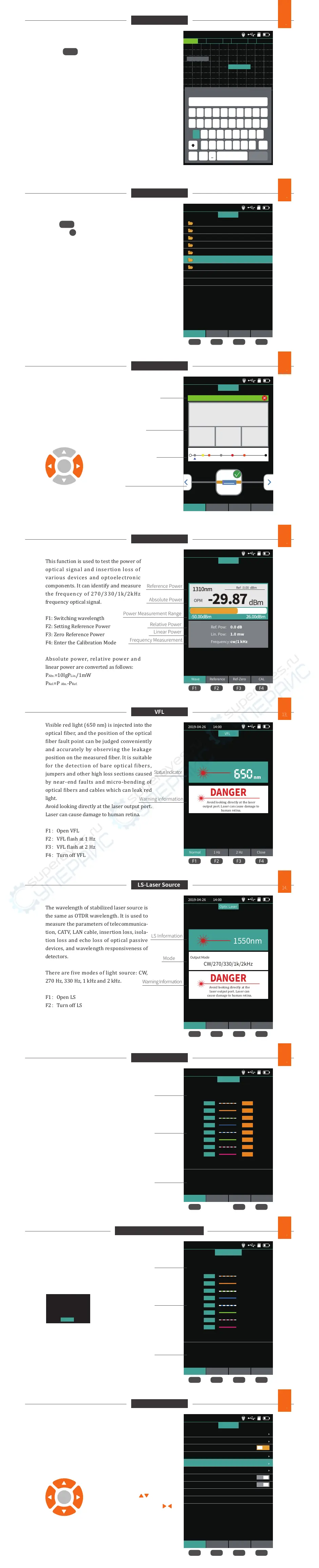
This function is used to test the power of
optical signal and insertion loss of
various devices and optoelectronic
components. It can identify and measure
the frequency of 270/330/1k/2kHz
frequency optical signal.
F1: Switching wavelength
F2: Setting Reference Power
F3: Zero Reference Power
F4: Enter the Calibration Mode
Absolute power, relative power and
linear power are converted as follows:
PAbs.=10lgPLin./1mW
PRel.=P Abs.-PRef.
2019-04-26 14:00
Wave Reference Ref-Zero CAL
OPM
-29.87
dBm
OPM
1310nm
-50.00dBm 26.00dBm
0.0 dBRef. Pow:
1.0 mwLin. Pow:
cw/1 kHzFrequency:
Ref :0.00 dBm
Visible red light (650 nm) is injected into the
optical �iber, and the position of the optical
�iber fault point can be judged conveniently
and accurately by observing the leakage
position on the measured �iber. It is suitable
for the detection of bare optical �ibers,
jumpers and other high loss sections caused
by near-end faults and micro-bending of
optical �ibers and cables which can leak red
light.
Avoid looking directly at the laser output port.
Laser can cause damage to human retina.
F1:Open VFL
F2:VFL �lash at 1 Hz
F3:VFL �lash at 2 Hz
F4:Turn off VFL
The wavelength of stabilized laser source is
the same as OTDR wavelength. It is used to
measure the parameters of telecommunica-
tion, CATV, LAN cable, insertion loss, isola-
tion loss and echo loss of optical passive
devices, and wavelength responsiveness of
detectors.
There are �ive modes of light source: CW,
270 Hz, 330 Hz, 1 kHz and 2 kHz.
F1:Open LS
F2:Turn off LS
F3:Switch LS Wavelength
F4:Switch LS Mode
RJ45 line sequence measurement.
F1:Start Test
F3:Switch Line Sequence Test Standard
F4:Return to the main menu
RJ45 Line Tracker
Used for RJ45 cable length testing and wire
tracker.After the line-�inding function is activat-
ed, the cable being searched is touched by the
distal end of the line-searching, and the sound of
continuous "drops and drops" is heard.
RJ45 Line Length Test
F1: Start Line Length Test
F2: Switch Line Length Unit
F3: Switch Line Sequence Test Standard
F4: Start Line-tracker Function
Set up automatic shutdown, backlight brightness, time,
language, upgrade and other information.
F1: Optional for switching the current menu
F3: System Software Upgrade
F4: Con�irmation settings
OTDR-File Save
9
F3
OTDR-File Operation
10
2019-04-26 14:00
20180328
20180327
20180326
20180325
20180322
20180324
20180323
FOLDER
Open Del Rename Back
F2 F3 F4F1
F2 F3 F4F1
F4
OK
iLOM(Event Map)
11
OPM
12
F2 F3 F4F1
VFL
13
2019-04-26 14:00
Set Save File OTDR
NK700-39
5.201
3.82
Km
Link Length
Link Loss
dB
0.25
Average Loss
dB/km
45.2
Return Loss
dB
Link quality PASS/FAIL
start END
5-1
5.201Km
5.201Km 5.201Km
0.5dB
2019-04-26 14:00
Normal 1 Hz 2 Hz Close
VFL
650
nm
Avoid looking directly at the laser
output port. Laser can cause damage to
human retina.
DANGER
F2 F3 F4F1
F2 F3 F4F1
F2 F3 F4F1
LS-Laser Source
14
2019-04-26 14:00
Open Close Mode Back
Optic Laser
Avoid looking directly at the
laser output port. Laser can
cause damage to human retina.
DANGER
CW/270/330/1k/2kHz
1550nm
Output Mode
F3 F4F1
RJ45 Sequence
15
2019-04-26 14:00
Test Standard Back
Sequence Test:TIA-568B
Tips:
Please connect the remote device.
Click F1 for cable sequence test.
Port:1
Port:2
Port:3
Port:4
Port:5
Port:6
Port:7
Port:8
Port:1
Port:2
Port:3
Port:4
Port:5
Port:6
Port:7
Port:8
RJ45 Sequence
RJ45 Line Length & LineTracker
16
2019-04-26 14:00
Length Unit Standard Tracker
Tips:
Click F1 for cable length test.
Click F4 for cable track test.
RJ45 Length:TIA-568B
Port:1
Port:2
Port:3
Port:4
Port:5
Port:6
Port:7
Port:8
200m
200m
200m
200m
200m
200m
200m
200m
Length&Tracker
System settings
17
2019-04-26 14:00
Set Help Update OK
Auto OFF
Back Light
Beep
Language
Auto Save(OTDR)
USB Connection
Factory Data Reset
Version Information
10 Min
50%
English
Date
Time
2019-04-25
20:18:20
System
2019-04-26 14:00
PASS
A 0.000Km
B 10.057Km
QWERTYU I OP
1234567890
ASDFGHJK
ZXCVBNM
L
space Enter
#
.
Save SOR
Del
OK
OK
Press left and right buttons to switch events
Link state
Link information
Link events
Current event information
Note:The function module is optional accessories.
Note:The function module is optional accessories.
exit
The Line-Tracker test is
under way. Please use the
remote line-�inding
module to test and click
the return key to exit.
Switch settings entry
Switch options of current entry
Reference Power
Absolute Power
Power Measurement Range
Relative Power
Linear Power
Frequency Measurement
Status Indicator
Warning information
Mode
LS Information
Warning Information
Test Results
Test Standard
Tips
Test Results
Test Standard
Tips
Len Loss Event


 To Previous Page
 Loading...