EasyManua.ls Logo

Fisher FBX2129 - User Manual

Fisher FBX2129
7 pages
Print Icon
To Next Page IconTo Next Page
Loading...
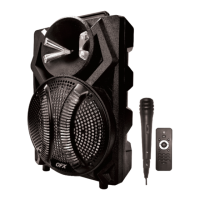
Trolley Speaker
FISHER-FBX2129
USER MAUNAL
MIC. VOL (microphone volume): Turn the knob to adjust
microphone volume level.
ECHO (microphone echo): Turn the knob to adjust
microphone echo level.
BASS: Turn the knob to adjust master bass level.
TREBLE: Turn the knob to adjust master treble level.
VOLUME/POWERmaster volume: Turn the knob to adjust
master volume level. / main ON/OFF switch for the speaker.
(Note: Battery charging is independent of Power switch
ON/OFF status)
MIC IN (Microphone input): Plug wired microphone with ¼”
jack to this socket.
LINE IN (AUX IN ) (external audio interface): 3.5mm stereo
input for connecting external audio devices. You may connect
your Smartphone / Tablet as external music source with a
3.5mm line-in cable.
USB/MICRO SD (TF) Card player: Insert USB/MICRO SD (TF)
Card drive with MP3 file to this port.
Question and Answer IconNeed help?

Do you have a question about the Fisher FBX2129 and is the answer not in the manual?

Summary

General Operation: USB;Micro SD Card Player

USB;Micro SD Card Player Setup

Format card to FAT-32, ensure MP3 files, and insert into speaker for playback.

General Operation: Wireless Microphone

Wireless Microphone Usage

Insert battery, turn on, extend antenna, adjust volume, and maintain optimal distance.

General Operation: Wired Microphone

Wired Microphone Connection

Connect the wired microphone to the MIC IN socket and turn its power ON.

General Operation: Bluetooth Mode

Bluetooth Connection and Playback

Connect to 'BT SPEAKER' via device Bluetooth and play music.

General Operation: FM Mode (Radio Mode)

FM Radio Tuning and Control

Enter FM mode, auto-scan stations, and navigate between previous/next stations.

FCC Warning Statement

Summary

General Operation: USB;Micro SD Card Player

USB;Micro SD Card Player Setup

Format card to FAT-32, ensure MP3 files, and insert into speaker for playback.

General Operation: Wireless Microphone

Wireless Microphone Usage

Insert battery, turn on, extend antenna, adjust volume, and maintain optimal distance.

General Operation: Wired Microphone

Wired Microphone Connection

Connect the wired microphone to the MIC IN socket and turn its power ON.

General Operation: Bluetooth Mode

Bluetooth Connection and Playback

Connect to 'BT SPEAKER' via device Bluetooth and play music.

General Operation: FM Mode (Radio Mode)

FM Radio Tuning and Control

Enter FM mode, auto-scan stations, and navigate between previous/next stations.

FCC Warning Statement

Overview

This document describes the FISHER-FBX2129 Trolley Speaker, a portable audio device with multiple input options and features for various audio playback and recording needs.

Function Description:

The FISHER-FBX2129 Trolley Speaker serves as a versatile audio system, capable of playing music from various sources, supporting wired and wireless microphones, and offering recording functionality. It is designed for portability, indicated by its "Trolley Speaker" designation.
Important Technical Specifications:

  • Power Input: DC5V, requiring the included AC adapter.
  • Microphone Input: ¼" jack for wired microphones.
  • Audio Input (AUX IN): 3.5mm stereo input for external audio devices like smartphones and tablets.
  • USB/MICRO SD (TF) Card Player: Supports USB and Micro SD (TF) card drives with MP3 files.
  • Wireless Microphone/Radio Antenna: Requires extension during operation.
  • Bluetooth: Compatible with Bluetooth A2DP audio profile, device name "BT SPEAKER".
  • Recording Format: WAV format for recordings on USB/MICRO SD (TF) Card.
  • USB/MICRO SD (TF) Card Format: FAT-32 file system.
  • Wireless Microphone Effective Distance: Up to 30m.

Usage Features:

Controls and Adjustments:

  • MIC. VOL (microphone volume): Knob to adjust microphone volume level.
  • ECHO (microphone echo): Knob to adjust microphone echo level.
  • BASS: Knob to adjust master bass level.
  • TREBLE: Knob to adjust master treble level.
  • VOLUME/POWER (master volume): Knob to adjust master volume level and main ON/OFF switch for the speaker.
  • MODE Key: Switches between different audio sources: LINE-IN, Bluetooth mode, FM mode (radio mode), and MP3 player.
  • Voice Prompt (on/off): Hold for 2 seconds to enable/disable voice prompt function.
  • Record Key: Press for next music, long press for record function.
  • Play/Pause Key (USB/MICRO SD, Bluetooth, FM): Press to play/pause music or auto-scan stations in FM mode.
  • Previous Music Key (USB/MICRO SD, Bluetooth, FM): Press for previous music/station.
  • Next Music Key (USB/MICRO SD, Bluetooth, FM): Press for next music/station.
  • Fast Forward (USB/MICRO SD): Hold previous music key for 2 seconds.
  • Fast Backward (USB/MICRO SD): Hold next music key for 2 seconds.
  • REPEAT (repetitive playing): Press to select repeat mode for USB/MICRO SD playback.
  • Mic Priority (Mic Pri): Hold for 2 seconds to enable/disable microphone priority over music.

Microphone Usage:

  • Wired Microphone: Plug into the "MIC IN" socket. Turn power switch to "ON". Adjust microphone volume.
  • Wireless Microphone: Insert battery with correct polarity. Turn power switch to "ON". Extend speaker antenna vertically for better reception. Adjust microphone volume.
  • Recording: Insert USB/MICRO SD (TF) Card. Connect microphone. Press and hold the record key for 2 seconds. The speaker will announce "Starting Recording". Press the record button again to stop. Recordings are saved in WAV format in the "RECORD" folder.
  • Microphone Best Practices: Operate within 30m effective distance. Maintain 5-15cm distance between microphone and lips.

Audio Playback:

  • USB/MICRO SD (TF) Card Player: Insert drive with MP3 files. Files will play automatically. Use navigation buttons for playback control.
  • LINE IN (AUX IN): Connect external audio devices (e.g., smartphone/tablet) using a 3.5mm line-in cable.
  • Bluetooth Mode: Turn speaker ON, press MODE key to enter Bluetooth mode. Enable Bluetooth on your device, search for "BT SPEAKER", and connect. The speaker will announce "Bluetooth Mode" upon successful connection. Play music from your device.
  • FM Mode (Radio Mode): Turn speaker ON, press MODE key to enter FM mode. The speaker will announce "Radio mode". Press the play/pause key to auto-scan stations. Use navigation buttons to change stations.

Recording Playback:

  • Press the play/pause button (not hold) to enter record playback mode.
  • Recordings in the "RECORD" folder on the USB/MICRO SD (TF) Card will be played and looped.
  • Use next/previous buttons to navigate recordings.

Maintenance Features:

  • Battery Charging: Independent of the Power switch ON/OFF status.
  • Wireless Microphone Battery Indicator: LED indicator turns red when power is low, requiring battery replacement.
  • Power Adapter: ONLY use the included DC5V AC adapter.
  • USB/MICRO SD (TF) Card Formatting: Format to FAT-32 file system.
  • USB/MICRO SD (TF) Card Content: Ensure only MP3 files are present on the drive.
  • Wireless Microphone: Only use the wireless microphone included in the speaker package.

Fisher FBX2129 Specifications

General IconGeneral
BrandFisher
ModelFBX2129
CategorySpeakers
LanguageEnglish

Related product manuals