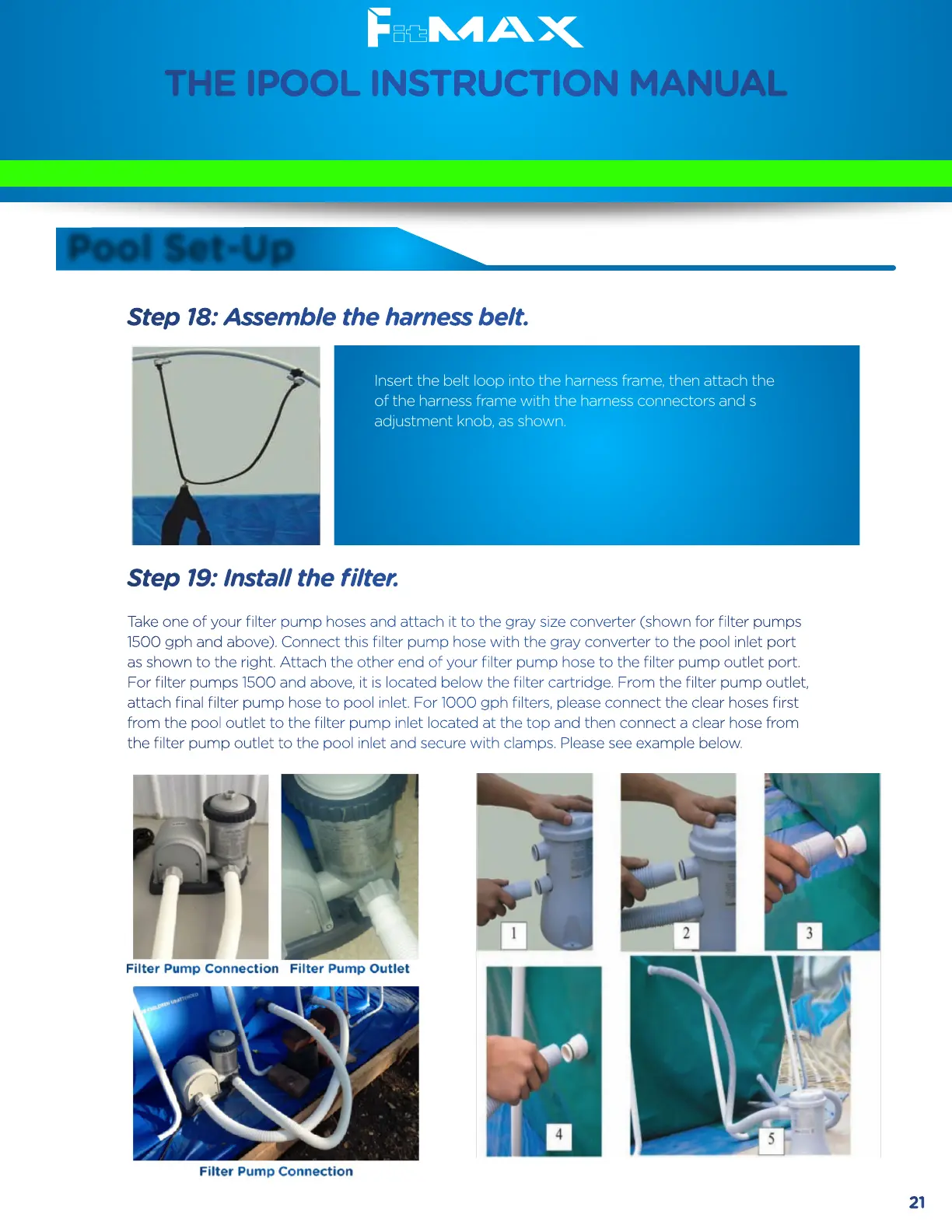
Step 18: Assemble the harness belt.
Insert the belt loop into the harness frame, then attach the end
of the harness frame with the harness connectors and small
adjustment knob, as shown.
Step 19: Install the filter.
Take one of your filter pump hoses and attach it to the gray size converter (shown for filter pumps
1500 gph and above). Connect this filter pump hose with the gray converter to the pool inlet port
as shown to the right. Attach the other end of your filter pump hose to the filter pump outlet port.
For filter pumps 1500 and above, it is located below the filter cartridge. From the filter pump outlet,
attach final filter pump hose to pool inlet. For 1000 gph filters, please connect the clear hoses first
from the pool outlet to the filter pump inlet located at the top and then connect a clear hose from
the filter pump outlet to the pool inlet and secure with clamps. Please see example below.
THE IPOOL INSTRUCTION MANUAL
Pool Set-Up
Please carefully read this instruction manual
before installing and using the iPool
21


 To Next Page
 Loading...