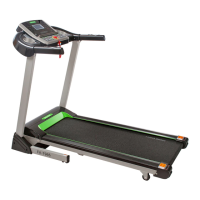
This document is a user manual for the FA-7967 Treadmill with Manual Incline, manufactured by Fitness Avenue. It provides comprehensive instructions for assembly, operation, maintenance, and troubleshooting, ensuring safe and effective use of the equipment.
The treadmill is designed for indoor and home use, offering a platform for various exercise programs. Its primary function is to provide a walking or running surface for cardiovascular workouts. A key feature is its manual incline adjustment, allowing users to vary the intensity of their workouts by changing the slope of the running surface. This is achieved by removing and reinserting adjustable bolts into different holes on the adjustable cushion, which aligns with the main frame to set the desired incline level.
Before starting any exercise program, users are advised to consult a physician, especially if they have existing medical conditions or are taking medication that affects heart rate, blood pressure, or cholesterol. It emphasizes the importance of listening to one's body and stopping exercise if symptoms like pain, chest tightness, irregular heartbeat, shortness of breath, lightheadedness, dizziness, or nausea occur.
Safety is a paramount concern, and the manual outlines several precautions. Children and pets should be kept away from the equipment, as it is designed for adult use only. The treadmill should be used on a solid, flat, level surface with a protective cover, ensuring at least 8 feet (240 CM) of free space behind it and 2 feet (60 CM) on each side. It also warns against placing the treadmill on surfaces that block air openings and recommends using a mat to protect floors or carpets. All nuts and bolts must be securely tightened before use, and regular examination for damage or wear and tear is crucial for maintaining safety. Users are instructed to discontinue use immediately if any defective components are found or if unusual noises are heard during exercise.
The treadmill features a display console with various functions. It includes manual modes, 12 preset programs (P1-P12), 3 user-setting programs (U1-U3), 3 Heart Rate Control (HRC) programs, and a Body Fat (FAT) test program. The console displays speed, time, steps/distance, calories, and heart rate. The "START" key initiates the treadmill at a default speed of 0.5 MPH after a 3-second countdown. The "PAUSE/STOP" key can temporarily halt the motor and save data, or fully stop the treadmill and clear data. "PROG" allows selection of different programs, while "MODE" enables setting countdown modes for time, distance, or calories. "SPEED +/-" keys adjust the treadmill speed in 0.1 MPH increments, with continuous acceleration/deceleration if held for more than 2 seconds. Speed shortcut keys (2/3/4MPH and 5/6/7MPH) provide quick speed adjustments. The console also features a safety key, which, when removed, rapidly slows down and stops the treadmill, displaying "---" and disabling buttons until reinserted. The unit can switch between displaying measurements in miles or kilometers.
The Heart Rate Control (HRC) programs allow users to train within specific heart rate zones. Users can set age and target heart rate, and the treadmill will adjust speed based on heart rate readings from the pulse sensors on the handles. If heart rate is too low, speed increases; if too high, speed decreases. Safety mechanisms are in place, such as automatically shutting down if no heart rate is detected for over a minute or if the heart rate exceeds the maximum safe limit.
The Body Fat (FAT) test program helps users assess their body proportion by measuring the relevance between height and weight. Users input gender, age, height, and weight, then hold the pulse sensors for 5-6 seconds to display their FAT value. The manual provides a guide for interpreting FAT values as underweight, normal weight, overweight, or obese.
The treadmill also includes a Bluetooth function, allowing users to connect their mobile phones (Bluetooth model number: SUNNY) to play music through the treadmill's loudspeakers. A USB power charger is provided for charging tablets or smartphones.
Maintenance is critical for prolonging the treadmill's life and performance. General cleaning involves dusting components regularly and cleaning both sides of the running belt (No. 17) to prevent dust accumulation. Users should also keep their running shoes clean to avoid wearing out the running board (No. 16) and running belt (No. 17). The surface of the running belt should be cleaned with a damp cloth. To prevent overheating and prolong lifespan, it's recommended to power off the machine for 10 minutes every 2 hours and fully power it off when not in use.
Lubrication of the running board (No. 16) and running belt (No. 17) is essential to reduce friction and extend the treadmill's lifespan. The running belt must be lubricated before the first use. Instructions involve raising one side of the running belt, applying lubricant to the running board, and wiping it thoroughly with a rag. A lubrication reminder icon on the console will light up every 188 miles, which can be reset by removing the safety key and holding the "STOP" button. The manual provides a recommended lubrication schedule based on usage frequency: every five months for light users (less than 3 hours/week), every two months for medium users (4-7 hours/week), and every one month for heavy users (more than 7 hours/week).
Proper tension and centering of the running belt (No. 17) are also important. A loose belt can cause the runner to slide off, while a too-tight belt can negatively affect motor performance and increase friction. The ideal tightness allows the belt to be pulled out 50-75mm from the running board. To center the running belt, the treadmill should be placed on level ground and set at 3-5mph. If the belt drifts to the right, the right adjusting bolt should be turned clockwise and the left adjustment bolt counter-clockwise. If it drifts to the left, the left adjusting bolt should be turned clockwise and the right adjustment bolt counter-clockwise. Adjustments should be made in ¼ turn increments until the belt centers. Over time, the running belt may loosen and can be tightened by turning both left and right side adjustment bolts one full turn clockwise, ensuring equal adjustment on both sides for proper alignment.
The treadmill also features folding instructions for convenient storage. To fold, the incline should be restored to a flat position (Level 0). Users lift the main frame (No. 2) until the cylinder (No. 7) locks into the tube, indicated by a clicking sound. To unfold, users grasp the main frame, push against the cylinder with their foot, and press down on the main frame, allowing it to steadily lower itself. Before unfolding, it's crucial to ensure the area underneath is clear of objects and the power is turned off. For moving the machine, it should be folded and unplugged. Users tilt the treadmill by supporting the top end and holding the bottom end with their foot until the transport wheels (M) touch the ground, allowing it to be rolled.
Electrical safety information highlights that the treadmill requires a 10 amps (100-120V) power source and must be properly grounded. It should be plugged into an appropriate, grounded outlet, and no adapters should be used. Warnings include never using a ground fault circuit interrupt (GFCI) wall outlet, generator, or UPS power supply, and never removing covers without disconnecting AC power. The treadmill is not designed for outdoor use or high humidity environments.
Troubleshooting guidance is provided for common issues, such as the safety key falling off, communication failures (E01), motor abnormalities (E02), no sensory signal (E03), lifting learning or self-inspection failures (E04), over-current protection (E05), lifting sensor signal issues (E06), and no display on the electronic meter. Solutions range from re-inserting the safety key and checking connections to replacing components like the controller, motor, or transformer. If issues persist, users are advised to contact customer service.


 To Next Page
 General