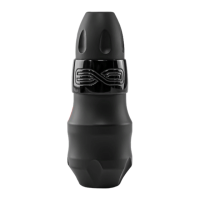
The Spektra Flux is a wireless pen-style cartridge tattoo machine designed for professional artists, offering a blend of power, precision, and freedom of movement. It is the first wireless pen-style machine from FK Irons to feature detachable batteries and complete Bluetooth connectivity, aiming to enhance the tattooing experience with a new sense of autonomy.
Function Description
At its core, the Spektra Flux is a direct-drive tattoo machine with a 4mm stroke, powered by a 9-watt brushless motor. This motor is housed within a robust body crafted from 6061 T6 aircraft-grade aluminum, ensuring durability and reliable performance. The machine operates wirelessly through a detachable PowerBolt battery, which integrates dynamic power path management via a USB-C connection. This allows for efficient charging and consistent power delivery.
The PowerBolt serves as the brain of the machine, featuring an LED indicator that displays both battery capacity and voltage settings. This indicator uses a system of single and double blinks to convey whole and half voltage increments, respectively, alongside color-coded battery level checks. For instance, a solid green light indicates 10V, while a flashing green light signifies 10.5V. Battery levels are also indicated by color: white when checking, then green for 97-60%, yellow for 59-40%, orange for 39-15%, and red for 14-0%. The LED will flash while charging, and if the battery drops below 15%, the red light will blink alternately with the voltage display, alerting the artist to recharge.
The machine's design emphasizes user control and comfort. It incorporates a ratcheted, adjustable needle depth system, allowing artists to precisely control needle hang. This system provides tactile feedback with each "click," displacing the needle by 0.2mm, which helps prevent involuntary depth changes during tattooing.
Bluetooth connectivity is a key feature, enabling the machine to pair with the Darklab app. This integration likely offers advanced control options, firmware updates, and potentially tracking of usage data, further enhancing the machine's capabilities.
Usage Features
The Spektra Flux is designed for ease of use and adaptability in a professional tattooing environment.
- Wireless Operation and Detachable Battery: The primary advantage is its wireless nature, eliminating the need for cables and power supplies during tattooing. The detachable PowerBolt allows artists to quickly switch to an auxiliary battery (sold separately) for uninterrupted work, ensuring continuous operation during long sessions.
- Voltage Adjustment: Artists can easily adjust the operating voltage using the up and down arrow buttons on the PowerBolt. The LED indicator provides immediate visual feedback on the selected voltage. The machine is designed to operate between a minimum of 5 Volts and a maximum of 12 Volts, allowing flexibility to suit various needle configurations and tattooing styles.
- Needle Depth Adjustment: The grip features a ratcheting control mechanism for adjusting needle depth. By holding the machine body and PowerBolt, artists can turn the grip clockwise to increase needle depth (needle hang) or counter-clockwise to decrease it. The tactile "clicks" ensure precise and stable adjustments.
- Bluetooth Connectivity: The PowerBolt can be switched to Bluetooth on (blue LED) or off (yellow LED) mode by holding the power button. This allows for seamless integration with the Darklab app, expanding control and customization options.
- PowerBolt Management: The PowerBolt can be hard shut off (red LED) to disable the battery for storage or transport. To reactivate, simply plug it into any USB-C power source. A device reset function is also available by holding the power button and the down arrow for 5 seconds.
- Cartridge Compatibility: The machine is compatible with most membrane needle cartridges on the market. The use of cartridges with internal membranes is crucial to prevent accidental contamination of the machine's internal components.
- Ergonomic Design: The autoclavable grip is ergonomically designed for comfortable handling during tattooing, reducing artist fatigue.
Maintenance Features
Proper maintenance is essential for the longevity and hygiene of the Spektra Flux.
- Grip Sterilization: The standard 33mm grip is autoclavable, meaning it can be sterilized under steam at temperatures no higher than 270° Fahrenheit (132.222° Celsius). After autoclaving, it is recommended to add a hint of ointment or PTFE grease around the internal opening of the grip or on the stabilizing friction O-rings to maintain optimal functionality.
- Body and PowerBolt Sanitization: The machine body and PowerBolt, which are constructed from aircraft-grade aluminum, should be sanitized externally by wiping them with cold sterilization solutions. It is crucial to avoid spraying cleaning fluids directly onto the surface to prevent liquids from entering the machine's housing. Pads or disposable paper towels should be used for application.
- Internal Lubrication: The Flux is pre-lubricated from the factory and generally does not require internal lubrication by the user. It is important to prevent any external elements from entering the machine, as this can disrupt component motion and contaminate the existing lubrication.
- Barrier Protection: While the grip is autoclavable, FK Irons strongly recommends using barrier products to protect the entire machine from contamination. This practice helps maintain hygiene and prolong the machine's lifespan.
- Charging: The PowerBolt is recharged via a USB-C connection. It can be recharged whether or not it is connected to the Flux machine. For optimal charging speed (up to 1.5 A), it is recommended to use the included USB-C cable and connect it to a Hover or other suitable power socket. The PowerBolt is not designed to operate while plugged in; the USB-C connection is solely for recharging.
- Avoid Disassembly: Users are explicitly advised not to disassemble the machine. Unauthorized disassembly can void the warranty and potentially damage internal components.
- Regular Servicing: FK Irons suggests servicing the machine at least once a year. This professional service ensures a proper diagnosis of all working parts, including internal cleaning and fresh lubrication, to maintain the machine's optimal condition. Service is subject to fees.
- Pre-use Battery Charge: Before the first use, the battery should be charged for a minimum of 3 hours to ensure full capacity.
- Needle Care: Regularly rinsing the needle helps prevent pigment from drying and slowing down cartridges. When rinsing, only dip the tip of the cartridge to avoid backflow of fluids into the machine. Always inspect needles prior to use.

 Need help?
 General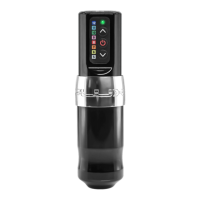

 To Next Page