7
The module has 8 channels, each with an instrument (algorithm). The settings for the
respectively selected channel are made in the menus A, B and CV. The sound of the
selected channel can be triggered directly with the FIRE button. For each channel, there
are memory locations A and B for two different (or identical) variants of the same instru-
ment, between which you can then control fluently in the MASTER or MORPH menu
(Morph function). So only one common algorithm can be chosen for memory locations A
and B, but with different values in memory locations A and B.
First program a variation in memory location A. Then copy it to memory location B and
then change the variation in memory location B.
How to copy:
Copy A to B: while holding down the A-button, press and release the B-button
Copy B to A: while holding down the B button, press and release the A button
Advice: After copying, the target remains selected!
INSTRUMENT (select algorithm of the channel)
Turn the DATA knob to select the channel's algorithm (select channel with SELECT and
then buttons 1-8). There are currently the following 9 algorithms:
SNAREDRUM
HIHAT
FM-DRUM
BASSDRUM
T-BRIDGE
RIMSHOT
CLAP
TOM
UNIVERSAL
There are 3 pages for each algorithm (with up to a maximum of 17 parameters).
DISPLAY - VALUES - POTS
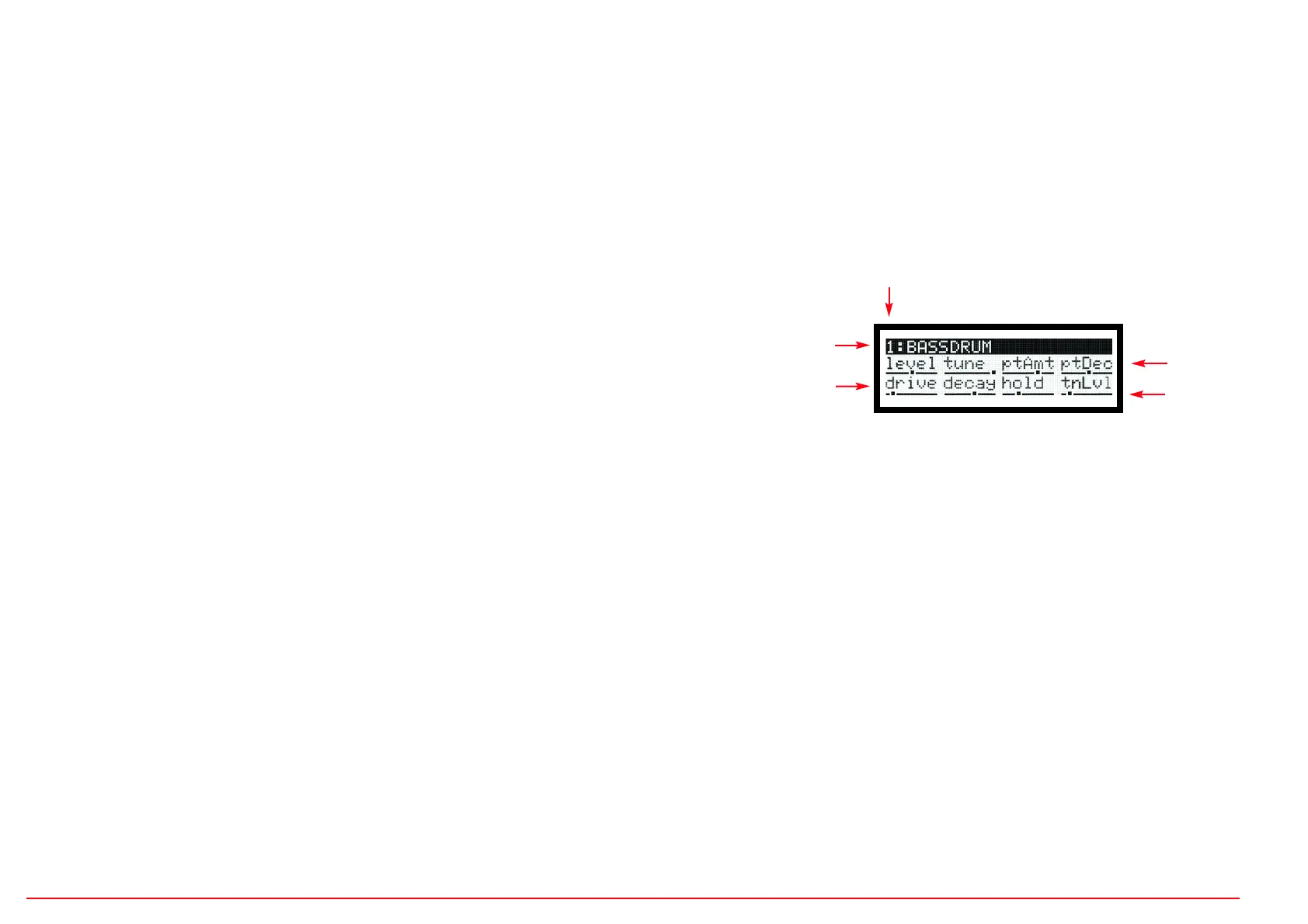
The EDIT menus are structured in such a way that the names and values of the 8 con-
trollers are shown in the display accordingly. The first line with a black background
shows the channel number and the selected algorithm. In line 2 the parameters for Poti
1-4 and in line 3 the parameters for Poti 5-8. The value is indicated by a slider under
the parameter name.
LEVEL (set individual level of A and of B)
You can set separate volume levels for both sound variants A and B in order to com-
pensate for excessive volume differences, or to fade the instrument in or out with the
morph control. LEVEL is the first parameter for Pot 1 in each Instrument Page. In con-
trast, the overall volume is set in the main menu LEVEL. The volume ratio between A
and B is retained there.
MENU CV (set velocity/CV function of analog CV inputs)
In this menu, the velocity or CV sensitivity of each parameter can be adjusted. The
Velocity/CV input of the channel is set to either Velocity (unipolar 0..+5v) or CV (bipo-
lar -5v..+5v) with the DATA control. With Velocity, the input voltage is only effective
when the instrument is triggered (Sample&Hold). With CV, the input voltage acts con-
tinuously (in the KHz range). When the slider is in the middle position, the parameter
is not affected. Higher values amplify, lower values decrease the parameter by the
input voltage. In Page 3 you can adjust the CV/Velocity control for MORPH between A
and B.
Parameter 1-4
Slider values
Instrument channel number
Parameter 5-8
Instrument algorithm
EDIT MENUS A,B,CV


 To Next Page
 Loading...