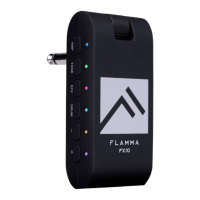
1. 1/4’’ instrument input jack. Connect to the output of the guitar.
2. Volume control: Rotate to adjust the volume level of the guitar and drum machine.
3. Three-way Power Switch. OFF: Power off. ON: Power on (Bluetooth off). BT ON:
Bluetooth on. The power indicator will show current power status.
4. AMP button: Press to select AMP module (preset patch), then press the -/+ buttons to
select between 14 different amp models. The color of LED indicator will show currently
selected amp model.
5. TONE button: Press to select TONE module. Press -/+ buttons to switch between 5
different tone colors.
6. EFX button
a. Press to select EFFECT module. Press the -/+ buttons to switch between different
effects
b. When the EFFECT module is selected, press the EFX button to bypass effect.
c. When the EFFECT module is selected, press and hold the EFX button to enter hidden
mode.
7. DRUM button
a. Press DRUM to turn on the drum machine. You can press and hold DRUM to turn off
the drum machine. The LED indicator will show the On/Off status of the drum machine.
b. When drum machine is on, press DRUM to switch between three parameter
adjustment modes. The color of the LED indicator will show current select mode: RED for
drum groove, GREEN for volume level of drum machine, BLUE for speed of drum
machine. You can adjust those parameters via -/+ button.
8. -/+ button: Adjust currently selected modules (AMP/TONE/EFX/DRUM).
9. 1/8” TRS headphone jack, connect to headphone device.
10. USB-C port for charging and OTG function (support USB audio recording
and playback).


 To Next Page
 Loading...