22 / EN
Washing Machine / User’s Manual
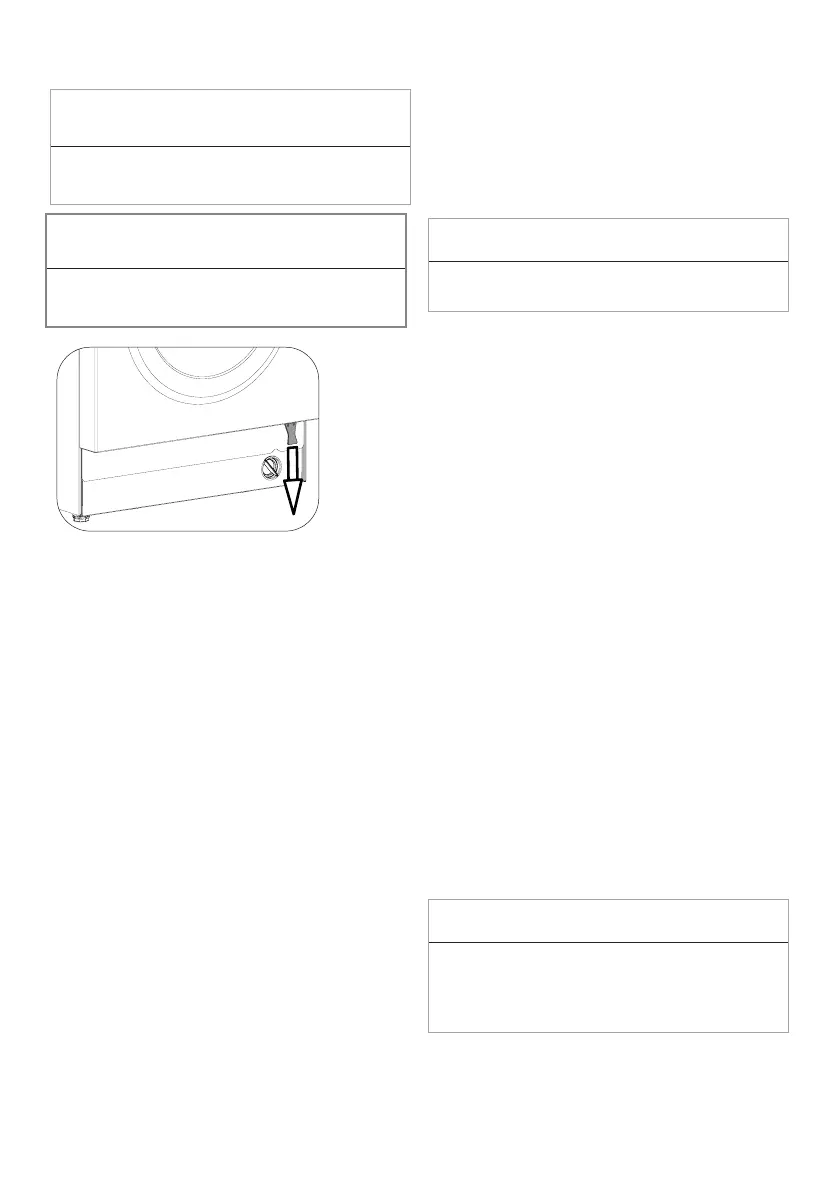
Opening the loading door in case of power
failure:
C
INFORMATION
• In case of a power failure, you can use the
loading door emergency handle under the pump
filter lid to manually open the loading door.
A
WARNING!
• Before opening the loading door, make sure that
there is no water in the machine to avoid flooding.
Water may be hot and could cause scalding.
•
Turn off and unplug the appliance.
•
Open the loading door by pulling the loading
door emergency handle downwards.
•
Try to pull the handle downwards again
if the loading door is not opened.
4.3.15 Changing the selections
after programme has started
Switching the machine to pause mode
Press the Start/Pause to switch the machine
to pause mode while a programme is running.
The light of the current programme will flash on
the Programme Follow-up indicator, indicating
that the machine has switched to pause mode.
Also, when the loading door is ready to be
opened, the Loading Door light will turn off in
addition to the programme step light.
Changing the auxiliary function, speed and
temperature
Depending on the step the programme has
reached, you can cancel or select auxiliary
functions. See “Auxiliary function selection”.
You can also change the speed and
temperature settings. See "Spin speed
selection" and "Temperature selection".
C
INFORMATION
• If no change is allowed, the
relevant light will flash 3 times.
Adding and removing laundry
1. Press the “Start/Pause” button to pause the
machine. The programme follow-up light of
the relevant step during which the machine
was switched into the pause mode will flash.
2. Wait until the Loading Door can be opened.
3. Open the loading door and add or take out
laundry.
4. Close the loading door.
5. Make changes in auxiliary functions,
temperature and speed settings if necessary.
6. Press the “Start/Pause” button to start the
machine.
4.3.16 Cancelling the programme
To cancel the programme, turn the Programme
Selection knob to select another programme.
Previous programme will be cancelled. End/
Cancel light will flash continuously to notify that
the programme has been cancelled.
When you turn the Programme Selection knob,
the machine will end the programme but will not
discharge the water inside. When you select
and start a new programme, the newly selected
programme will start depending on the step
the previous programme was cancelled in. For
example, the machine may take in additional
water or continue to wash with the water inside.
C
INFORMATION
• Depending on the step where the
programme was cancelled in, you may have
to add detergent and softener again for
the programme you have selected anew.


 To Next Page