

EasyManua.ls Logo

FlexRadio MHCozy TYWB 4ch - User Manual

FlexRadio MHCozy TYWB 4ch
6 pages
Print Icon
To Next Page IconTo Next Page
Loading...
MHCozy USB 5V Switch
This simple remote WiFi switch can be used to remotely turn your FlexRadio on and off remotely. Using the
Remote connector on the back of a FLEX-6000 radio allows for a clean shutdown of your radio.
Model:TYWB 4ch
Input: DC 7-32V
USB Input: 5V
RCA Pigtail
Software: Tuya Smart
Required: Jeweler Screwdriver
It is shipped with a USB 5V power supply allowing you to plug it into a wall socket. Optionally, you can connect
it to another power source between 7V and 32V. Only 1 power source is required (and recommended).
FlexRadio Inc. Remote Switch Guide page 1
Question and Answer IconNeed help?

Do you have a question about the FlexRadio MHCozy TYWB 4ch and is the answer not in the manual?

Summary

MHCozy USB 5 V Switch Overview

Product Specifications

Details model, input voltage, USB input, software, and required tools for the switch.

Included Accessories

Lists the USB 5V power supply and RCA pigtail that come with the switch.

MHCozy Switch Installation Guide

Download and Install Tuya Smart App

Instructions for obtaining and installing the Tuya Smart mobile application.

Add Device via Tuya App

Steps to add the MHCozy device using the '+' sign and 'Add Device' function in the app.

Enter WiFi Credentials

Guide to entering the network name and password for Wi-Fi connection.

Name the MHCozy Device

How to change the default name of the MHCozy device within the application.

Connecting and Operating the MHCozy Switch

Manual Relay Control

How to label buttons and manually turn relays on/off using the app.

Physical RCA Connection

Instructions for connecting the RCA cable to Channel 1 of the switch.

Integrate MHCozy Switch with FlexRadio

Connect RCA and Configure SmartSDR

Connect the RCA cable to the FlexRadio and enable 'Remote On' in SmartSDR settings.

Test the MHCozy Switch

Verify the MHCozy switch functionality via the app or web browser.

Overview

The MHCozy USB 5V Switch is a remote WiFi switch designed to control the power of a FlexRadio remotely, allowing for a clean shutdown of the radio via its Remote connector. This device is identified by the model number TYWB 4ch.

Technical Specifications:

  • Model: TYWB 4ch
  • Input: The device can accept a DC input between 7V and 32V. Alternatively, it can be powered via a USB 5V input. Only one power source is required for operation.
  • Max. Load: Each individual channel (gang) can handle a maximum load of 10A, with a total maximum load of 16A across all channels.
  • Wi-Fi: Supports 2.4Ghz b/g/n Wi-Fi standards, along with Bluetooth connectivity.
  • Radio Frequency: Operates at 433Mhz.
  • Channels: The device is a four-channel IoT web switch, meaning it has four independent relays that can be controlled.

Usage Features:

The MHCozy USB 5V Switch is designed for ease of use and remote control through a smartphone application.
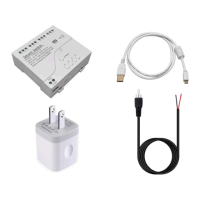
  • Remote Power Control: The primary function is to remotely turn a FlexRadio on and off. This is achieved by connecting the switch to the FlexRadio's Remote connector using an RCA pigtail.
  • Power Supply Flexibility: The device comes with a USB 5V power supply, allowing it to be plugged directly into a wall socket. For alternative power setups, it can also be connected to any DC power source ranging from 7V to 32V.
  • Smartphone Application Control: The switch is controlled via the "Tuya Smart" application, available for download on smartphones.
    • Installation: Users need to download and install the Tuya Smart application.
    • Device Pairing: To add the device, users open the app, touch the "Plus Sign," select "Add Device," and then power up the TYWB device. Bluetooth must be enabled on the phone for initial pairing.
    • Wi-Fi Configuration: Users must enter their Wi-Fi network name and password into the app to connect the switch to their home network.
    • Automatic Addition: Once Wi-Fi information is entered, the device is automatically added to the app. The process may take a few minutes, and users should wait for an "Added Successfully" confirmation.
    • Customizable Labels: Each of the four channels can be renamed within the app. By pressing and holding a button for 2 seconds, users can change the label to a name of their choice (e.g., "FLEX-6600M PWR" for Channel 1).
    • Manual Control: The physical buttons (K1-K4) on the device itself can also be used to manually turn the relays on or off, providing local control in addition to remote access.
  • FlexRadio Integration:
    • Connection: The RCA pigtail connects to Channel 1 of the MHCozy switch. Specifically, one wire connects to the COM (Common) terminal and the other to the NO (Normally Open) terminal of Channel 1. This setup allows the switch to act as a remote trigger for the FlexRadio.
    • FlexRadio Configuration: After connecting the RCA cable to the Remote RCA connector on the back of the FlexRadio, users must ensure that the "Remote On" setting is enabled in the SmartSDR for PC software, under the "Settings" and "Radio" tabs.
    • Multiple Applications: While Channel 1 is typically used for FlexRadio power control, the remaining channels (2-4) can be utilized for other applications, offering versatility.
  • Confirmation of Connectivity: Users can verify the switch's connection to their Wi-Fi network by opening the MHCozy app or accessing the switch's control panel via a web browser.

Maintenance Features:

  • Software Updates: As an IoT device, the Tuya Smart application may receive updates, which can include function optimizations and upgrades to enhance device control and intelligence. Users are encouraged to keep their app updated.
  • Troubleshooting: In case of issues, users should consult the manufacturer's documentation for precise instructions and troubleshooting tips specific to their MHCozy switch model and firmware version. A jeweler's screwdriver is listed as a required tool, suggesting that minor adjustments or access to internal components might be necessary for certain maintenance tasks or installations.

FlexRadio MHCozy TYWB 4ch Specifications

General IconGeneral
BrandFlexRadio
ModelMHCozy TYWB 4ch
CategorySwitch
LanguageEnglish