EasyManua.ls Logo

FLI LOADED 450s - Connection Methods; Amplifier Controls and Setup; Input and Control Features

Default Icon
12 pages
Print Icon
To Next Page IconTo Next Page
To Previous Page IconTo Previous Page
Loading...
,
G
round
C
able
O
The
g
round cable needs to carr
y
the same current as the power cable. At least an 8
g
au
g
e cable should be used.
O
The ampli
f
ier
g
round should be connected directl
y
to the chassis o
f
the vehicle, to bare metal.
O
The cable len
g
th should be kept to an absolute minimum.
I
t
is not recommended that
y
ou connect the
g
round cable to the vehicles seatbelts anchor point.
Remote Turn
On
O
A minimum o
f
18
g
au
g
e cable should be used
f
or this connection.
O
The cable should be run with exactl
y
the same care and attention as the power cable and taken back to the source
(
headunit
)
and
j
oined to the remote cable provided.
O
I
f
the source
(
headunit
)
does not have a remote turn on cable then a 12v suppl
y
should be used. This will require a
s
witch to be
f
itted inline to enable the ampli
f
ier to be turned on and o
ff
. Remember that i
f
this switch
is le
f
t on
y
ou will
flatten the car batter
y
.
R
C
A
C
able
s
O
Dependin
g
on the model number o
f
y
our ampli
f
ier and the number o
f
speakers
y
ou wish to power
y
ou will have to run
e
ither one or two RCA cables from the source to the amplifier.
O
Please take extra care when runnin
g
these cables
f
rom the source to the ampli
f
ier. Ensure that the
y
are placed awa
y
f
rom all items that can
g
enerate an
y
inter
f
erence, wirin
g
harnesses etc.
O
It is recommended that the R
C
A cables should be run on the opposite site o
f
the car to the previousl
y
installed power
c
ables, i
f
possible.
A
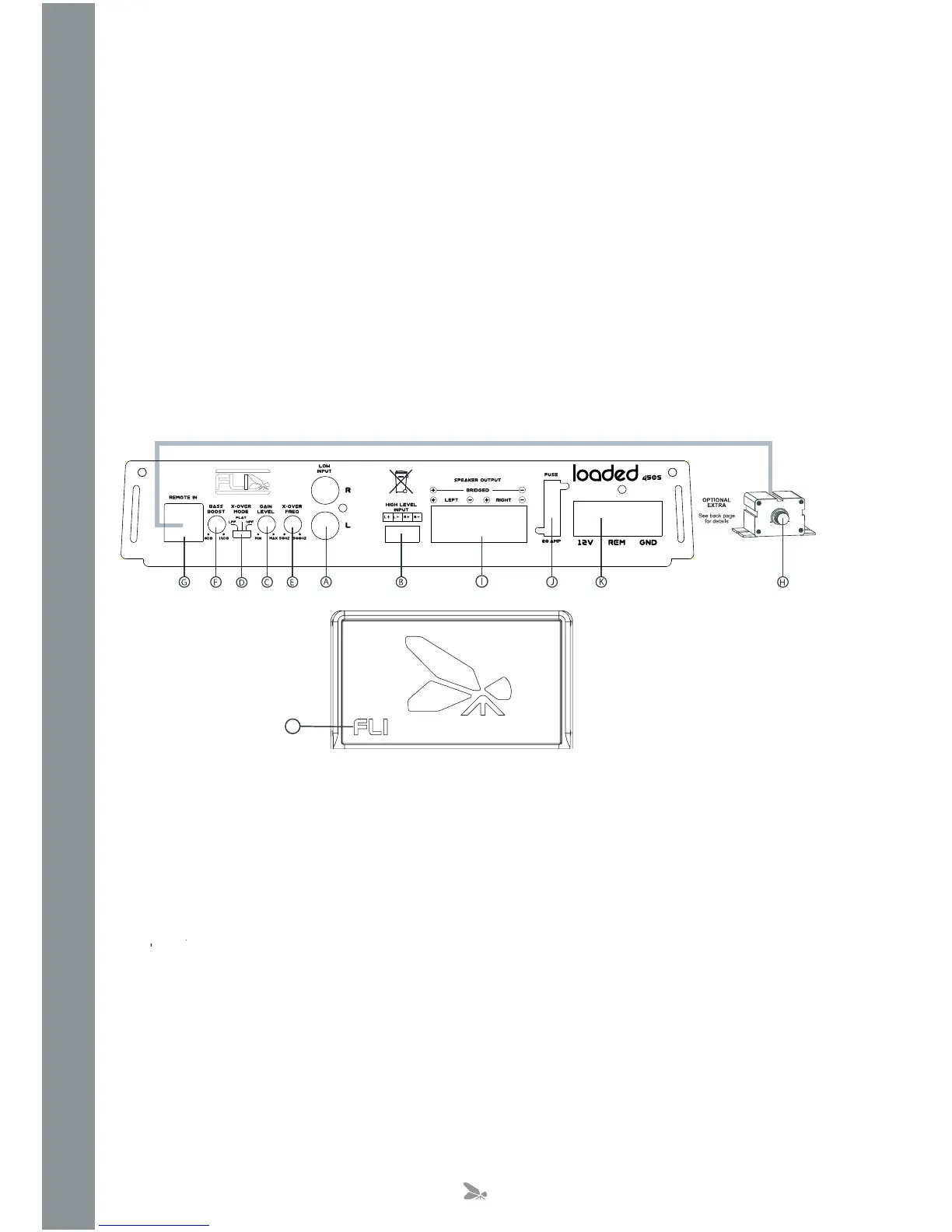
. Low Level In
p
ut
/
out
p
ut.
Low level input for connection to any source (headunit) with a low level output. This is your RCA output from the source
y
source
(
headunit
)
with a low level output. Th
i
(
headunit
)
.
Low level output for connection to another amplifier
B
. Hi
g
h Level Input
To be used when no R
C
A’s are available. Use the provided loom to connect to closest speakers. The loom provided will onl
y
f
it one wa
y
round.
O
nce plu
gg
ed in
y
ou should connect the wires this wa
y
around
:
C
.
G
ain
C
ontro
l
U
sed to match the input si
g
nal o
f
the source
(
headunit
)
to the ampli
f
ier.
S
ee the setup section
f
or more details.
Brown
n
Left
Speaker
ft
P
os
itiv
e
r
R
ed Le
f
t
S
peaker Ne
g
ativ
e
Orange
e
Right
Speaker
ht
Negative
e
r
Yellow
ow
Right
w
w
Speaker
g
h
t
P
os
itiv
e
ke
r
4

Related product manuals